76 GPSMAP 292/298 Owner’s Manual
USING SONAR > SONAR PAGE
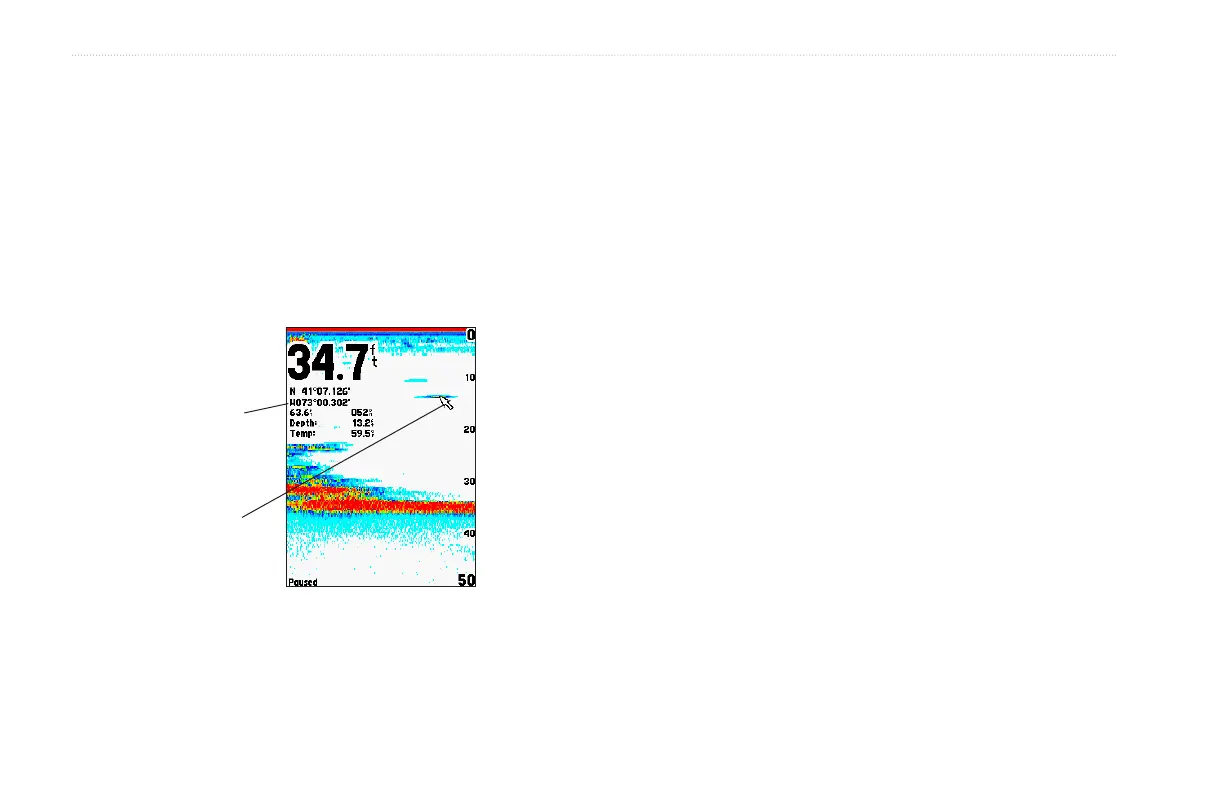
Show/Hide Pointer—allows you to reference sonar items and
mark underwater waypoints. This makes it easier to find and use
an object such as a stump for a future fishing location. When using
this feature, the Sonar Page pauses. The map pointer does not move
off the paused screen and cannot show an area that has scrolled off
the screen. The depth is updated while the screen is paused, but
the unit does not show any new sonar data until the standard Sonar
Page is resumed. You can see a discontinuity from where the sonar
information stops to where it starts again.
Show Map Pointer Option
Data window
Map pointer
To mark an underwater waypoint:
1. From the Sonar Page, press ADJ/MENU, highlight Show
Pointer, and press ENTER to pause the screen movement.
2. Use the ROCKER to move the cursor onto the target, such
as underwater drop-offs and stumps, you want to mark. The
data window at the top of the screen shows the cursor’s
depth, coordinates, bearing and distance from your current
position.
3. Press ENTER/MARK. The New Waypoint Page appears
with the waypoint’s coordinates, default three-digit name,
and map pointer depth automatically filled in.
4. To change the name, symbol, water temp, or depth,
highlight the appropriate field and press ENTER. Make your
changes and press ENTER when finished.
5. When finished, highlight OK, and press ENTER.
6. To return to the standard Sonar Page, press QUIT; or press
ADJ/MENU, highlight Hide Pointer, and press ENTER.













 To Next Page