72 GPSMAP 400/500 Series Owner’s Manual
Using XM WX Weather and Audio
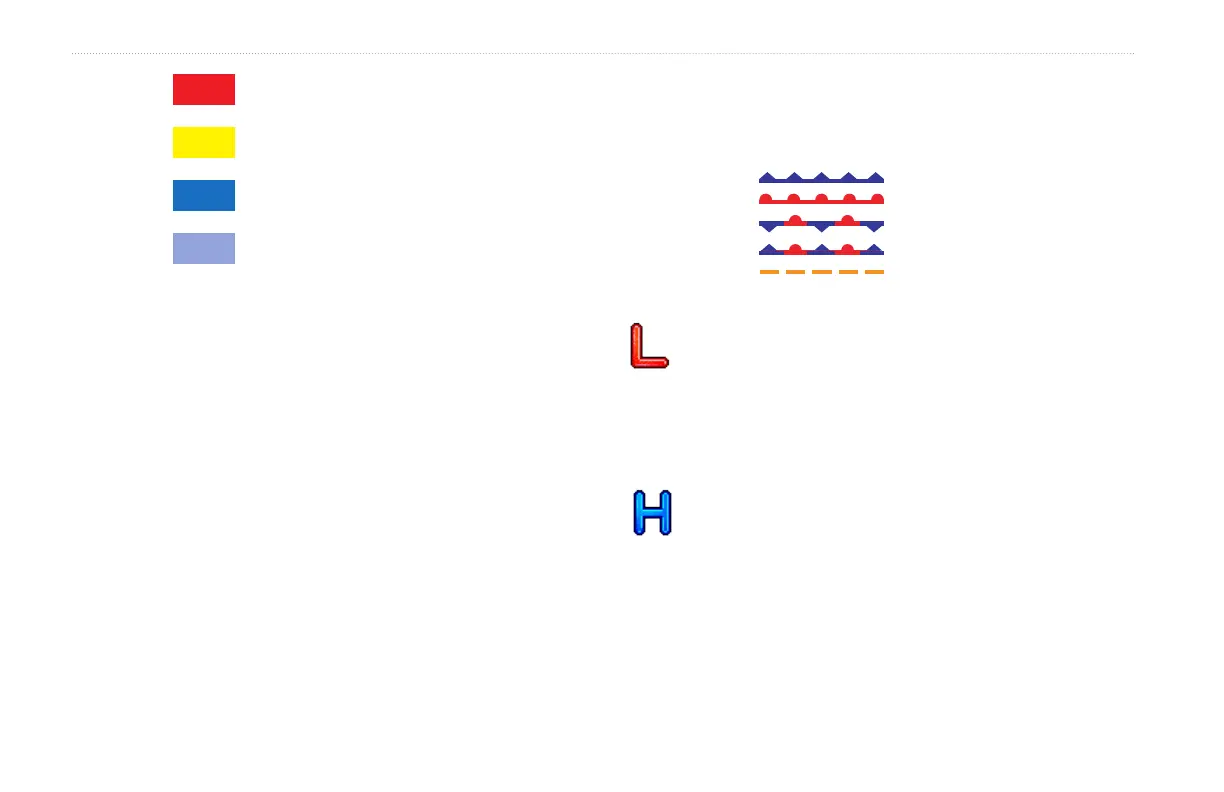
Tornado Warning
Severe Thunderstorm Warning
Flood Warning
Flash Flood Warning
Viewing Forecast Information
Forecasts show the weather conditions including fronts and
precipitation.
From the Home screen, select Information > Weather > Forecast.
To view the forecast for another time period:
1. From the Home screen, select Information > Weather >
Forecast.
2. Press right on the Rocker to select Next. The forecasted
weather for the next 12 hours is shown.
3. Select Next again to view forecasts for the next 24, 36, and 48
hours.
To view forecast information for another location:
Use the Rocker to pan the screen until the screen displays the
location you want.
Understanding Fronts
The Fronts show lines indicating the leading edge of an air mass.
This feature also shows pressure centers.
Cold Front
Warm Front
Stationary Front
Occluded Front
Trough
Indicates a low-pressure center. A low-pressure center is
an area where the measured pressure is lowest relative to
the surrounding area. Moving away from a low-pressure
center in any horizontal direction results in increased
pressure. Winds ow counterclockwise around low-
pressure centers in North America.
Indicates a high-pressure center. A high-pressure center is
an area where the measured pressure is highest relative to
the surrounding area. Moving away from a high-pressure
center in any horizontal direction results in decreased
pressure. Winds ow clockwise around high-pressure
centers in North America.















 To Next Page