GPSMAP 620 Owner’s Manual 17
Marine Mode: Navigating
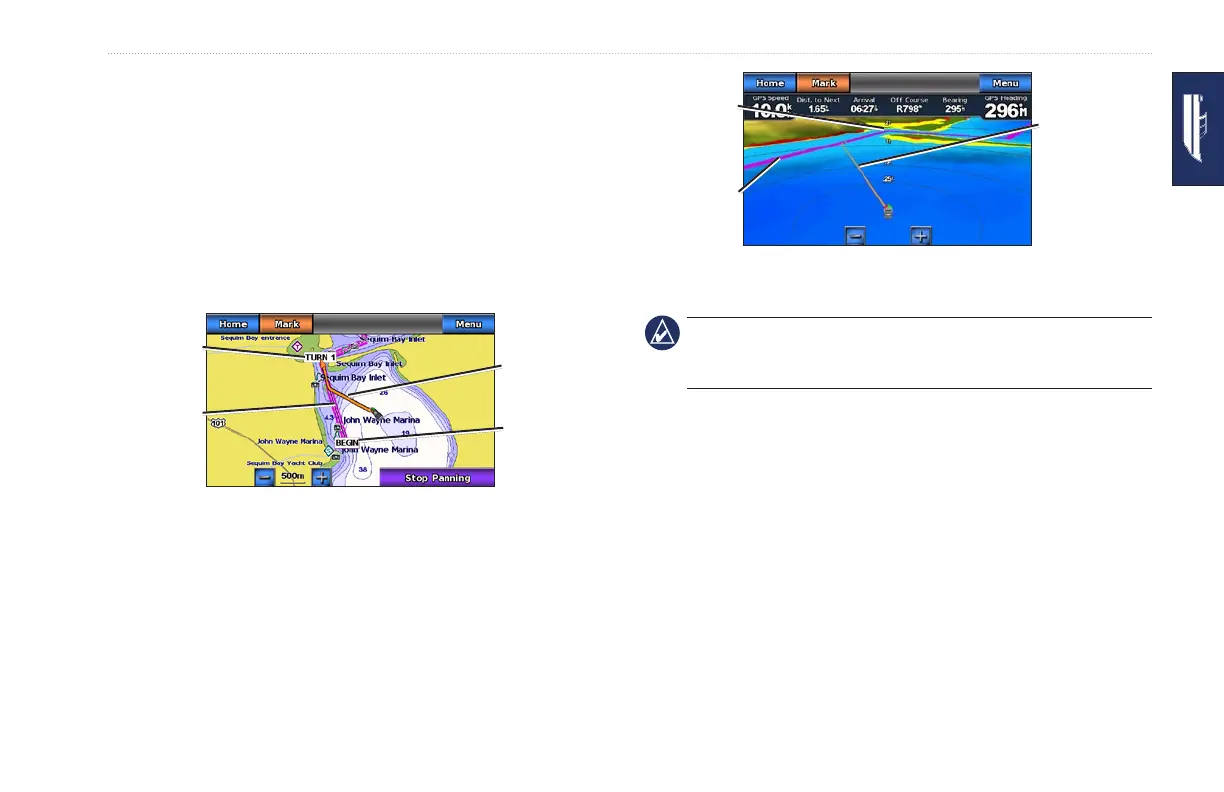
2. Follow the magenta and purple line (route leg) from the start
point to the rst turning point.
3. After you reach the rst turning point, follow the magenta and
purple line (route leg) to each subsequent turning point, until
you reach the end point.
4. Steer off course to avoid land, shallow water, and other
obstacles on the water.
5. When you are off course, follow the orange arrow (Course to
Steer) to steer back to the magenta and purple line (route leg).
Following a Route on the
Navigation Chart
Route leg
Course to
Steer
Start point
Route turn
Following a Route on the
Mariner’s Eye 3D Screen
Route leg
Course to
Steer
Route turn
NOTE: When following a route, important navigation information
appears in a data bar along the top of the chart. To adjust the
settings of the data bar, see page 37.
Setting an Automatic Course (Guide To)
When using a preprogrammed BlueChart g2 Vision SD card, you
can use Automatic Guidance to automatically create a suggested
passage based on available BlueChart g2 Vision chart information.
See page 35 for instructions on setting up Automatic Guidance for
your boat.














 To Next Page