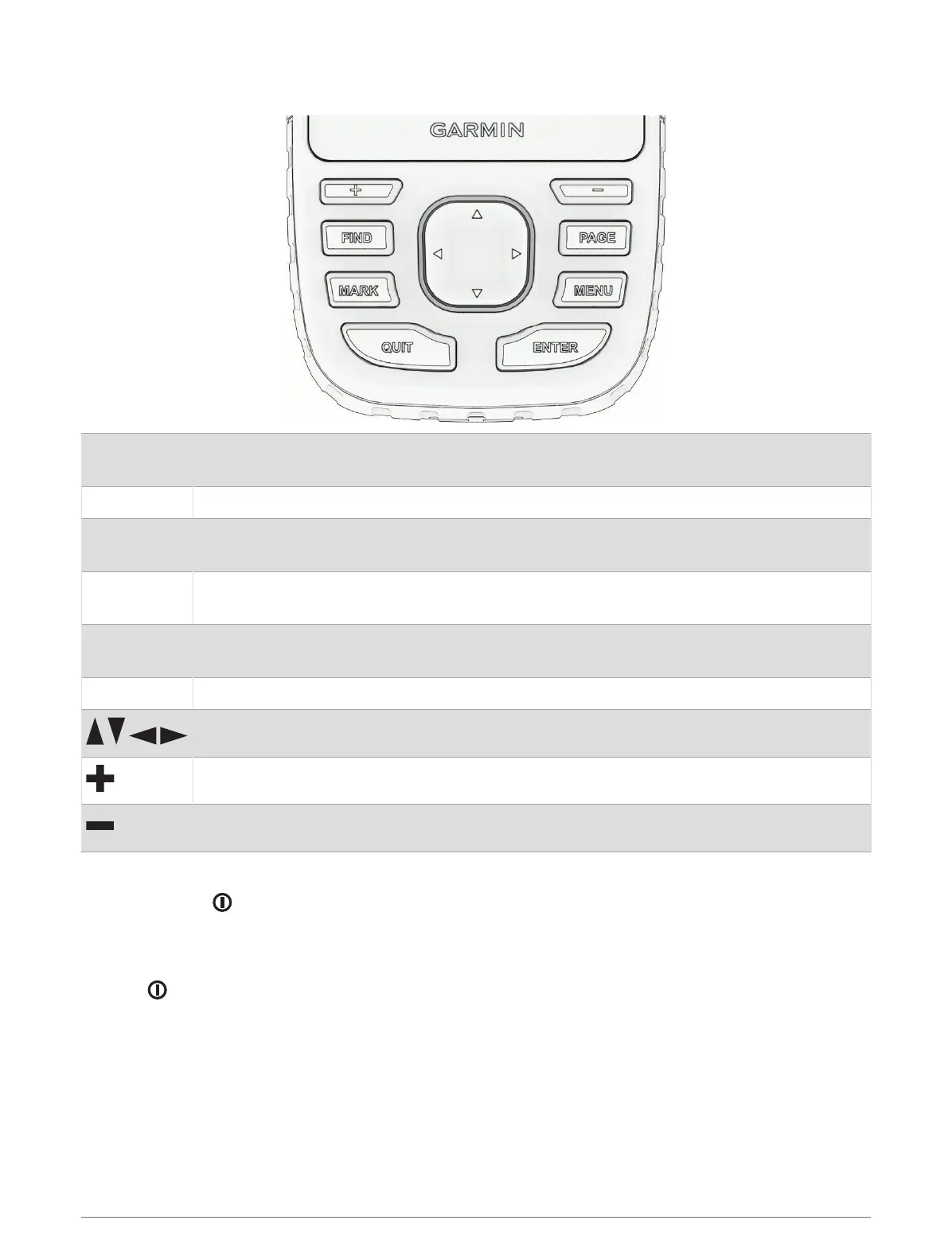
Buttons
FIND
Press to open the search menu.
Hold to mark your current location as a man overboard (MOB) location and activate navigation.
MARK Press to save your current location as a waypoint.
QUIT
Press to cancel or return to the previous menu or page.
Press to scroll through the main pages.
ENTER
Press to choose options and acknowledge messages.
Press to control the current activity recording (from the main pages).
MENU
Press to open the options menu for the page that is currently open.
Press twice to open the main menu (from any page).
PAGE Press to scroll through the main pages.
Press to select menu options and move the map cursor.
Press to zoom in on the map.
Press to zoom out on the map.
Turning On the Device
Press and hold .
Locking the Buttons
You can lock the keypad to prevent inadvertent button presses.
1 Press to open the status page.
2 Select Lock Keys.
Turning On the Backlight
Press any button to turn on the backlight.
The backlight turns on automatically when alerts and messages are displayed.
Introduction 3













 To Next Page