GPSMAP 700 Series Owner’s Manual 19
Charts and 3D Chart Views
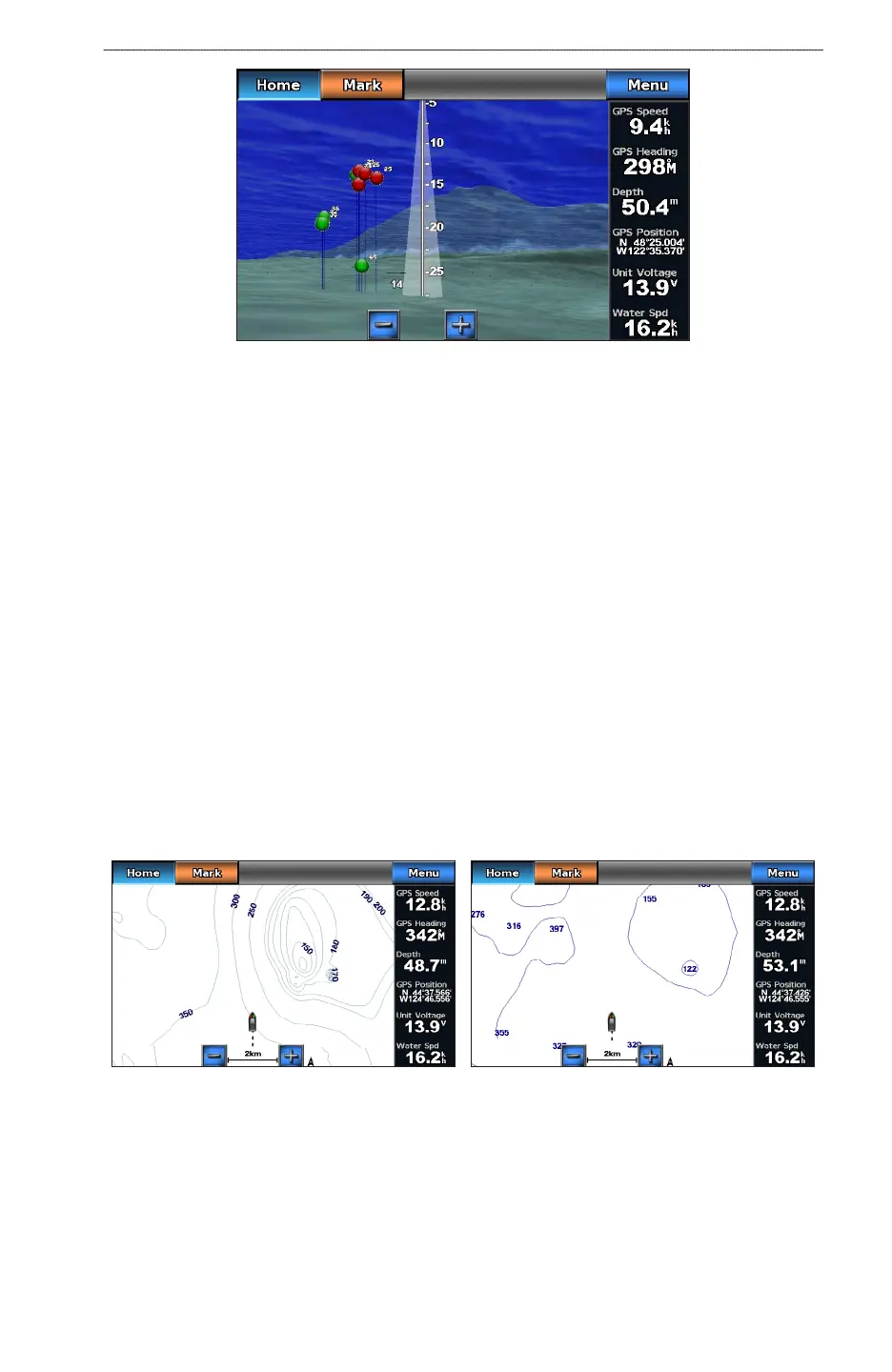
Fish Eye 3D with a Sonar Cone
Adjusting the View
See “Adjusting the View” (page 16).
Fish Eye 3D Chart Appearance
Indicating the Direction of the Fish Eye 3-D Chart View
1. From the Home screen, select > > > .
2. Select , , , or .
Showing a Sonar Cone on the Chart
You can show a cone that indicates the area covered by your transducer.
From the Home screen, select > > > > .
Showing Suspended Targets
From the Home screen, select > > > > .
Showing Tracks
From the Home screen, select > > > > .
Showing Overlay Numbers
See “Overlay Numbers” (page 48).
Fishing Chart
Use the Fishing chart for a detailed view of the bottom contours and depth soundings on the chart.
Navigation ChartFishing Chart
The Fishing chart uses detailed bathymetric data, and is best for offshore deep-sea shing.
Fishing Chart Appearance
Using Waypoints
See “Waypoints” (page 26).











 To Next Page