36 GPSMAP 700 Series Owner’s Manual
Almanac, On-boat, and Environmental Data
Almanac, On-boat, and Environmental Data
The Information screen displays information about tides, currents, celestial data, and gauges.
Almanac Data
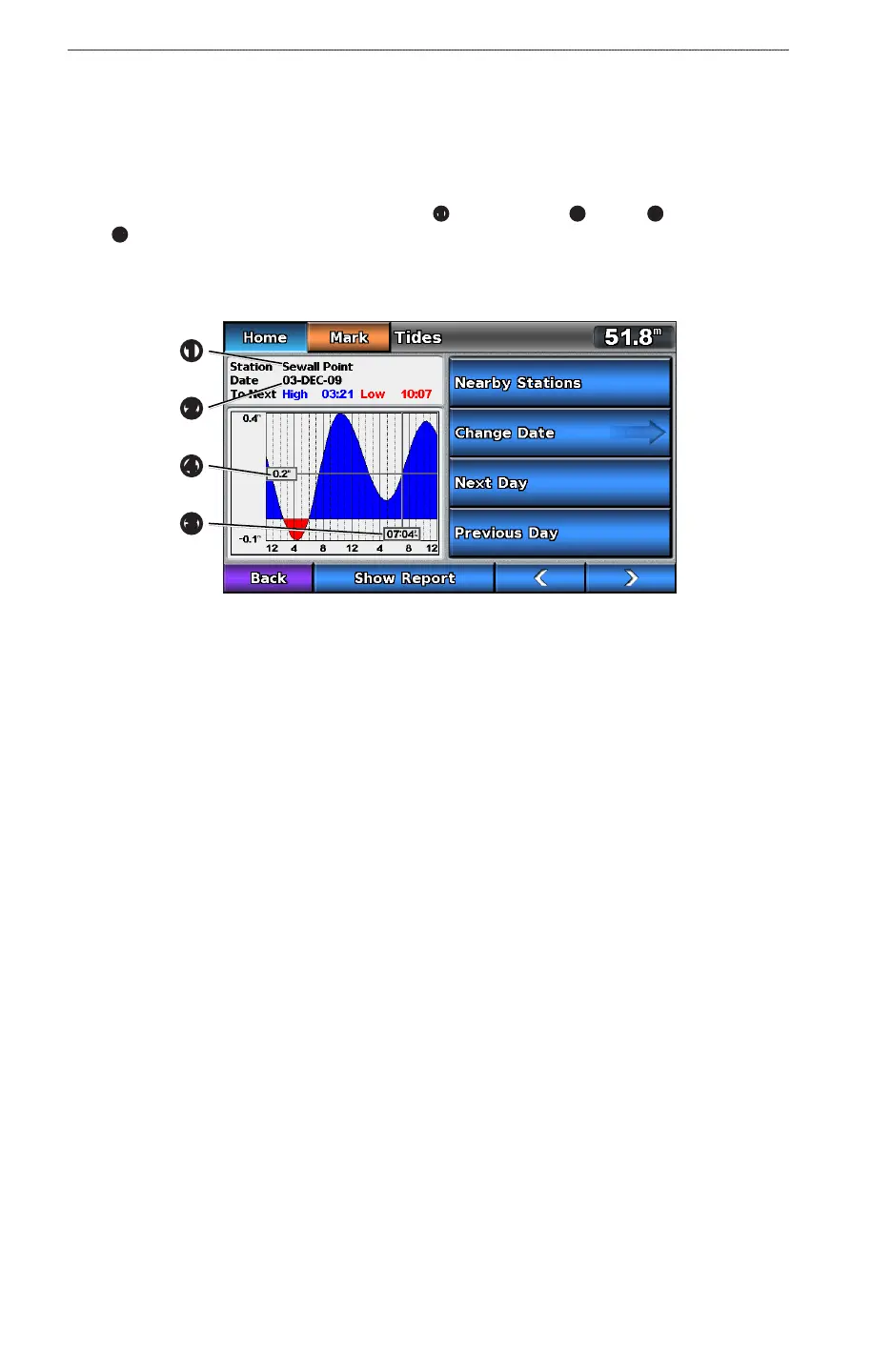
Tide Station Information
The Tides screen shows information about a tide station
➊
for a specic date
➋
and time
➌
, including the tide
height
➍
, and when the next high and low tides will occur. By default, the chartplotter shows tide information
for the most-recently viewed tide station and for the present date and time.
From the Home screen, select > .
Tide Station Information
➍
➊
➌
➋
Viewing Information about a Nearby Tide Station
1. From the Home screen, select > > .
2. Select a station.
Viewing Tide Station Information for a Different Date
1. From the Home screen, select > > .
2. Select a station.
3. Complete an action:
• Select > to view tide information for a different date, enter the date, and select
.
• Select to view tide information for the day after the date shown.
• Select to view tide information for the day before the date shown.











 To Next Page