28 GPSMAP 700 Series Owner’s Manual
Navigation
Deleting a Waypoint or an MOB
You can delete a waypoint or an MOB that has been saved.
1. From the Home screen, select > > .
2. Select a waypoint or an MOB.
3. Select .
Deleting All Waypoints
From the Home screen, select > > >>.
Copying Waypoints
See “Chartplotter Data Management” (page 52).
Routes
You can create and save up to 100 routes. Each route can contain up to 250 waypoints.
Creating and Navigating a Route from Your Present Location
You can create and immediately navigate a route on the Navigation chart or the Fishing chart. When you have
reached the destination, you can choose to save the route.
: The Fishing chart is available if you use a BlueChart g2 Vision SD card or a BlueChart g2 SD card, or
if your built-in map supports Fishing charts.
1. From the Home screen, select .
2. Select or .
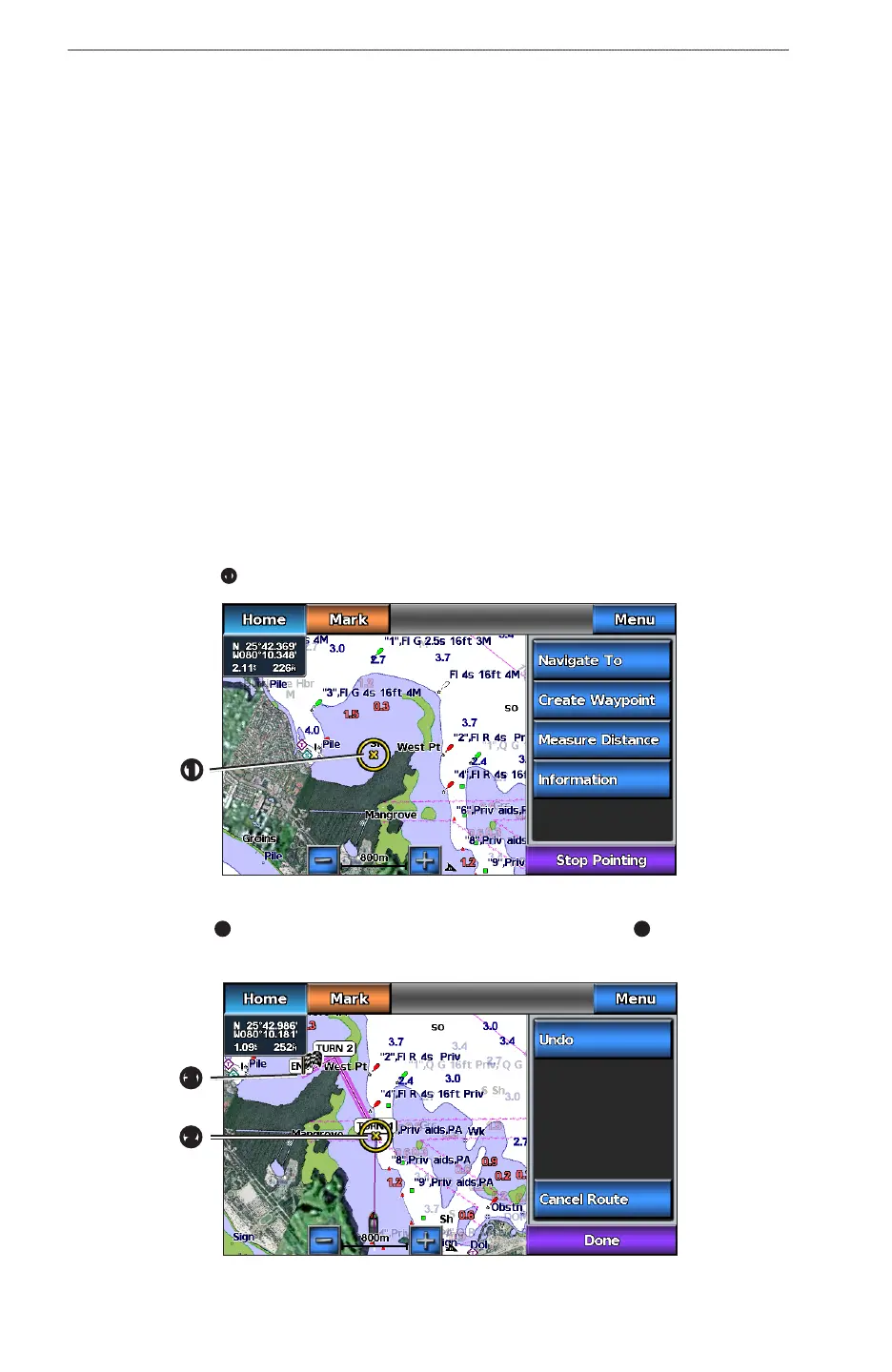
3. Touch a destination
➊
.
➊
4. Select > .
5. Touch the location
➋
where you want to make the last turn toward your destination
➌
.
6. Select .
➌
➋











 To Next Page