12 GPSMAP 700 Series Owner’s Manual
Charts and 3D Chart Views
Showing Other Vessels
See “Conguring the Appearance of Other Vessels” (page 50).
Showing and Conguring Data Overlay
See “About Chart Overlay Numbers” (page 48).
Using Waypoints
See “Waypoints” (page 26).
Using Tracks
See “Tracks” (page 30).
Automatic Identication System
The Automatic Identication System (AIS) enables you to identify and track other vessels.
About AIS
AIS alerts you to area trafc. When connected to an external AIS device, the chartplotter can show some
AIS information about other vessels that are within range, that are equipped with a transponder, and that are
actively transmitting AIS information. The information reported for each vessel includes the Maritime Mobile
Service Identity (MMSI), the location, the GPS speed, the GPS heading, the time that has elapsed since the last
position of the vessel was reported, the nearest approach, and the time to the nearest approach.
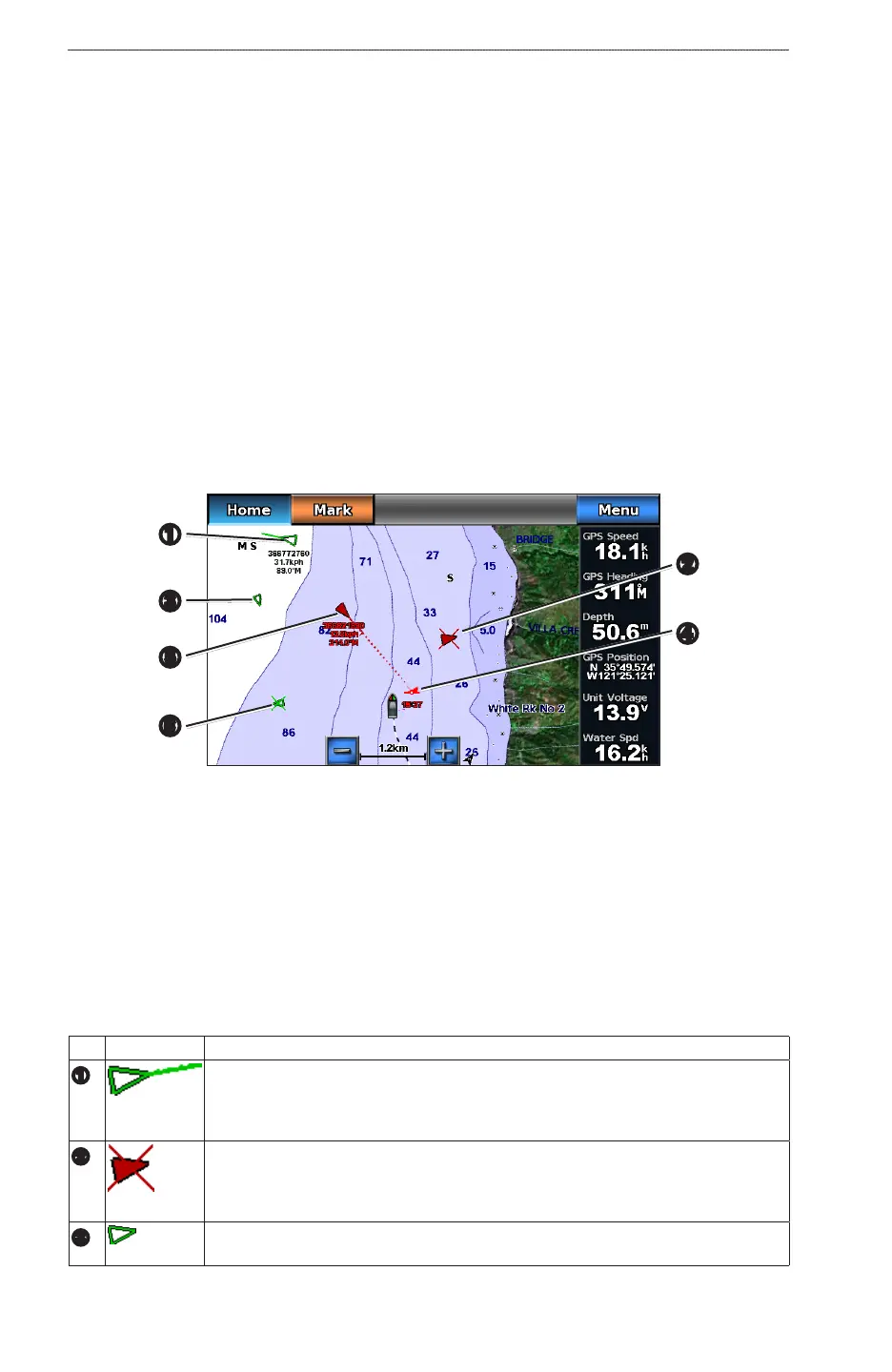
AIS Targeting on the Navigation Chart
➊
➏
➎
➍
➌
➋
About AIS Search and Rescue Transmitters
AIS Search and Rescue Transmitters (AIS-SART, or SART) are self-contained devices that transmit
emergency position reports when activated. SART transmissions are different than standard AIS transmissions,
so they look different than standard AIS symbols on the chartplotter. Instead of tracking a SART transmission
for collision avoidance, you track a SART transmission to locate and assist a vessel.
Navigating to a SART Transmission
When you receive a SART transmission, a distress signal alarm appears.
Select >to begin navigation to the SART transmission.
AIS Targeting Symbols
Symbol Description
➊
AIS Target is activated. The target appears larger on the chart. A green line attached
to the target indicates the heading of the target. The MMSI, speed, and direction of the
vessel appear beneath the target, if the details setting is set to Show (page 14). If the AIS
transmission from the vessel is lost, a message banner appears.
➋
Dangerous target is lost. A red X indicates that the AIS transmission from the vessel is
lost, and the chartplotter displays a message banner asking whether the vessel should
continue to be tracked. If you discontinue vessel tracking, the lost dangerous target
symbol disappears from the chart or the 3D chart view.
➌
AIS vessel. The vessel is reporting AIS information. The direction in which the triangle is
pointing indicates the direction in which the AIS vessel is moving.











 To Next Page