K2 Summit and K2 Base Direct Detection Camera User's Guide
24
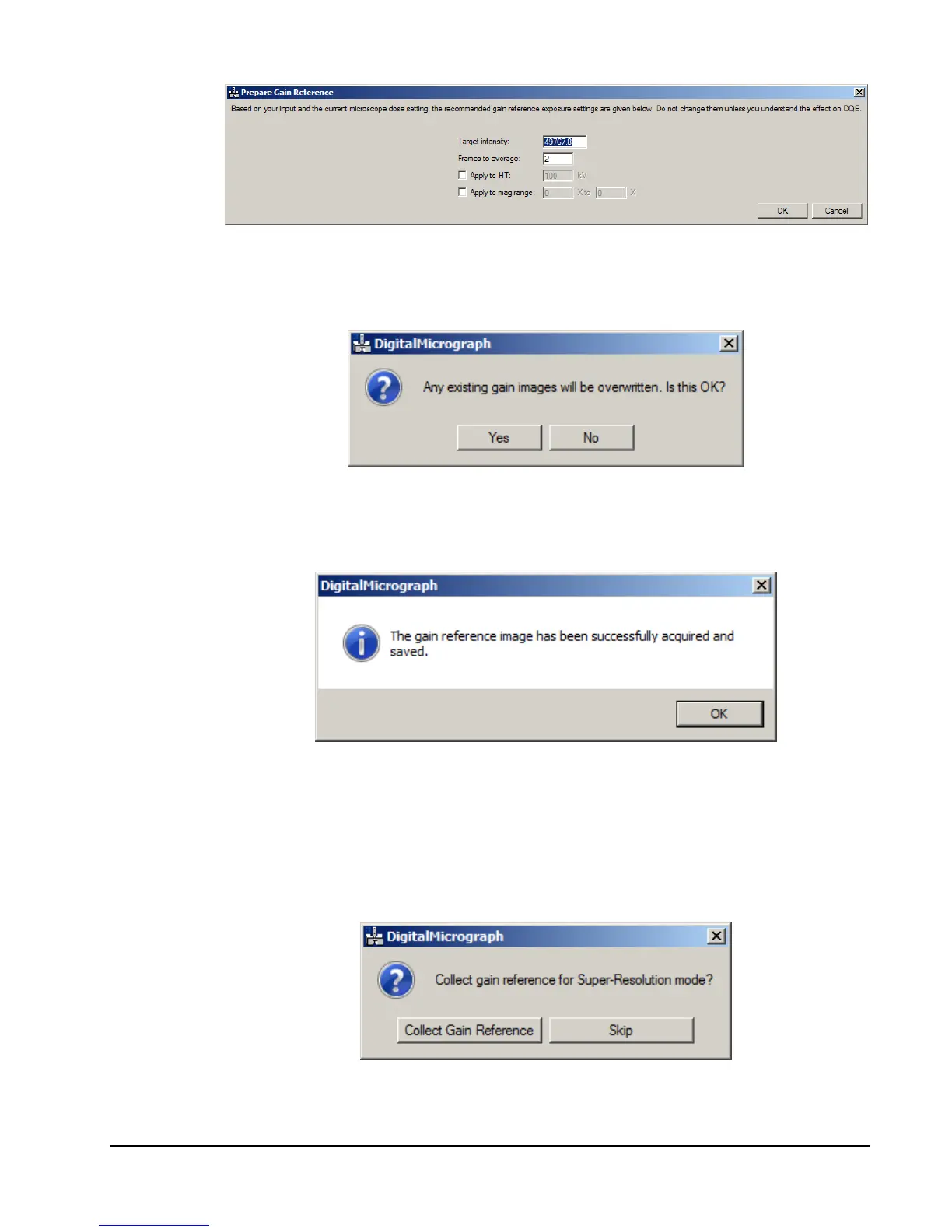
figure 1-20. Settings for intensity and number of frames to average
Next, DigitalMicrograph informs you that previous gain reference images are not saved
during this procedure. Click Yes.
figure 1-21. Image overwrite confirmation
DigitalMicrograph collects and saves the necessary images, and calculates any needed
corrections. When the success message appears, click OK.
figure 1-22. Linear mode gain reference success message
K2 Summit Counted and K2 Summit Super-Resolution
Next, if working in K2 Summit mode you are asked if you want to collect the Super-
Resolution references (which are also used for counted images). Preparing a gain reference
for K2 Super-Resolution mode is optional if it has been completed recently. A gain
reference can last for a number of days.
figure 1-23. Gain reference collection option


 To Next Page