70 232001840G(08)
Others Page
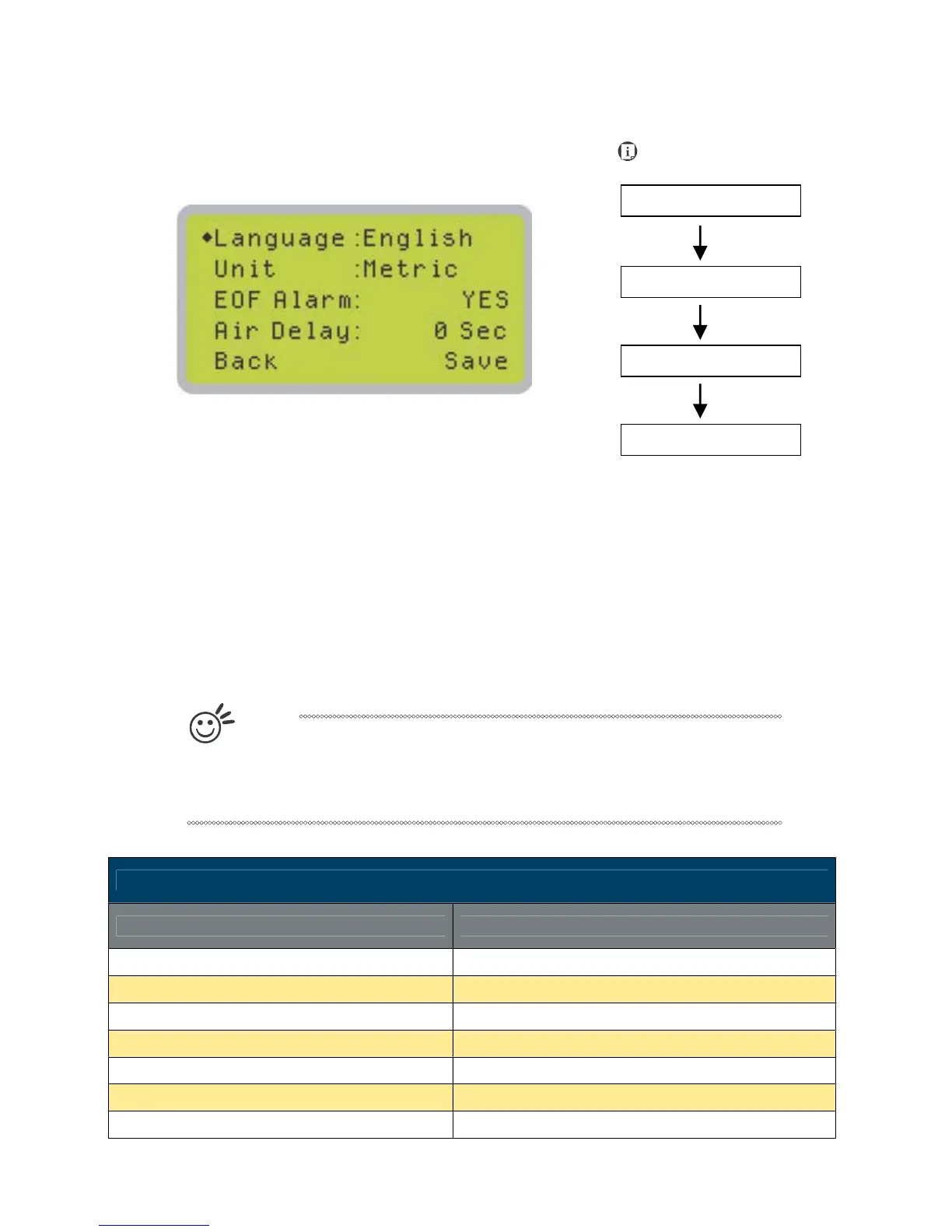
The Others Page allows you to change various settings that correspond to the control panel. The
Language setting will allow users to change available languages displayed on the control panel.
The Unit setting will allow you to change whether the units displayed by the control panel is in the
metric or imperial system. The EOF (end of file) Alarm setting will enable or disable an audible
notification when jobs are complete. The Air Delay setting allows you to specify the delay in
seconds of the SmartAIR air-assist after the point of laser firing.
• Language: ENGLISH (others dependent on Firmware)
• Unit: METRIC / ENGLISH
• EOF Alarm: YES / NO
• Air Delay: 1-100 seconds
T
i
p
Depending on the material you are engraving with, your laser settings, and the
desired results, please experiment with the air delay to achieve your desired
results.
Others Page
Relevant Buttons Function
F1 (Back) Back to previous page
F4 (Save) Save your current settings
U / V Directional Scroll through the menu selections
Y / Z Directional Adjust the value for that selection
Start / Stop Back to Main Work Page
Auto Focus Initiate the auto focus function
S / T Manual Focus Buttons Manually adjust the height of the work table (Z-axis)
Navigating to this page:





 To Next Page