77 232001840G(08)
CorelDRA
W
Example
(Page
Setup and
Orientation)
The following is an example of how to set the Page Setup and Orientation in the graphics software.
CorelDRAW is the designated graphics software used for this example. For other graphics software, you
will need to access the corresponding Page Setup page.
3) From the primary menu, click LAYOUT
→
PAGE SETUP.
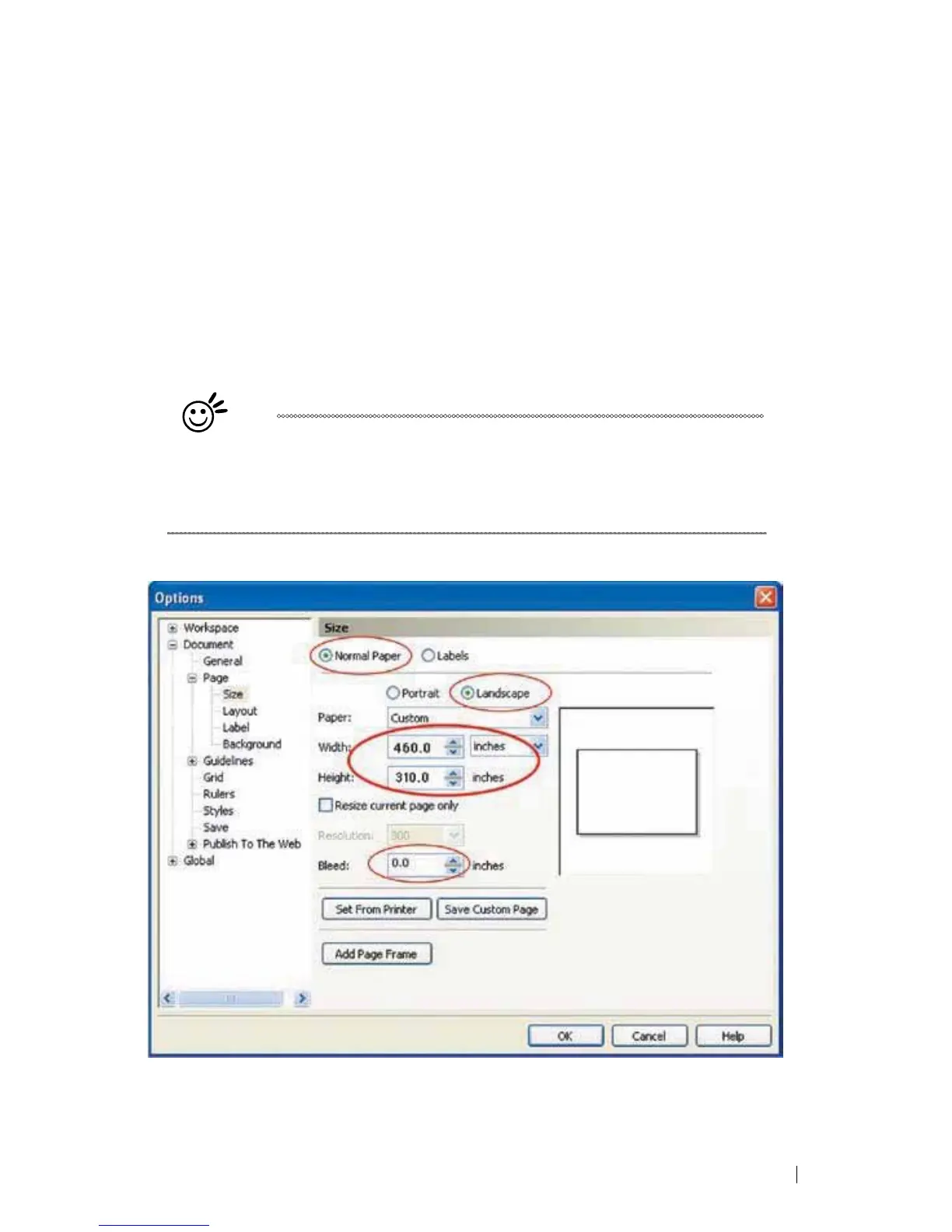
4) From the navigation bar on the left, click DOCUMENT
→
PAGE
→
SIZE.
5) Ensure that NORMAL PAPER and LANDSCAPE are selected.
6) Ensure the Paper Width and Height dimensions match the LaserPro C180II’s work table dimensions
of 458 mm (18 inches) and 305 mm (12 inches).
7) Click OK to complete the paper size adjustment.
Tip
Instead of manually selecting the Landscape and setting the Paper Width
and Height, you can simply click the Set From Printer function and
CorelDRAW will automatically set the proper orientation and dimensions
based on LaserPro C180II’s work table. (You MUST have the LaserPro
C180II set as the default printer prior to doing this.)





 To Next Page