CHAPTER 2: COMMUNICATION PORTS ETHERNET PORTS
8 SERIES PROTECTIVE RELAY PLATFORM – COMMUNICATIONS GUIDE 2-9
Deleting a route:
Rule #5.
Routes are deleted by replacing the route destination with the default address
(127.0.0.1). When deleting a route, the mask and gateway must also be put back to their
default values.
Rule #6.
The default route is deleted by replacing the default gateway with the default value
127.0.0.1.
Important Notes:
1. Host routes are not supported at present.
2. The route mask has IPv4 mask format. In binary this is a set of contiguous bits of 1
from left to right, followed by one or more contiguous bits of 0.
3. The route destination and mask must match.
4. Item #3, above, can be verified by checking that RtDestination & RtMask ==
RtDestination
5. This is an example of a good configuration: RtDestination= 10.1.1.0; Rt Mask=
255.255.255.0
6. This is an example of a bad configuration: RtDestination = 10.1.1.1; Rt Mask=
255.255.255.0
7. The route destination must not be a connected network.
8. The route gateway must be on a connected network. This rule applies to the gateway
address of the default route as well.
9. Item #8, above, can be verified by checking that:
RtGwy & Prt4Mask) == (Prt4IP & Prt4Mask) || (RtGwy & Prt5Mask) == (Prt5IP & Prt5Mask)
TARGETS
WRONG ROUTE CONFIG
Description: A route with mismatched destination and mask has been configured.
Message: “Wrong route configuration.
”What to do: Rectify the IP address and mask of the mis-configured route.
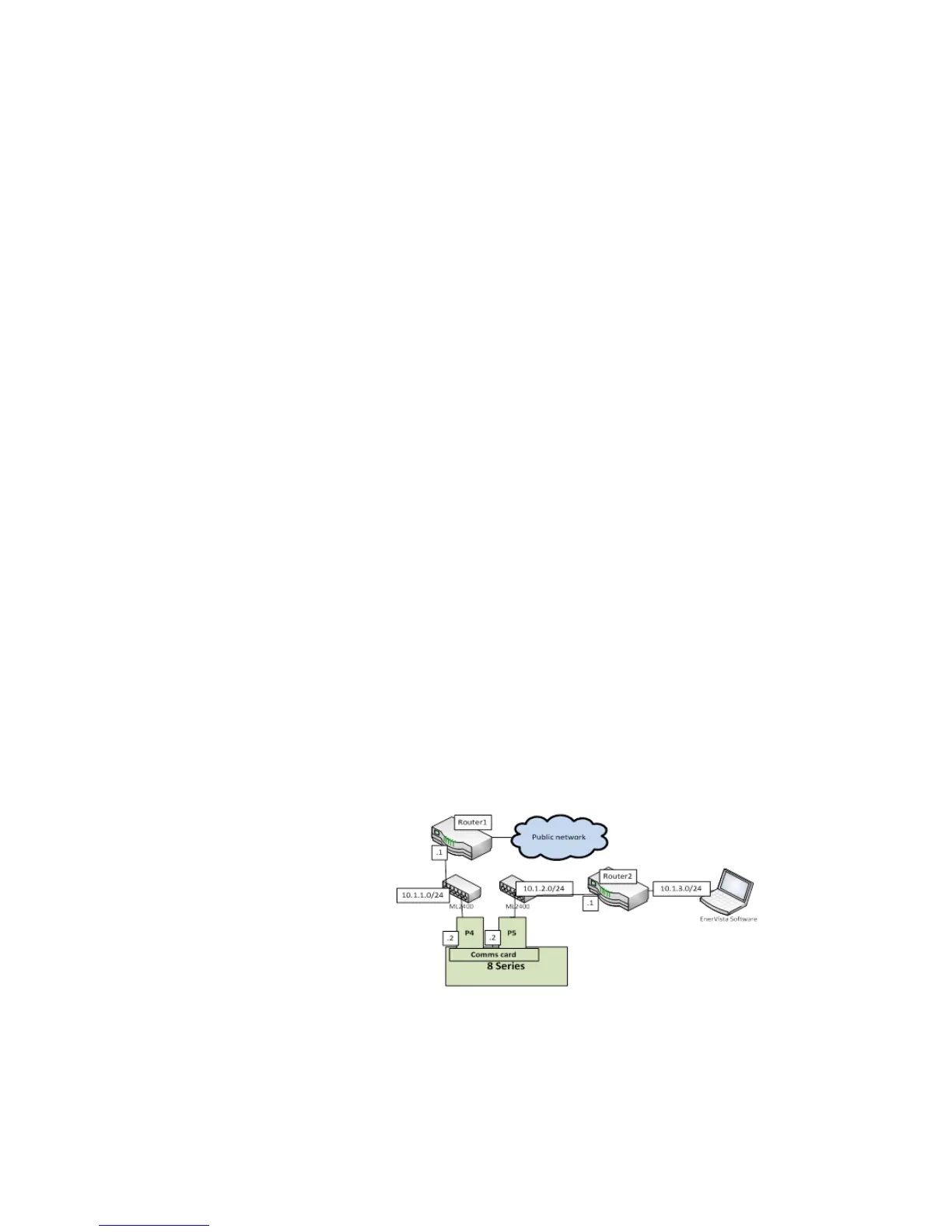
TOPOLOGY EXAMPLE
Figure 2-2: Topology Example
In the above figure: Topology Example, the 8 Series device is connected through the two
Ethernet ports available on the communications card.
• Port 4 (IP address 10.1.1.2) connects to LAN 10.1.1.0/24 and to the Internet through
Router1. Router 1 has an interface on 10.1.1.0/24 and the IP address of this interface is
10.1.1.1.



 To Next Page