GE Multilin F35 Multiple Feeder Protection System 5-51
5 SETTINGS 5.2 PRODUCT SETUP
5
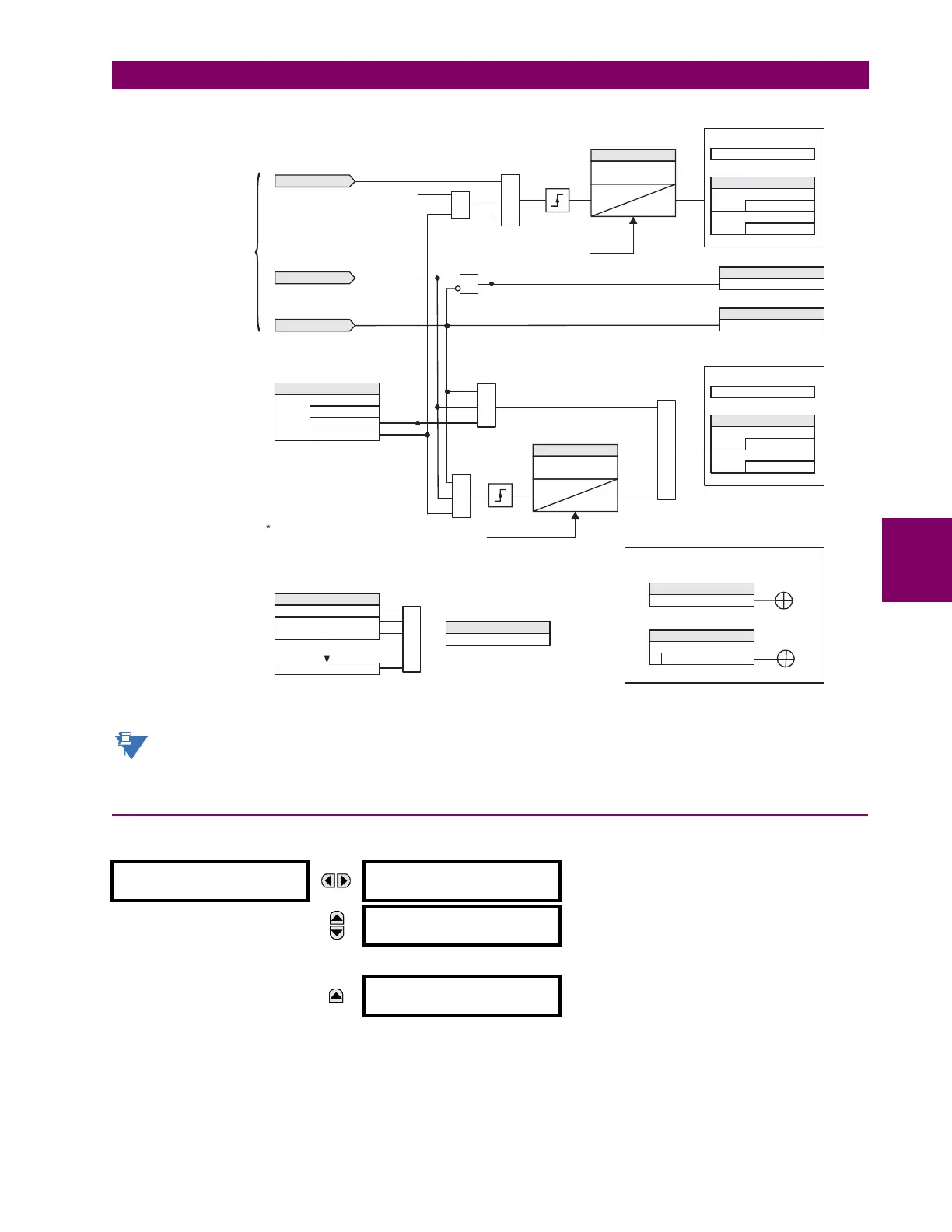
Figure 5–11: USER-PROGRAMMABLE PUSHBUTTON LOGIC (Sheet 2 of 2)
User-programmable pushbuttons require a type HP or HQ faceplate. If an HP or HQ type faceplate was ordered
separately, the relay order code must be changed to indicate the correct faceplate option. This can be done via
EnerVista UR Setup with the Maintenance > Enable Pushbutton command.
5.2.15 FLEX STATE PARAMETERS
PATH: SETTINGS Ö PRODUCT SETUP ÖØ FLEX STATE PARAMETERS
This feature provides a mechanism where any of 256 selected FlexLogic™ operand states can be used for efficient moni-
toring. The feature allows user-customized access to the FlexLogic™ operand states in the relay. The state bits are packed
so that 16 states may be read out in a single Modbus register. The state bits can be configured so that all of the states
which are of interest to the user are available in a minimum number of Modbus registers.
FLEX STATE
PARAMETERS
PARAMETER 1:
Off
Range: FlexLogic™ operand
MESSAGE
PARAMETER 2:
Off
Range: FlexLogic™ operand
↓
MESSAGE
PARAMETER 256:
Off
Range: FlexLogic™ operand
Pushbutton 1
LED
Instantaneous
reset *
OR
1. If pushbutton 1 LED control is set to off.
2. If pushbutton 1 LED control is not set to off.
PUSHBUTTON 1 LED LOGIC
OR
AND
AND
SETTING
= Disabled
= High Priority
PUSHBUTTON 1 MESSAGE
= Normal
FLEXLOGIC OPERAND
PUSHBUTTON 1 ON
Pushbutton 1
LED
SETTING
= any FlexLogic operand
PUSHBTN 1 LED CTL
AND
SETTING
FLASH MESSAGE
TIME
T
RST
0
PUSHBUTTON ON
LATCHED
LATCHED/SELF-RESET
AND
From user-programmable
pushbuttons logic
sheet 1, 842021A2
FLEXLOGIC OPERAND
PUSHBUTTON 1 ON
FLEXLOGIC OPERAND
PUSHBUTTON 1 OFF
SETTING
FLASH MESSAGE
TIME
T
RST
0
Instantaneous
reset *
LCD MESSAGE
ENGAGE MESSAGE
SETTINGS
= XXXXXXXXXX
PUSHBTN 1 ID TEXT
= XXXXXXXXXX
PUSHBTN 1 ON TEXT
The message is temporarily removed if
any keypad button is pressed. Ten (10)
seconds of keypad inactivity restores
the message.
LCD MESSAGE
ENGAGE MESSAGE
SETTINGS
= XXXXXXXXXX
PUSHBTN 1 ID TEXT
= XXXXXXXXXX
PUSHBTN 1 ON TEXT
Instantaneous reset will be executed if any
front panel button is pressed or any new
target or message becomes active.
842024A1.CDR
OR
FLEXLOGIC OPERAND
PUSHBUTTON 1 ON
PUSHBUTTON 2 ON
PUSHBUTTON 3 ON
PUSHBUTTON 16 ON
FLEXLOGIC OPERAND
ANY PB ON
The enhanced front panel has 16 operands;
the standard front panel has 12



 To Next Page