1-10 F35 Multiple Feeder Protection System GE Multilin
1.3 ENERVISTA UR SETUP SOFTWARE 1 GETTING STARTED
1
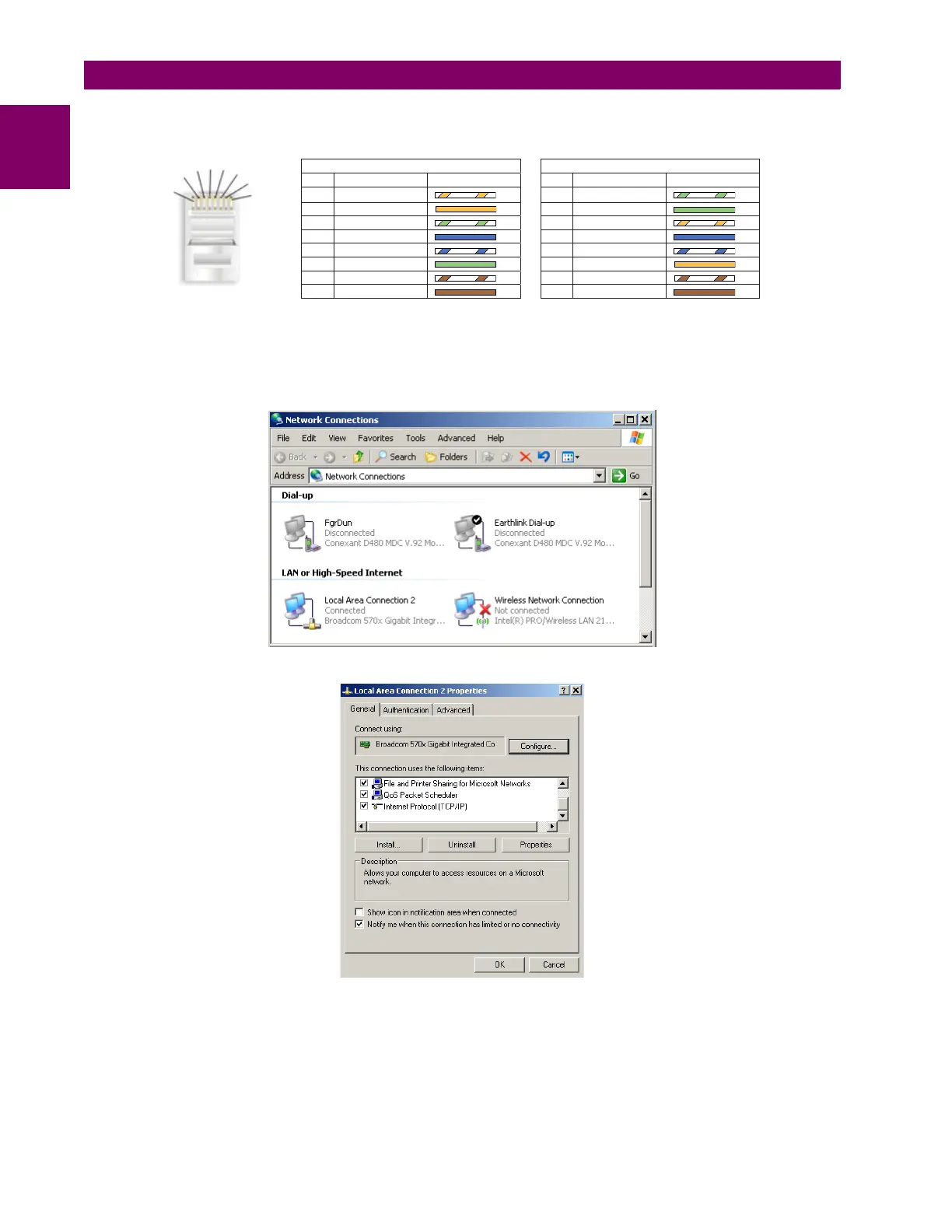
Next, use an Ethernet cross-over cable to connect the laptop to the rear Ethernet port. The pinout for an Ethernet cross-
over cable is shown below.
Figure 1–6: ETHERNET CROSS-OVER CABLE PIN LAYOUT
Now, assign the laptop computer an IP address compatible with the relay’s IP address.
1. From the Windows desktop, right-click the My Network Places icon and select Properties to open the network con-
nections window.
2. Right-click the Local Area Connection icon and select Properties.
842799A1.CDR
END 1 END 2
Pin Wire color Diagram Pin Wire color Diagram
1 White/orange 1 White/green
2 Orange 2 Green
3 White/green 3 White/orange
4 Blue 4 Blue
5 White/blue 5 White/blue
6 Green 6 Orange
7 White/brown 7 White/brown
8 Brown 8 Brown
1
2
3
4
5
6
7
8



 To Next Page