Appendix B - Settings and Signals
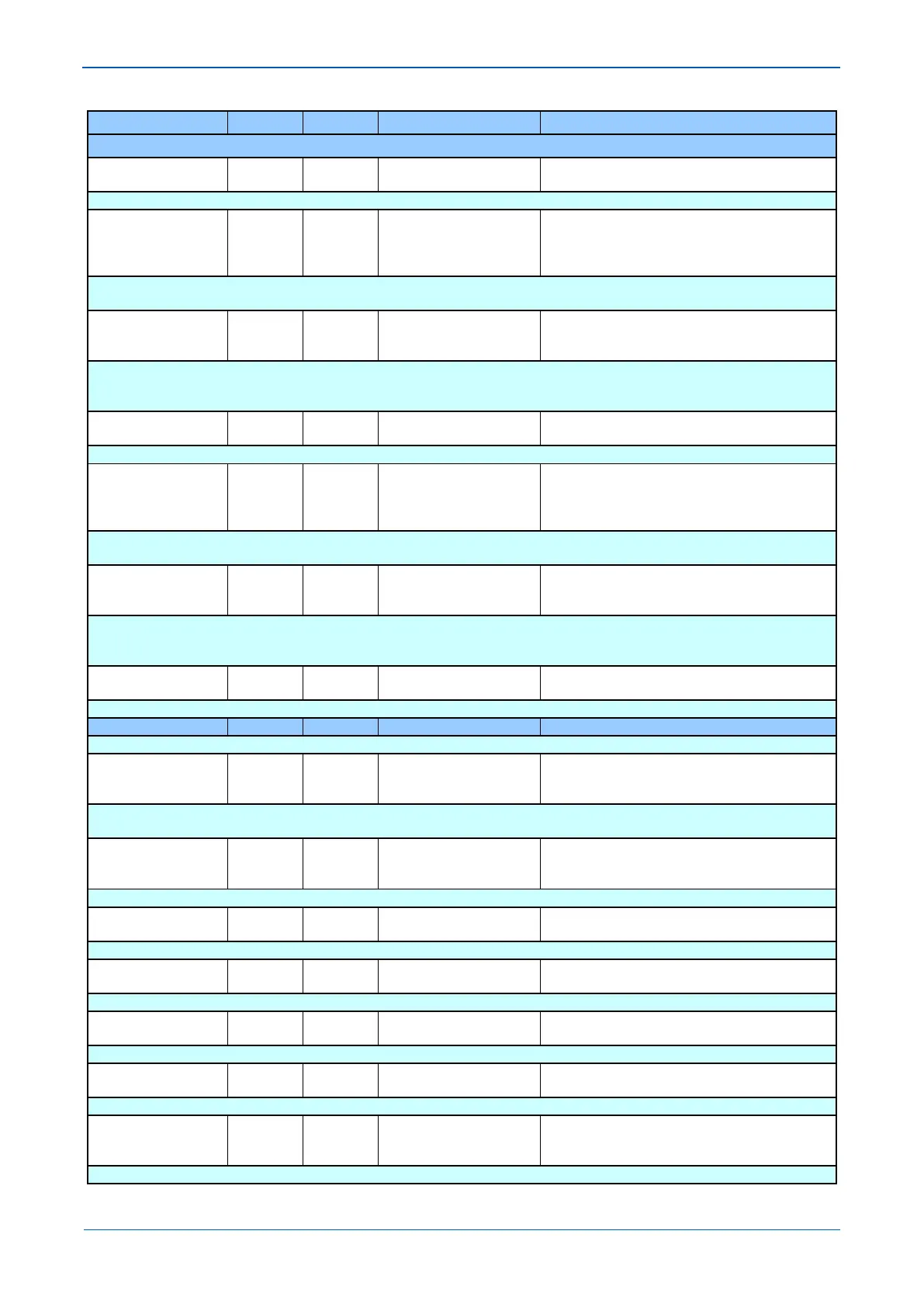
MENU TEXT COL ROW DEFAULT SETTING AVAILABLE OPTIONS
DESCRIPTION
Fn Key 8 Label 17 19 Function Key 1
From 32 to 163 in steps of 1
[ASCII Text (16 chars)]
Allows the text of the function key to be changed to something more suitable for the application.
Fn Key 9 17 1A Unlocked
Unlocked (Enabled)
Locked
Setting to activate function key. The ‘Lock’ setting allows a function key output that is set to toggle mode to be locked in its current active
position.
Fn Key 9 Mode 17 1B Normal
Toggled
Sets the function key in toggle or normal mode. In ‘Toggle’ mode, a single key press will set/latch the function key output as ‘high’ or ‘low’ in
programmable scheme logic. This feature can be used to enable/disable IED functions. In the ‘Normal’ mode the function key output will
remain ‘high’ as long as key is pressed.
Fn Key 9 Label 17 1C Function Key 1
From 32 to 163 in steps of 1
[ASCII Text (16 chars)]
Allows the text of the function key to be changed to something more suitable for the application.
Fn Key 10 17 1D Unlocked
Unlocked (Enabled)
Locked
Setting to activate function key. The ‘Lock’ setting allows a function key output that is set to toggle mode to be locked in its current active
position.
Fn Key 10 Mode 17 1E Normal
Toggled
Sets the function key in toggle or normal mode. In ‘Toggle’ mode, a single key press will set/latch the function key output as ‘high’ or ‘low’ in
programmable scheme logic. This feature can be used to enable/disable IED functions. In the ‘Normal’ mode the function key output will
remain ‘high’ as long as key is pressed.
Fn Key 10 Label 17 1F Function Key 1
From 32 to 163 in steps of 1
[ASCII Text (16 chars)]
Allows the text of the function key to be changed to something more suitable for the application.
This column contains IED Configurator settings
Switch Conf.Bank 19 05 No Action
Switch banks
Setting which allows the user to switch between the current configuration, held in the Active Memory Bank (and partly displayed below), to
the configuration sent to and held in the Inactive Memory Bank.
Restore MCL 19 0A No Action
Restore MCL
Setting which allows the user to restore MCL or no action.
Active Conf.Name 19 10
Active Conf.Name
[ASCII text]
IEC61850 versions only. The name of the configuration in the Active Memory Bank, usually taken from the SCL file.
Active Conf.Rev 19 11
Active Conf.Rev
[ASCII text]
IEC61850 versions only. Configuration Revision number of the configuration in the Active Memory Bank, usually taken from the SCL file.
Inact.Conf.Name 19 20
Inact.Conf.Name
[ASCII text]
IEC61850 versions only. The name of the configuration in the Inactive Memory Bank, usually taken from the SCL file.
Inact.Conf.Rev 19 21
Inact.Conf.Rev
[ASCII text]
IEC61850 versions only. Configuration Revision number of the configuration in the Inactive Memory Bank, usually taken from the SCL file.
IP From HMI 19 2F Disabled
Enabled
When set to Enabled the IP Address, Subnet Mask & Gateway may be configured via the HMI. When set to Disabled these parameters may



 To Next Page