– 40 –
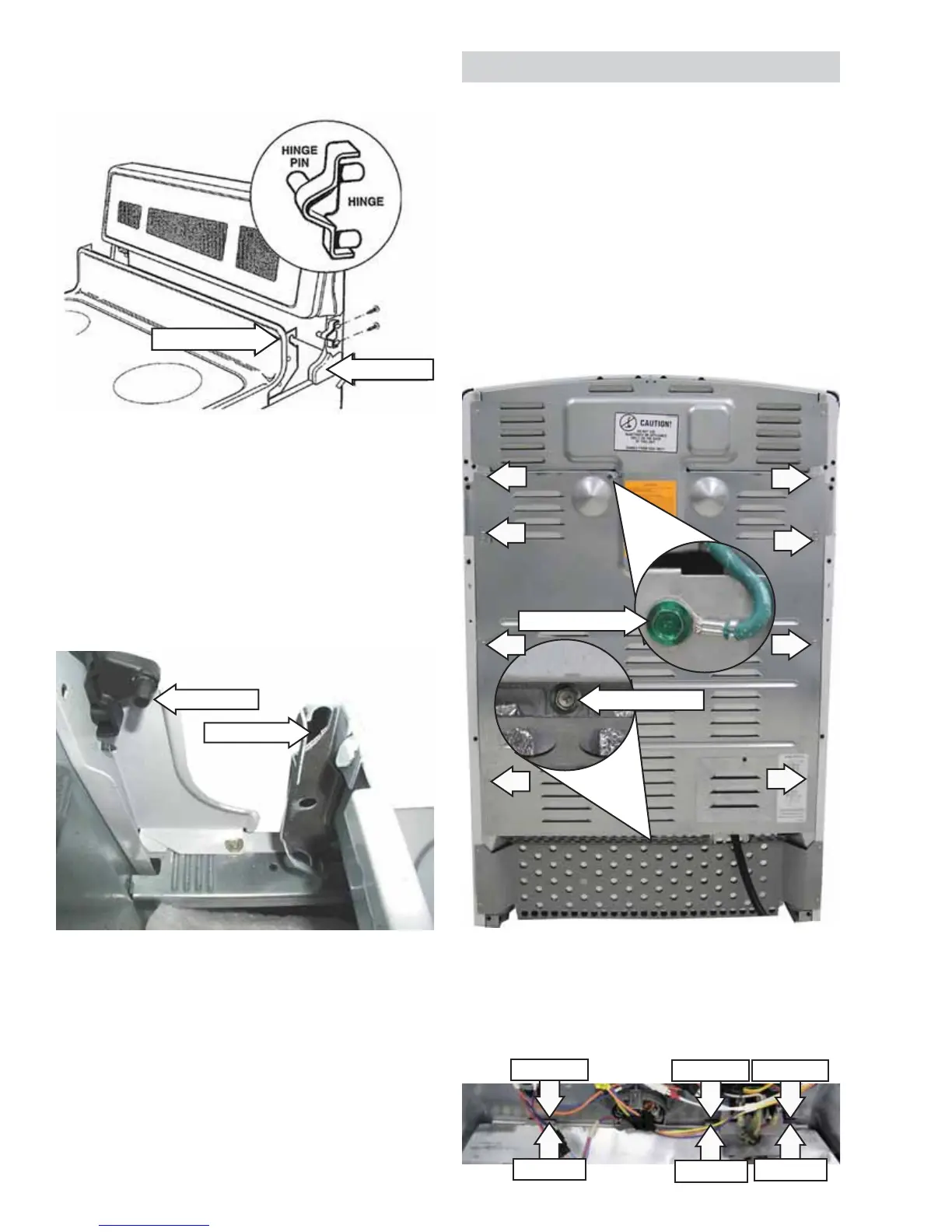
Note: The cooktop panel hinge slots rest on a hinge
pin mounted to each end plate.
Lift the front of the cooktop panel upward to 7.
approximately 45-degrees.
Lower the rear of the cooktop panel to 8.
disengage the hinge slots from the hinge pins.
Lift the cooktop panel upwards and over the 9.
hinge pins and remove the cooktop panel.
Hinge Slot
End Plate
Range shown with control panel removed for clearer
view.
Hinge Pin
Hinge Slot
Rear Cover Removal
To remove the rear cover:
Disconnect power to the range.1.
Pull the range out from its installation.2.
Remove and capture the hidden ¼-in. hex-head 3.
screw from the bottom of the cover.
Remove the ¼-in. ground screw and ground 4.
wire from the top of the cover.
Remove eight ¼-in hex-head screws that attach 5.
the panel to the range.
Pull the top of the cover away from the range 6.
and disengage the 3 cover tabs from the slots
near the bottom of the range.
Cover Tab
Range Slot Range Slot
Range Slot
Cover Tab
Cover Tab
Hidden Screw
Ground Screw




 To Next Page