– 56 –
Surface Unit Infi nite Switches
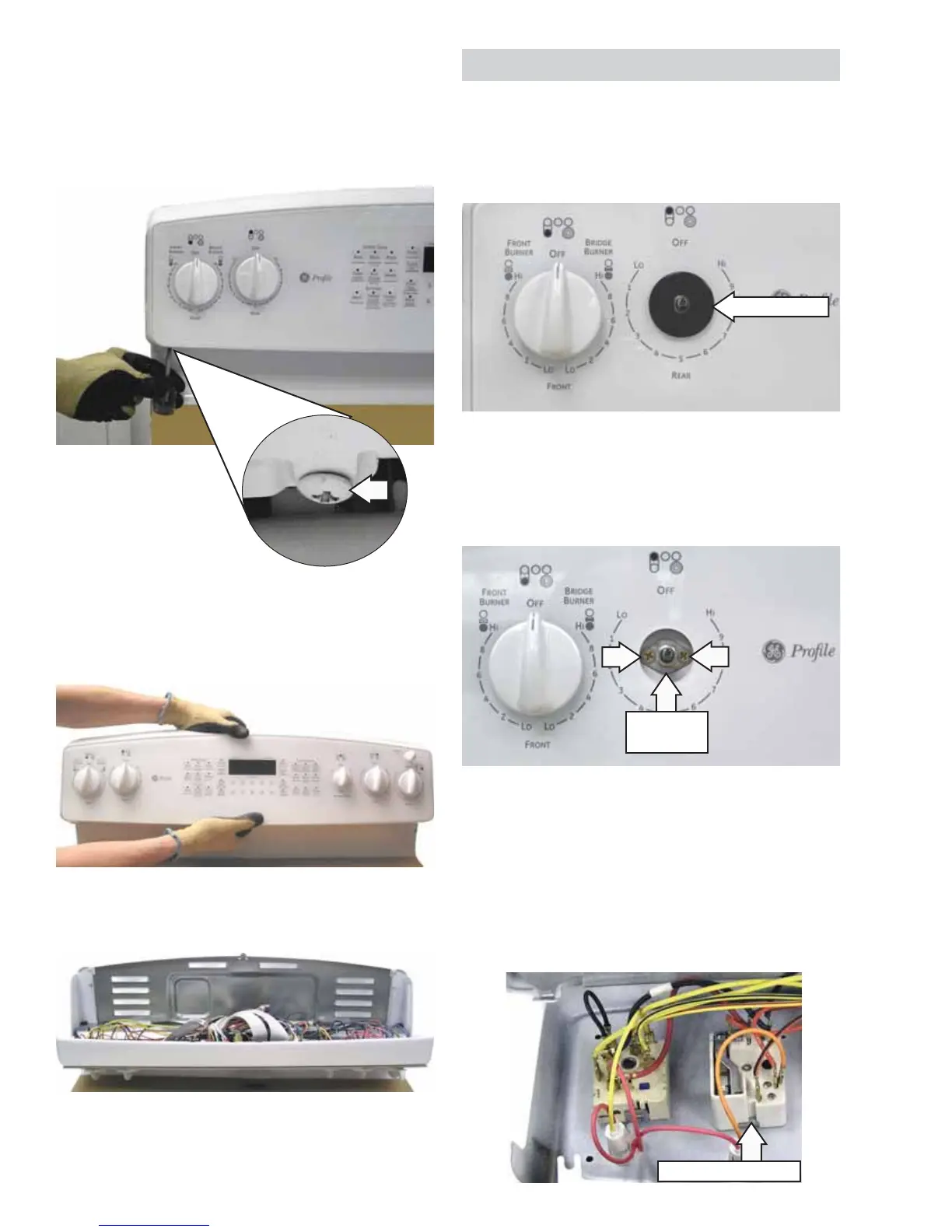
To remove the surface unit infi nite switch (1 of 4):
Pull out the knob, then loosen and remove the 1.
retainer nut from the switch to be removed.
Place a protective cover on the main top.3.
Using a stubby or off-set Phillips-head 4.
screwdriver, remove the 2 inverted screws that
attach the bottom of the control panel to the
range.
Grasp the control panel and pull the bottom out 5.
then lift the panel off the top 2 screws.
Place the control panel in the service position.6.
Remove and capture the 2 Phillips-head screws 2.
that hold the threaded retainer nut mount and
the infi nite switch to the control panel. Slide the
crystal mount off the shaft.
Place the control panel in the service position. 3.
(See Control Panel.)
Mark and remove the infi nite switch wiring.4.
Remove the infi nite switch from the control 5.
panel.
Service Position
Threaded
Nut Mount
Retainer Nut
Infi nite Switch (1 of 4)




 To Next Page