– 55 –
Control Panel Assembly
Glass Touch Panel
The glass touch panel and touch board will be
supplied as a complete assembly. If the glass is
damaged or the touch board is defective, the glass
touch panel assembly will have to be replaced. The
glass touch panel must be removed to replace the
tri-ring burner size switch and the warmer switch.
The glass touch panel assembly is attached to the
front of the control panel.
To remove the glass touch panel:
Caution: To prevent electrostatic discharge that can
damage electronic controls, ground yourself to the
range frame or use an ESD wristband.
Place a protective cover on the main top.1.
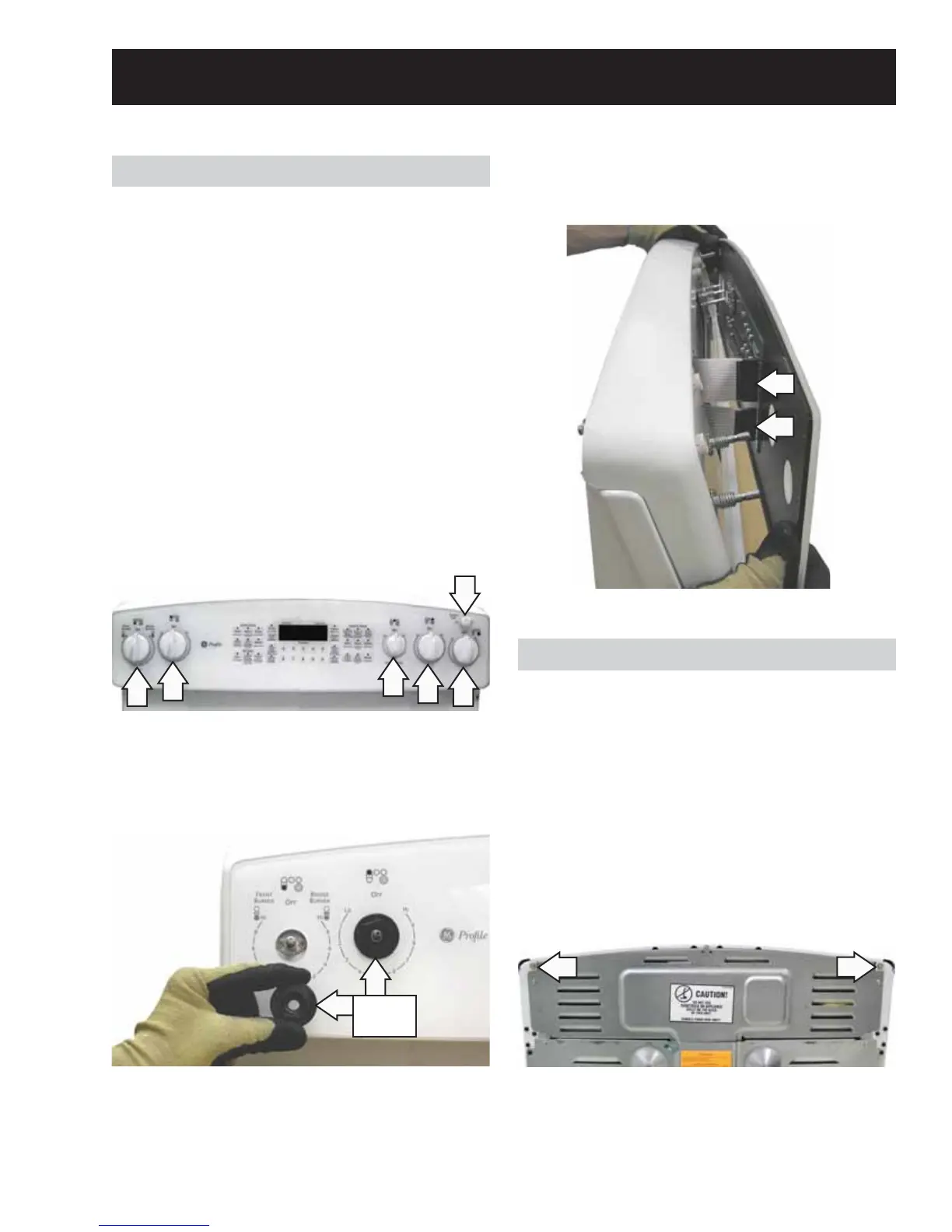
Remove all control panel knobs.2.
Control Panel
The control panel contains the ERC, infi nite heat
switches, tri-ring burner size switch (PB975), and the
warmer element switch.
To remove the control panel:
Pull the range out approximately 6 inches from 1.
the wall.
Loosen (do not remove) the two ¼-in. hex-head 2.
screws that hold the top of the control panel to
the range.
Remove the 4 glass touch panel retainer nuts 3.
that hold the glass touch panel to the control
panel.
Disconnect the 2 ribbon harness connectors 4.
from the glass touch panel.
Retainer
Nuts
Rear View
(Continued next page)




 To Next Page