Getting Started
1-20 Versana Essential – User Guide
5759238-100 English
Rev. 2
Monitor Display
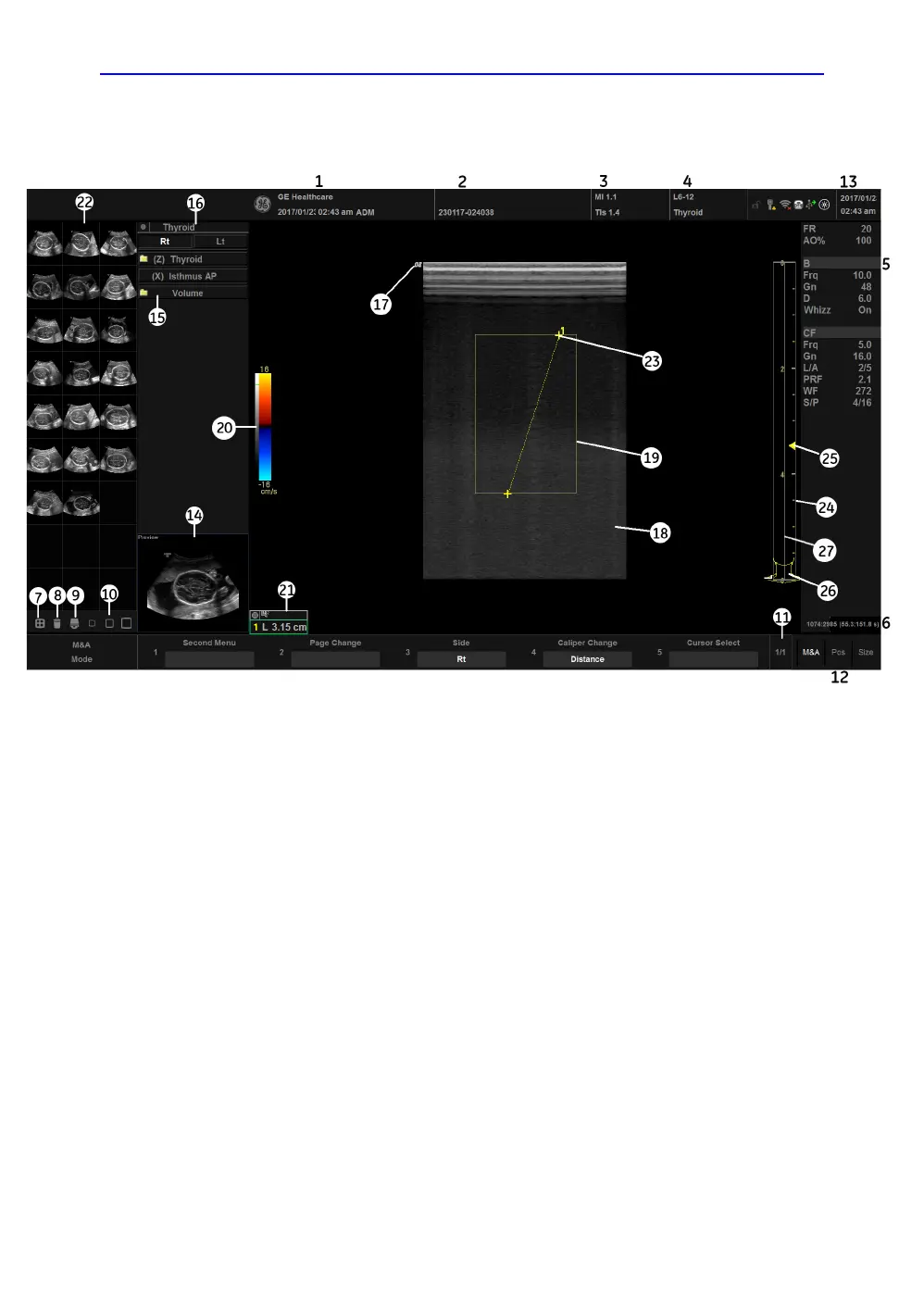
Figure 1-9. Monitor Display Tour
1. Institution/Hospital Name, Date, Time, Operator
Identification.
2. Patient Name, Patient Identification.
3. Power Output Readout.
4. Probe Identifier. Exam Preset.
5. Imaging Parameters by Mode.
6. Cine Gauge.
7. Active Images screen.
8. Delete Image.
9. Save As Menu.
10. Three types of Images Clipboard.
11. Primary Menu Page Indication.
12. Trackball Functionality Status.
13. Current date and time, Caps Lock: (lit when on),
network connection indicator, system messages
display, InSite status, InSite controls.
14. Image Preview.
15. Measurement Summary Window.
16. Exam Category.
17. Probe Orientation Marker.
18. Image.
19. Region of interest.
20. Gray/Color Bar.
21. Measurement Results Window.
22. Image Clipboard.
23. Measurement Calipers.
24. Depth Scale.
25. Focal Zone Indicator.
26. Body Pattern.
27. TGC.


 To Next Page