Getting Started
1-32 Versana Essential – User Guide
5759238-100 English
Rev. 2
System Start-Up
Connecting the System
To connect the system to the electrical supply:
1. Ensure that the wall outlet is of the appropriate type.
2. Ensure that the power switch is turned off.
3. Unwrap the power cable. Make sure to allow sufficient slack
in the cable so that the plug is not pulled out of the wall if the
system is moved slightly.
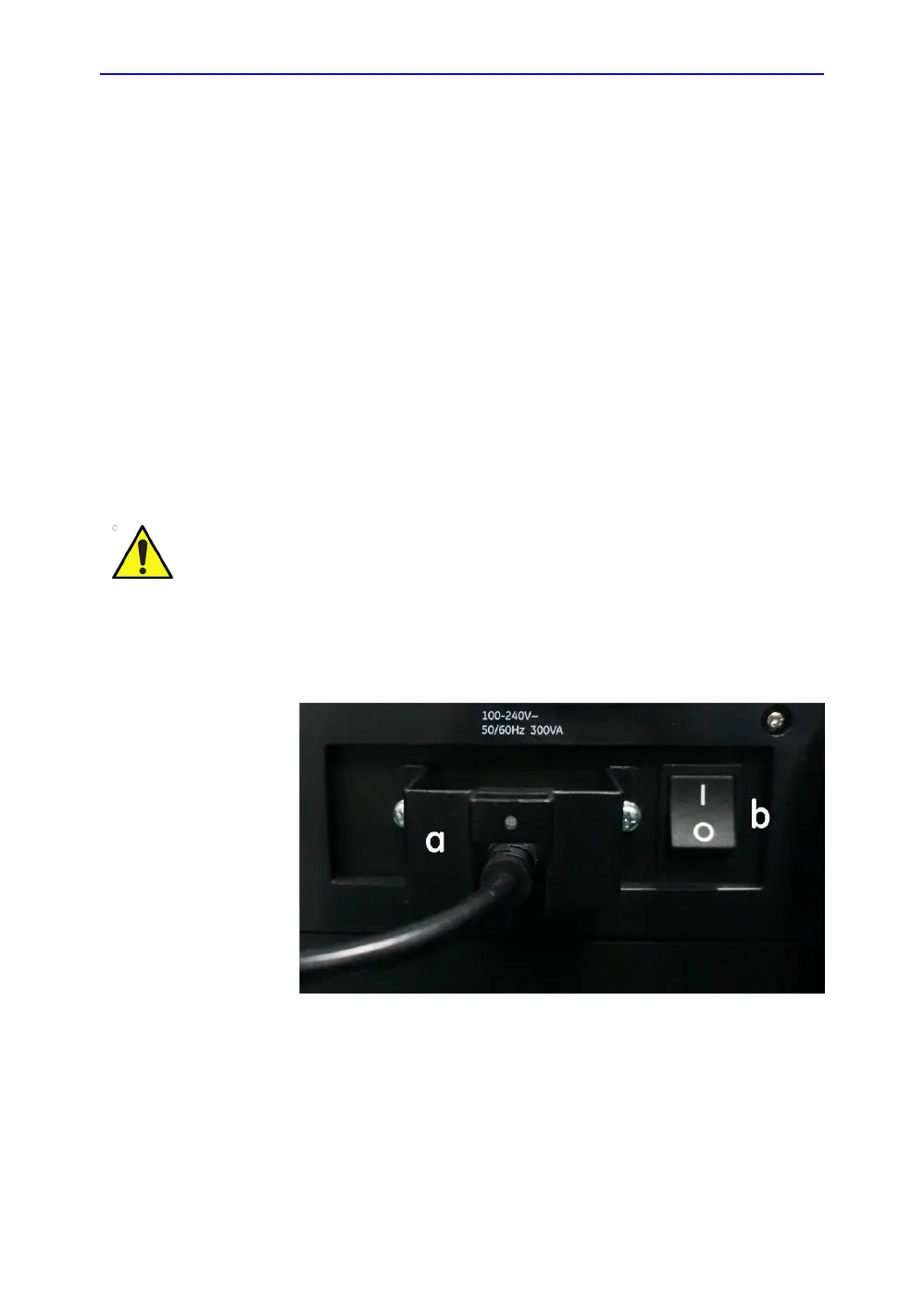
4. Attach the power plug to the system, and then install the
power cable bracket (a). Ensure the power plug is placed
securely in power cable bracket.
Figure 1-17. Circuit Breaker and Power Plug
5. Push the power plug securely into the wall outlet.
NOTE: Do not use an extension cord or adapter plug.
6. Switch ON the Circuit Breaker (b).The On/Off button on the
control panel illuminates blue, indicating that the system is
in standby mode.
Use the appropriate power cord provided by or designated
by GE.


 To Next Page