16
Swim Spa Solution™
1. Shut electrical power off.
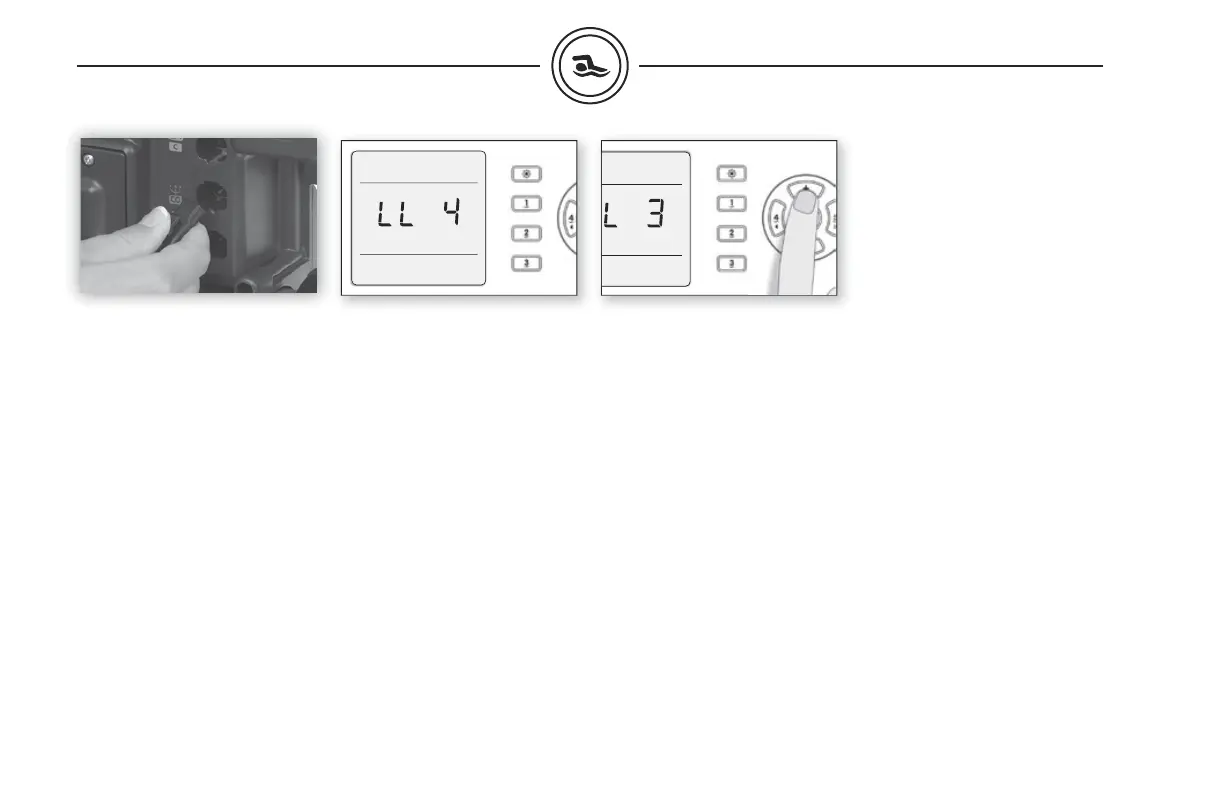
2. Insert the in.stik
TM
into the
communication connector
of the MASTER pack (see fi g.
above).
3. Turn power on. The in.xe
TM
system will upload all the
different confi gurations set
into the in.stik™ memory.
programming the in.xe™
7. Use the Up/Down key to
choose the new desired low
level confi guration number.
8. Press the Prog. key to confi rm
the selected confi guration
(consult the low level
confi guration selection chart
section of this manual).
Programming the in.xe™
using the in.stik™
This feature is very useful on
production lines to confi gure
packs and in the fi eld for service
purposes like software updates.
Follow these simple steps to
upload new pre-determined
low level program confi gura-
tions into the spa pack.
4. The in.xe™ will then enter
the low-level confi guration
menu. The keypad display
will show LL xx where “xx”
represents the confi guration
number registered in the
system.
5. Repeat steps 1 to 4 but this
time on the SLAVE pack.
6. Connect the communication
cable between the MASTER
and SLAVE packs (use the
cable in.tr LV-LV-8-KCO
9920-401316).
See low level confi guration chart page 18.



 To Next Page