R-Series v5 Instruction Manual74
© 2018 Geist
GM1196 R-Series v5 Instruction Manual
Communication
Serial Interface
The R-Series PDUs provide an out-of-band, serial monitoring interface. The unit provides
a RJ-45 port for RS-232 serial communication for out-of-band access to the units
command line interface.
Setup
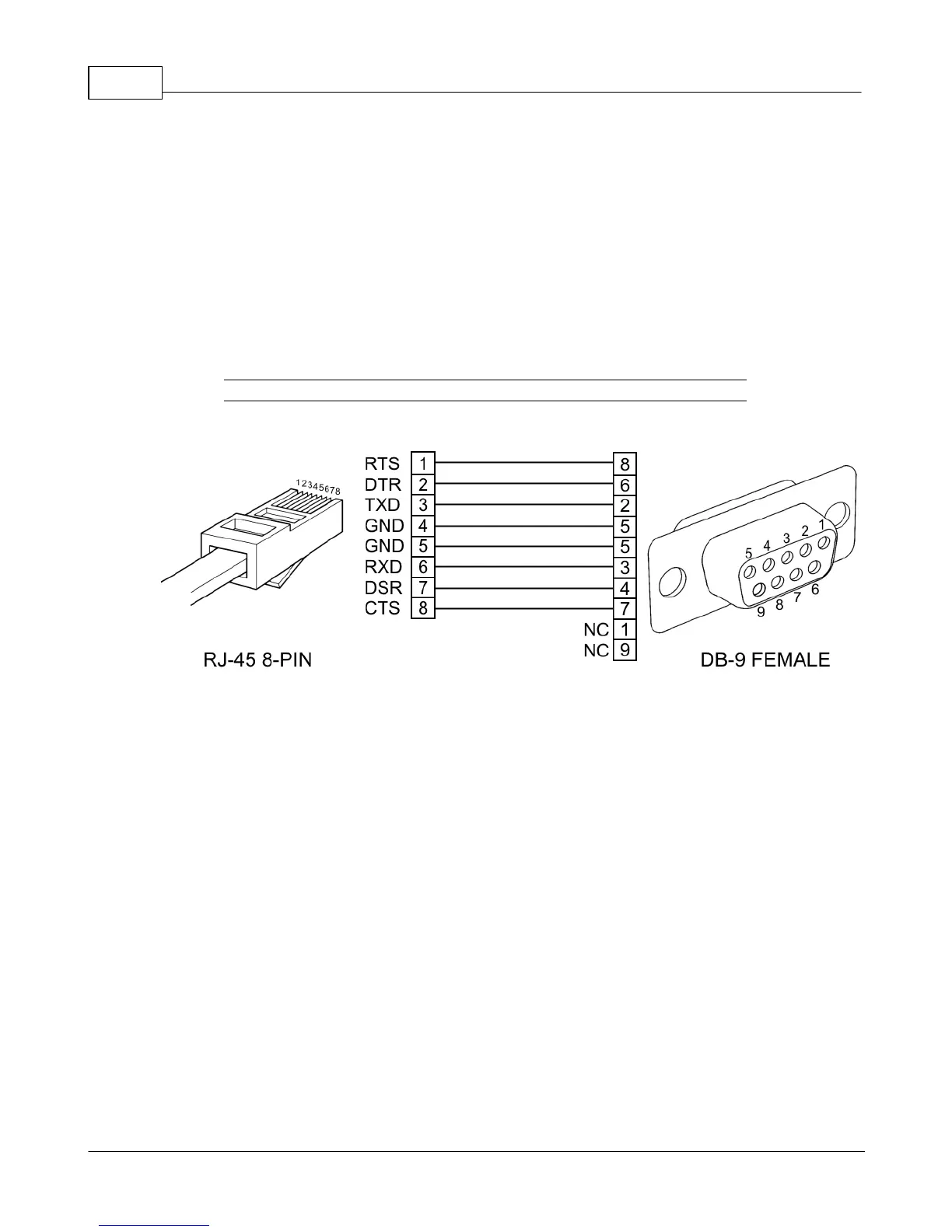
The following describes how to wire a cable for communicating with the serial port on an
R-Series PDU.
Figure 3-53 Serial Interface Wiring Info Page
The following describes the parameters for serial communication with a R-Series PDU:
· Baud Rate: 9600
· Data Bits: 8
· Parity: N
· Stop Bits: 1
· Flow Control: None
Communication
Serial communication is the same as the Web API commands, but using the following
syntax:
COMMAND PATH = ARGUMENT
Command is the only required part. It is a single word from the following list: get, set,
logout, add, delete, control, ack, sendTest, reset, and reboot.
Path is the location in the tree that you want to apply the Command. Starting at the root,
each child key is separated by spaces.
Argument if present, is always preceded by an equal sign and is in JSON or YAML format.
It is only used with the following Commands: set, add, control, and reset.



 To Next Page