17
ENGLISH
10 - START UP AND TESTING
The start up and testing of the softener must be carried out by authorized
technical staff, who will take care of:
- CHECKING INSTALLATION
- MEASURING WATER HARDNESS
- PROGRAMMING TIMER
- CARRYING OUT A MANUAL REGENERATION
- CALIBRATING MIXING VALVE (for potable use only)
- STARTING UP WATER SOFTENER
- GIVING INSTRUCTIONS TO THE USER ON USE AND MAINTENANCE
OF WATER SOFTENER
11 - USE OF THE WATER SOFTENER
11.1 - DIRECTIONS FOR USE
Regularly check that the salt level in the brine cabinet is higher than the
water level, otherwise add further salt in the tank.
A too low level of salt in the cabinet may cause the following:
- excessive use of salt
- salty water at the outlet!
Whenever adding salt to the cabinet, pour 10-20 cc (the amount of a
coffee) of sodium hypochlorite or bleach as well.
Except from the clock updating, never modify the programming of the
Timer set by authorized Technical Assistance Service.
Every two months check water hardness by using the special kit supplied
by Gel.
In case of fire, immediately cut off power supply, do not breathe the fumes
caused by the combustion (vessel and/or resins) and wear protective suit
and breathing apparatus to enter the rooms.
11.2 – HOW TO MEASURE WATER HARDNESS
As mentioned, every two months it is necessary to check the water
hardness at the outlet of the softener. Should it be higher than 15 °f,
please call the authorized Technical Assistance Service, carrying out the
start up and testing, for any inspections and adjustments.
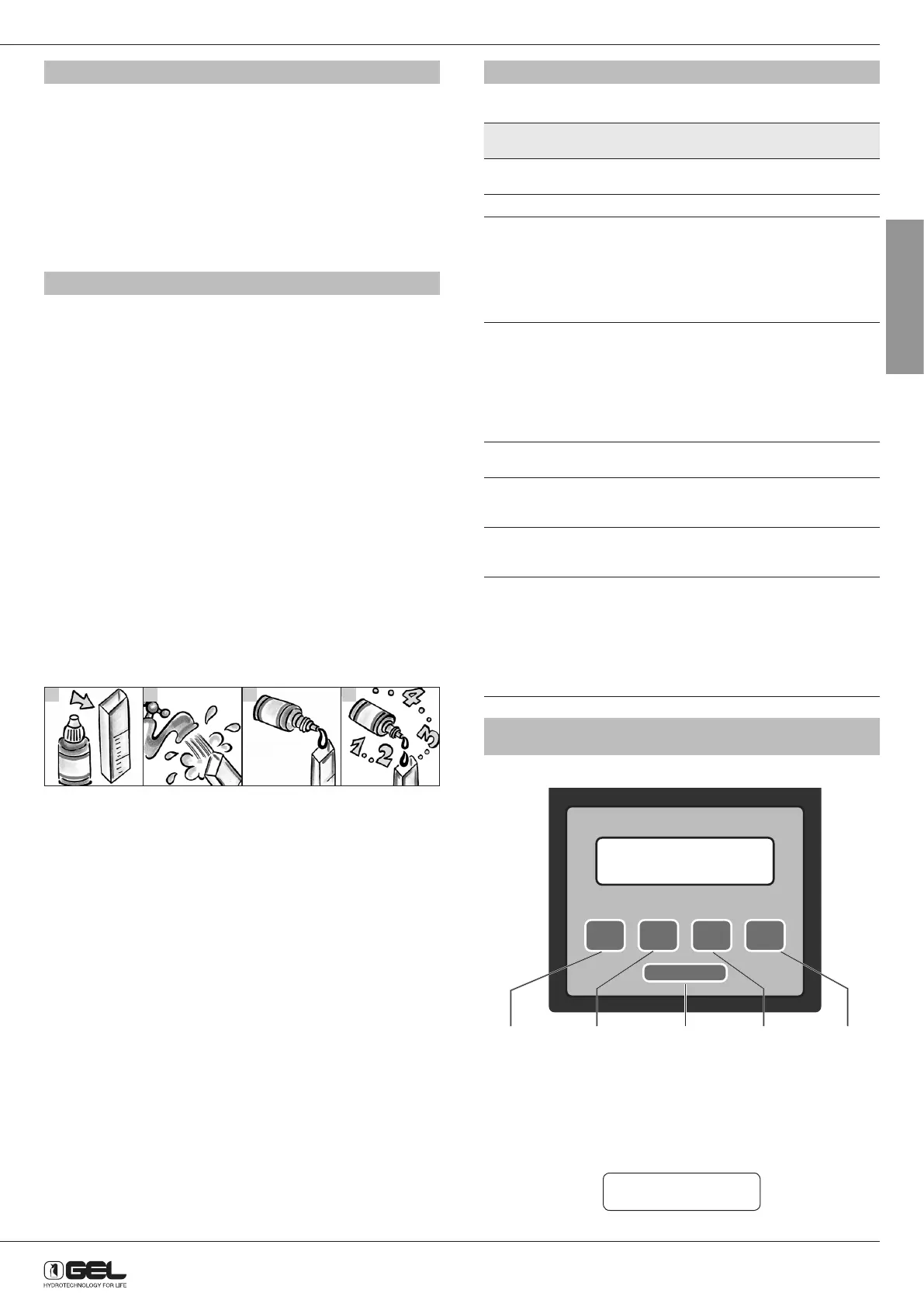
To measure water hardness at the outlet, operate as follows:
1
2
3
4
1 Take the test
tube supplied with
the kit.
Rinse it out with
running water, then
fill it up to the “5
ml” mark.
Add a drop of
reagent into the
tube and shake it
slowly. Water will
get reddish.
Repeat the
operation by
counting the drops
poured, until water
will get the colour
of the reagent used
(dark green).
Example: 20 drops = 20° f hardness
If 20 drops have been added to make the colour change, water hardness
will be 20 °f.
So each drop of reagent poured corresponds to 1 French hardness
degree.
The value of the residual hardness for potable water recommended by
GEL is 15°f.
11.3 - HOW TO STOP THE WATER SOFTENER
If the water softener has not been used for a period longer than 10-14
days, unplug the power supply, close the on-off valves before and after
the system and open the bypass gate valve (see installation drawing at
section 9.2).
After this non-use period, connect the power supply, open the on-off
valves before and after the system and close the bypass gate valve.
Perform a manual regeneration. To launch this operation, press
REGENERATE button.
12 - MAINTENANCE
For a proper operation of the water softener, regularly carry out the
following operations:
OPERATION FREQUENCY
(days)
OPER. NOTE
Clean filter cartridge
before softener
60 User
Clean brine cabinet 180 User
Check and refill salt
in brine cabinet
15 User During start up, according
to the model of softener
and regeneration frequency,
the technician will
recommend the user on the
most suitable frequency for
this inspection
Check hardness
of produced water
with special kit (see
section 11.2)
60 User If hardness is higher
than 15 °f, please call
the authorized Technical
Assistance Service,
carrying out the start
up and testing, for
any inspections and
adjustments
Check timer
programming
60 User
Softener inspection 365 Technical
Assistance
Service
Check injector is
clean
60 Technical
Assistance
Service
Resins disinfection Whenever
refilling salt, it is
recommended
to add a glass
(100 cc) of bleach
(not perfumed)
or sodium
hypochlorite
User
13 - HOW TO PROGRAMME THE 5 BUTTON TIMER
(MEDIUM AND MAXI MODELS)
CHANGE SELECT DISPLAY
SCROLL
BACK
REGENERATE
Changes
settings
Selects
settings
Reset to
scroll back
DisplayManual
regeneration
13.1 PROGRAMMING FOR TECHNICAL ASSISTANCE SERVICE
13.1.1 Start programming
To enter programming reserved to Technical Assistance Service, press
and hold the SELECT and DISPLAY buttons at the same time until “Set
language” is displayed:
Set language ENG
Press DISPLAY button to confirm.



 To Next Page