V 03/13
14 • Start-up and operation OptiSpray DPP01
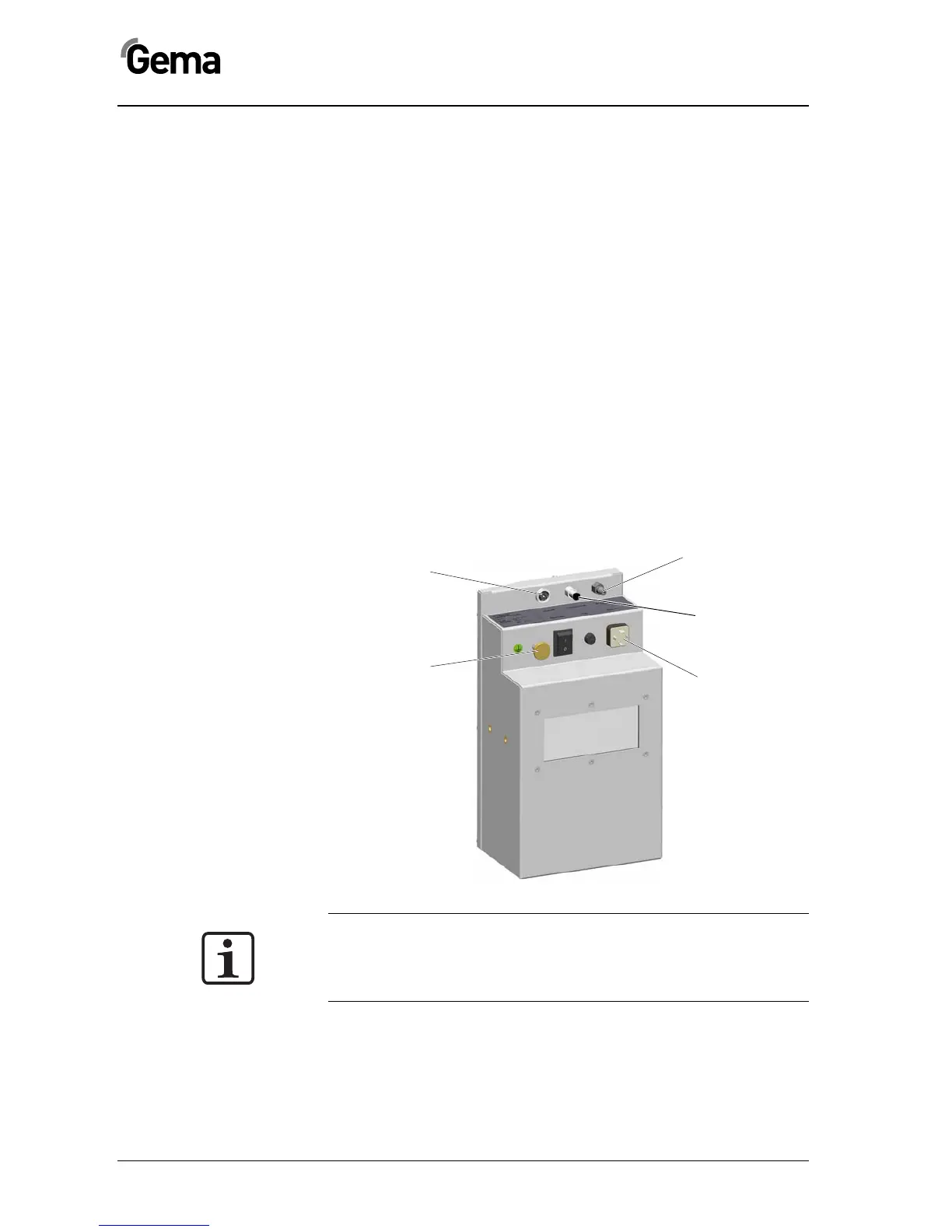
OptiSpray DPP01 - connections
The OptiSpray DPP01 Dense phase pump is supplied ready for use by
the manufacturer. Just a few cables and hoses must be connected.
The connection of the OptiSpray DPP01 Dense phase pump takes place
according to following instructions:
1. Connect the powder hoses to the dense phase pump input
and output
2. Connect the compressed air supply to the connection Air
Supply IN
3. Connect the transport air to the connection Conveying Air
IN
4. Connect the control signal cable to the connection Control
IN
5. Connect the grounding cable (or ensure the grounding by
fasten it to a grounded plate)
6. Connect the pump operating voltage to the connection Pow-
er IN
Note:
The further start-up procedure for the OptiSpray DPP01 Dense
phase pump is explicitly described in the CG09-P Gun control unit
operating instructions (chapter "Initial start-up" and "Daily start-
up")!
Signal connection
(Control IN)
Grounding
Compressed air
connection
(Air Supply IN)
Power supply
(Power IN)
Transport ai


 To Next Page