Manual Part No.: 119514-00 Rev. 03
7.0 Connection
For the Wireless Kit to function, the receiver and transmitter must be properly connected. This
is achieved by matching the channel group and channel number on both devices. These figures
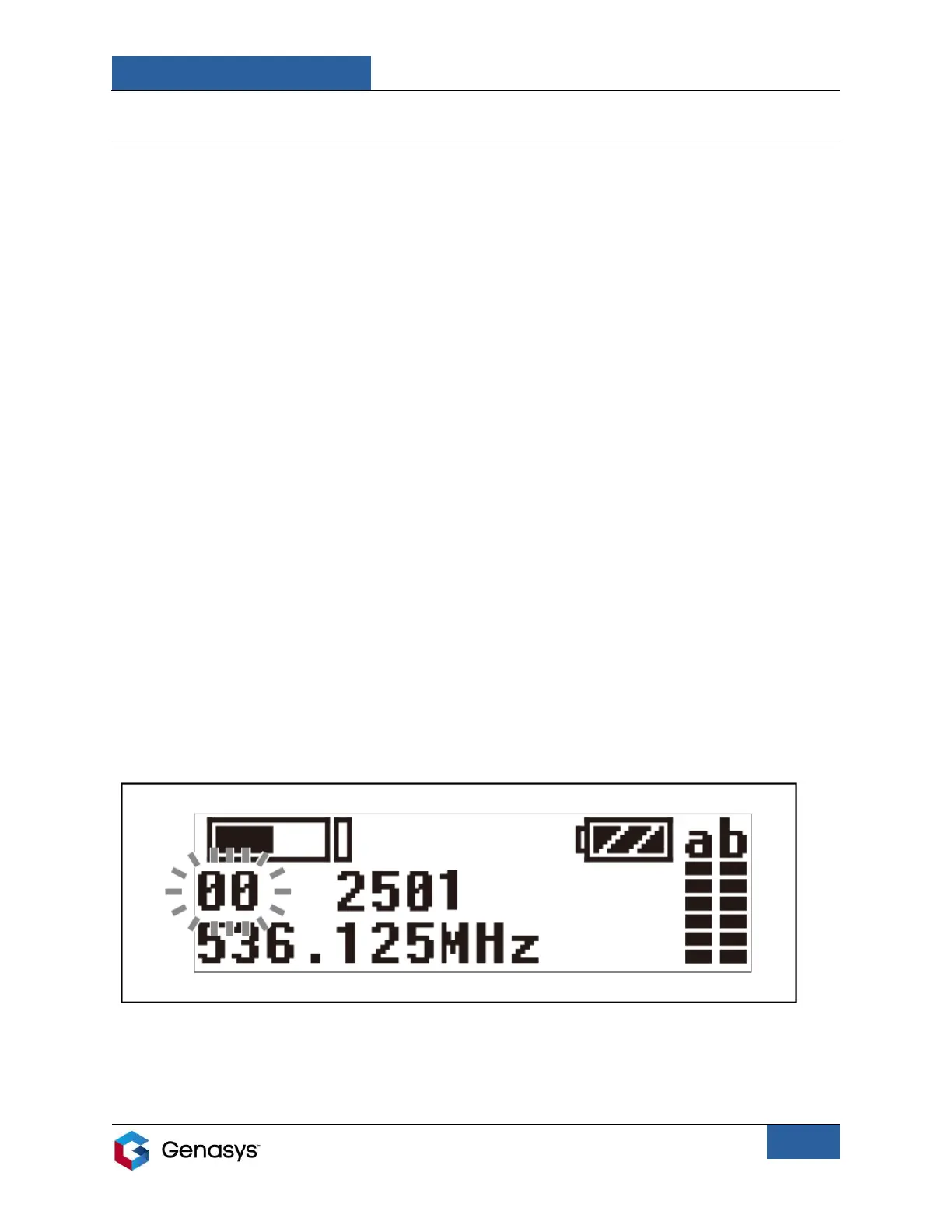
are displayed, for both the receiver and the transmitter, in the Group/Channel menu (GP/CH
menu). This is the default menu that appears when the devices are turned on. The GP/CH menu
is shown in Figures 9 and 10.
NOTE: Receivers and transmitters can only operate on channels in their given frequency range.
This range depends on the location of the user. For more information on frequency ranges
consult the Sony Wireless Microphone Package Manual, which is included as part of the LRAD
Wireless Kit.
7.1 Manual Channel Selection
Manually selecting the channel allows the user to scroll through available channels and select
the exact channel they would like to use to connect the receiver and transmitter.
To execute a manual channel selection, perform the following steps:
Manual Channel Selection on Receiver:
1. Power on the receiver and make sure the screen displays the GP/CH menu (the default
menu).
• If this menu is not displayed, use the SELECT buttons (+ and -) to scroll through
menus.
2. Press and hold the SET button until the channel group starts flashing (Figure 9).
3. Use the SELECT buttons to scroll through channel groups. Then press the SET button to
choose the desired channel group. The channel group is now set.


 To Next Page