Manual Part No.: 119514-00 Rev. 03
Clear Channel Scan on Receiver:
1. Use the SELECT buttons to scroll through menus until the CLR CH SCAN menu is displayed.
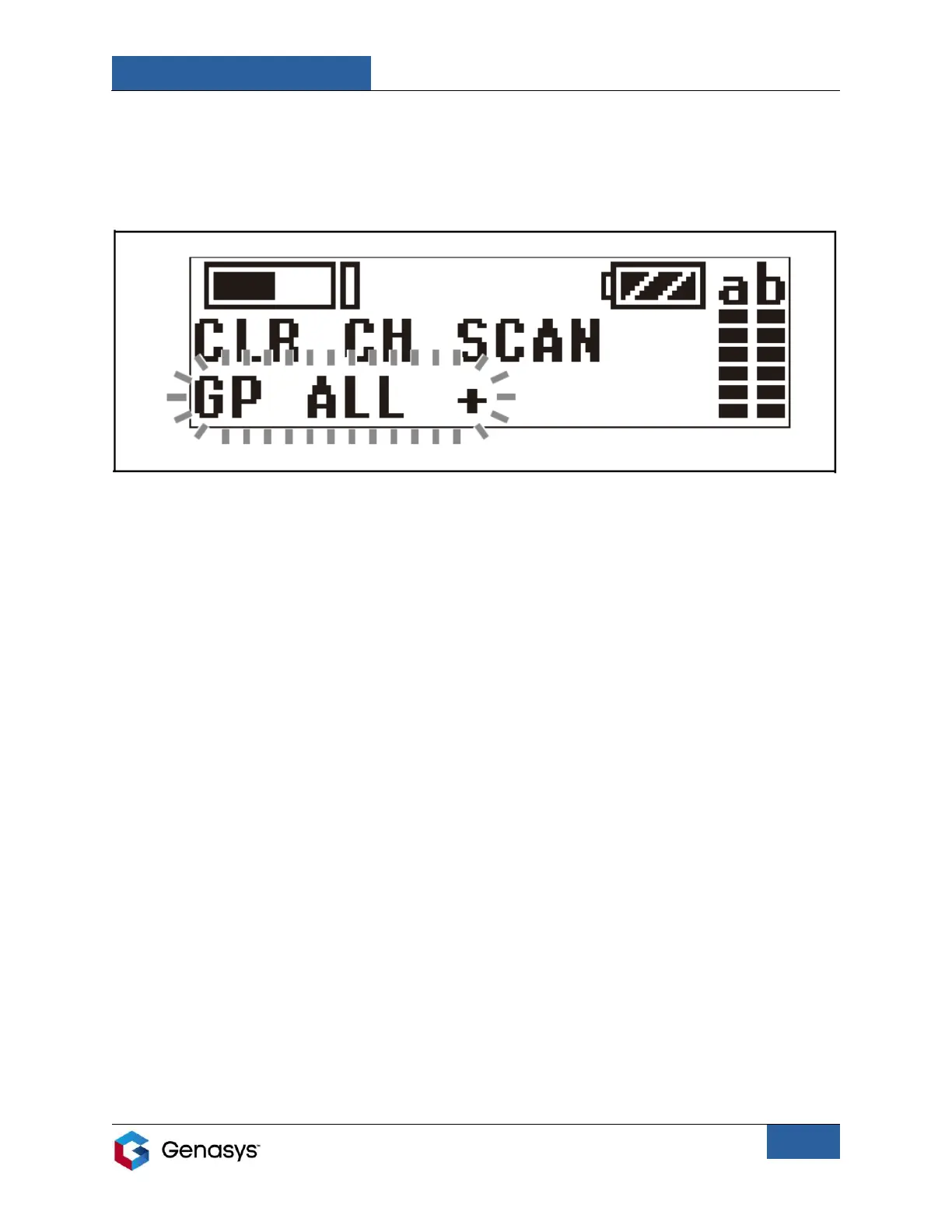
2. Press and hold the SET button until the GP ALL + section starts flashing (Figure 11).
3. Press the (+)SELECT button. This will initiate the clear channel scan.
• The first clear channel number available will flash on the screen.
• To display the next available clear channel number, press the (+)SELECT button.
• To cancel searching press the (-)SELECT button.
4. Press the SET button when the desired channel number is displayed. The receiver’s channel
is now set, and the screen will stop flashing.
Clear Channel Scan on Transmitter:
1. Manually set the channel group and channel number to match that of the receiver.
2. After matching the channel group and channel number on both devices, cycle the
transmitter’s power. This should connect the two devices.
Figure 11: GP ALL + Section


 To Next Page