Manual Part No.: 119514-00 Rev. 03
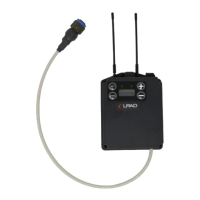
The transmitter is equipped with LED indicator lights that communicate information on the
status of the Wireless Kit.
These indicator lights relay messages regarding battery power and audio input.
4.1.1 Audio Input
Table 3: Audio Input Information
Audio Input Indicator Light
Audio input level is appropriate.
Audio input level is too high. If sound is distorted, lower
volume using VOLUME CONTROL knob.
Audio is muted. Press MUTE button to enable audio.
There is no audio input, or the input level is too low.
4.1.2 Battery Power
Table 4: Battery Power Information
Sufficient battery level.
Battery level is getting low.
Charging not possible. User must replace batteries. **
Power is off or battery is empty.
There are multiple battery options for powering the transmitter. The protocol for charging
and/or replacing batteries will depend on the chosen battery option. The transmitter is
compatible with the following size AA battery types:
• Alkaline LR6 batteries
• Rechargeable nickel metal hydride batteries
• Lithium batteries
*Charging requires rechargeable nickel metal hydride batteries. To charge, the rechargeable batteries
must be inserted in the transmitter, and the transmitter’s power must be off. Then connect the
transmitter to a power source via USB cable.
**Charging is not possible with alkaline or lithium batteries, or if the rechargeable batteries have
deteriorated.


 To Next Page