General Dynamics Itronix 72-0146-001
GD8200 User Guide
# Feature Description
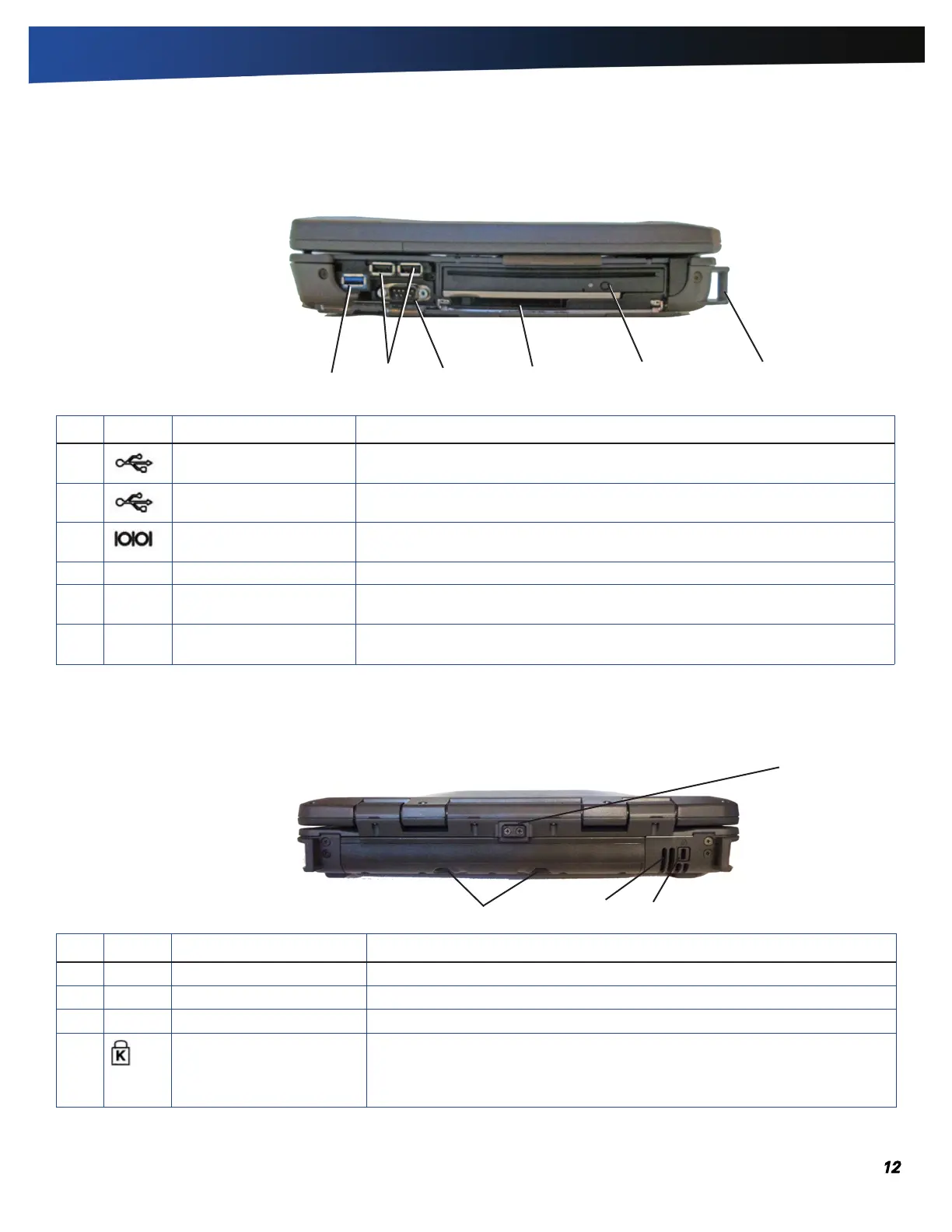
1 Battery Release Lock Press this in (toward the display) to unlock the battery
2 Battery Release Latches Slide these toward the center of the unit to release the battery
3 Cooling Fan Intake Air intake for fan. Do NOT block this area
4 Security Slot The security slot can be used with a standard laptop-locking device, such as a
Kensington lock. You can connect the computer to a large object with the lock
to prevent theft. See the documentation that comes with your lock for more
information.
# Icon Feature Description
1 One USB 3.0 Port Connects to USB devices (e.g., USB digital camera)
2 Two USB 2.0 Ports Connects to USB devices (e.g., USB digital camera)
3 Serial Port Connects your computer to serial devices such a fax/modem or a serial mouse.
This port is identified as COM1
4 PC Card Slot Use this slot for Type II PC Card devices
5 Media Bay Combo DVD-ROM/CD-RW, DVD Multi-Drive (DVD-RAM/DVD-ROM/DVD-RW/CD-R/
CD-ROM/CD-RW), or second battery module
6 Back Handle Mount The back handle mount located on both sides of the computer is used with an
optional back handle.
2
3
4
5 6
2
3 4
1
Right Side View
Getting Familiar With Your Computer
Back Edge View
1



 To Next Page