General Dynamics Itronix 72-0146-001
GD8200 User Guide
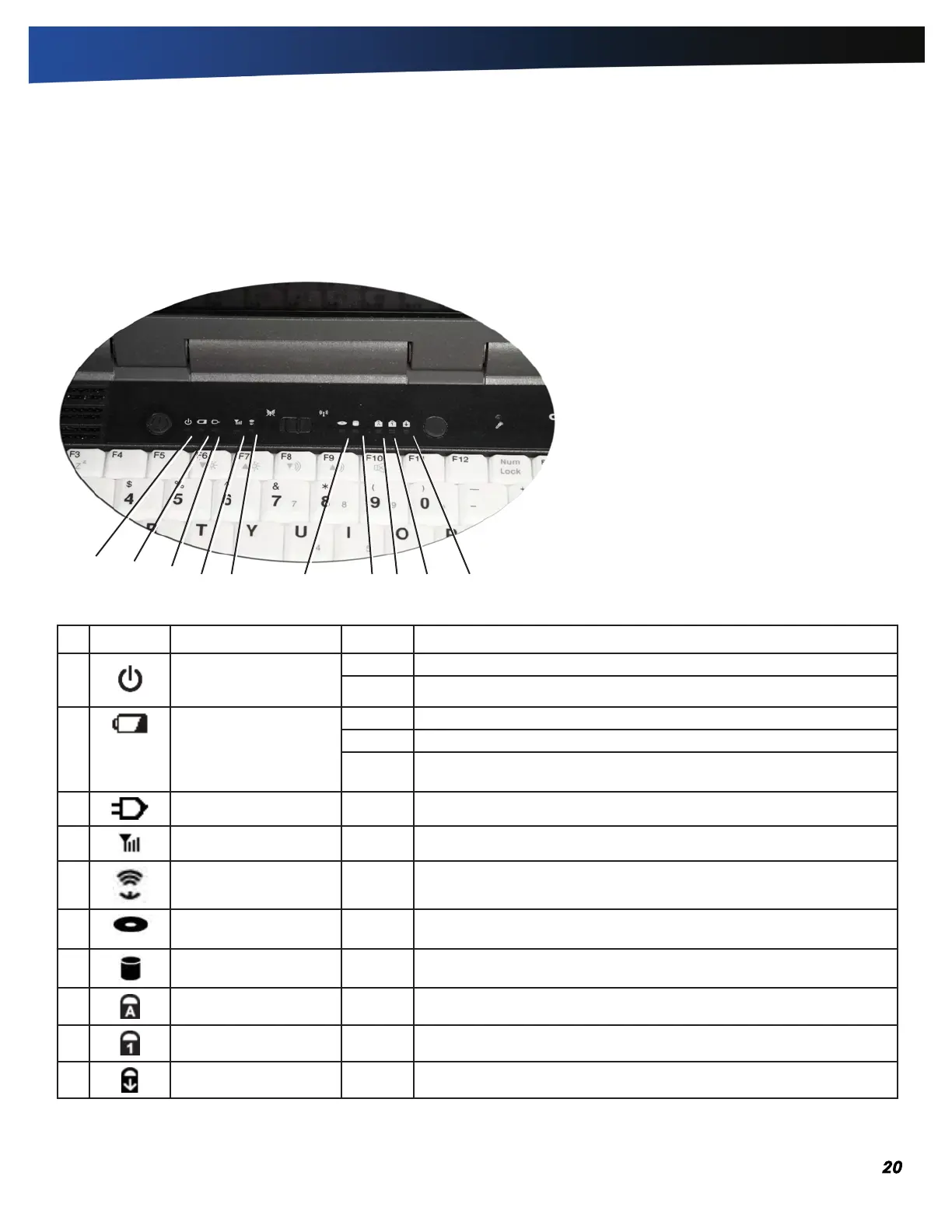
LED Status Indicators
The activity indicators, located above the keyboard, light up
when a particular function of the computer is active. Each
indicator is marked with an icon.
# Icon Function LED Description
1 Power Lit Power is ON
Flashing Suspend to RAM
2 Battery Lit Battery charging
Flashing Low Battery
LED off No battery / battery fully charged (will always be OFF without external
power connected to the unit)
3 External Power Lit External power is connected to the unit
4 WWAN Communication Lit WWAN radio is on
5 WLAN Communication Lit Wireless LAN, Bluetooth
®
, and/or GPS radio(s) are on
6 Media Bay Lit The computer is equipped with a DVD/CDRW Combo, CD-ROM,
or DVD-ROM
7 Disk Status (HW) Lit The hard disk drive is being accessed
8 Caps Lock Lit The keyboard is in Caps Lock mode
9 Number Lock Lit The keyboard is in Num Lock mode
10 Scroll Lock Lit The keyboard is in Scroll Lock mode
1
2
3
4 5
6 7 8 9 10
Getting Familiar With Your Computer



 To Next Page