GD8200 User Guide
General Dynamics Itronix 72-0146-001
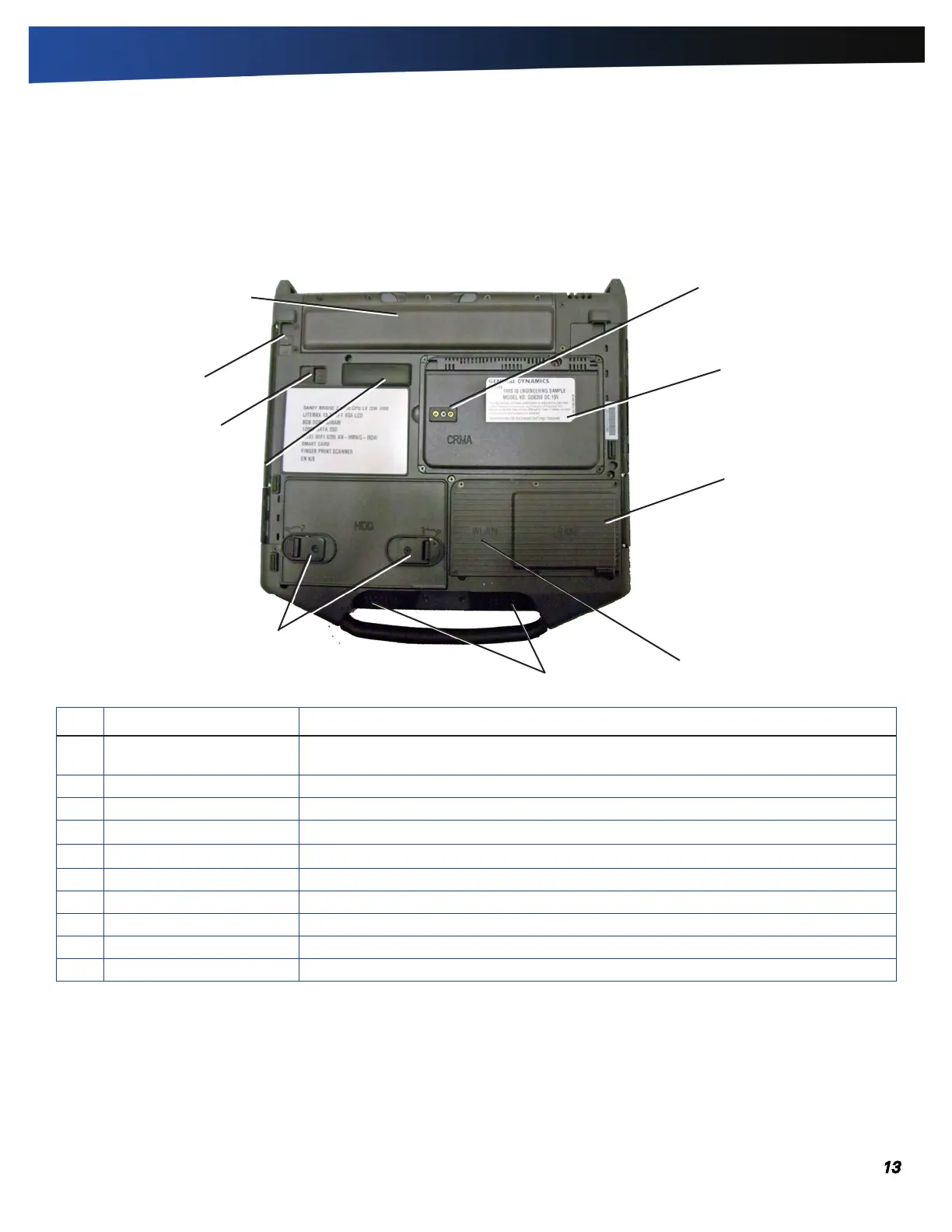
# Feature Description
1 Dual External Antenna
Connector (DEAC)
The DEAC gives you the ability to switch the internal WLAN and WWAN to an external
antenna to gain better performance when you are in a vehicle.
2 CRMA Express Module Upgradeable WWAN radio module (optional)
3 Memory compartment User expandable memory slot
4 WLAN compartment Integrated wireless LAN radio
5 Speakers Integrated stereo speakers for audio output
6 Hard Disk Drive Locks Open and turn these to lock or unlock the removable hard disk drive
7 Docking Connector 84-pin cradle connector that mates with the Vehicle Dock, or Office Dock
8 Media Bay Release After unlocking the media drive, slide this to release the media drive.
9 Media Bay Lock Slide Slide to unlock the media drive before releasing it
10 Battery Pack Smart Lithium-Ion battery
1
2
3
4
6
7
8
9
10
5
Getting Familiar With Your Computer
Bottom View



 To Next Page