28
English
Functional Characteristics
Cursor mode (Manual)
When in Cursor mode, the manual cursor is displayed. It is
possible to edit a route, insert or delete markers, display navaid
information etc., but it is not possible to gain access to the
depth sounder window. By pressing one of the four arrows in
the CURSOR key, the unit switches from Navigation to Cursor
mode, and the screen is centered in relation to the manual
cursor. To return to Navigation mode press PAGE.
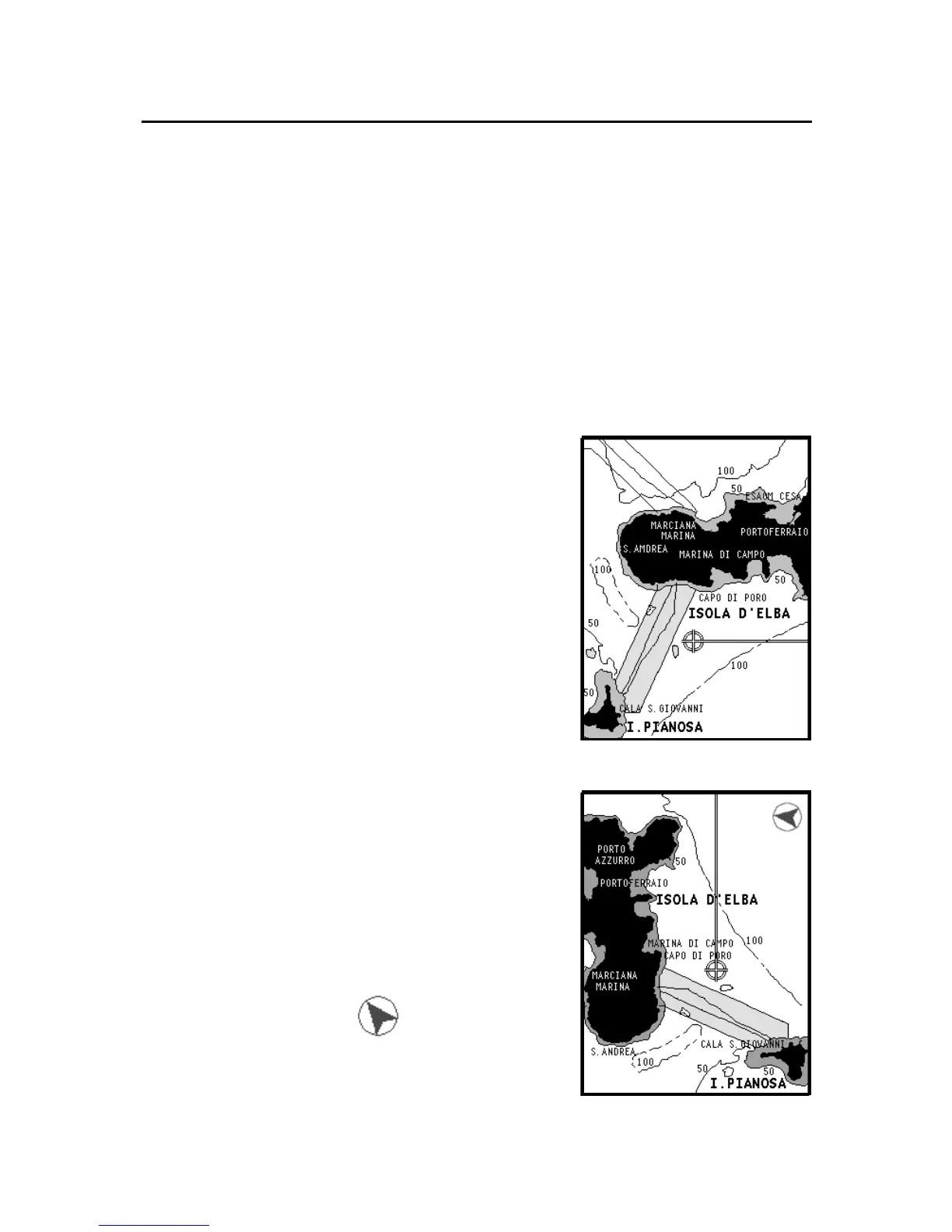
Chart rotation
Charts are traditionally displayed in
north-up mode. This, however, does not
correspond to reality. For example,
when traveling southwards, the chart
shows, on the right side of the boat,
what is actually located on the left side,
and vice versa.
The Chart Rotation function allows ro-
tating the electronic chart displayed ac-
cording to the plotted route (COG -
Course Over Ground) as detected by the
GPS receiver. Since the COG value var-
ies continuously, a filter has been in-
serted to prevent the chart from bounc-
ing.
To activate the Chart Rotation function,
press GOTO to display the menu, select
SETUP, then CHART ROTATION and
ON. A message will prompt the user to
select the requested maximum range be-
fore activating the chart rotation.
The northern direction will be indi-
cated by the symbol .
Autozoom
With the Autozoom function the
GEONAV will always display automati-
Without rotation
With rotation



 To Next Page