11
English
CONNECTIONS
Power supply
The GEONAV can be powered by us-
ing the appropriate power supply
cable with car lighter plug or the
built-in battery pack.
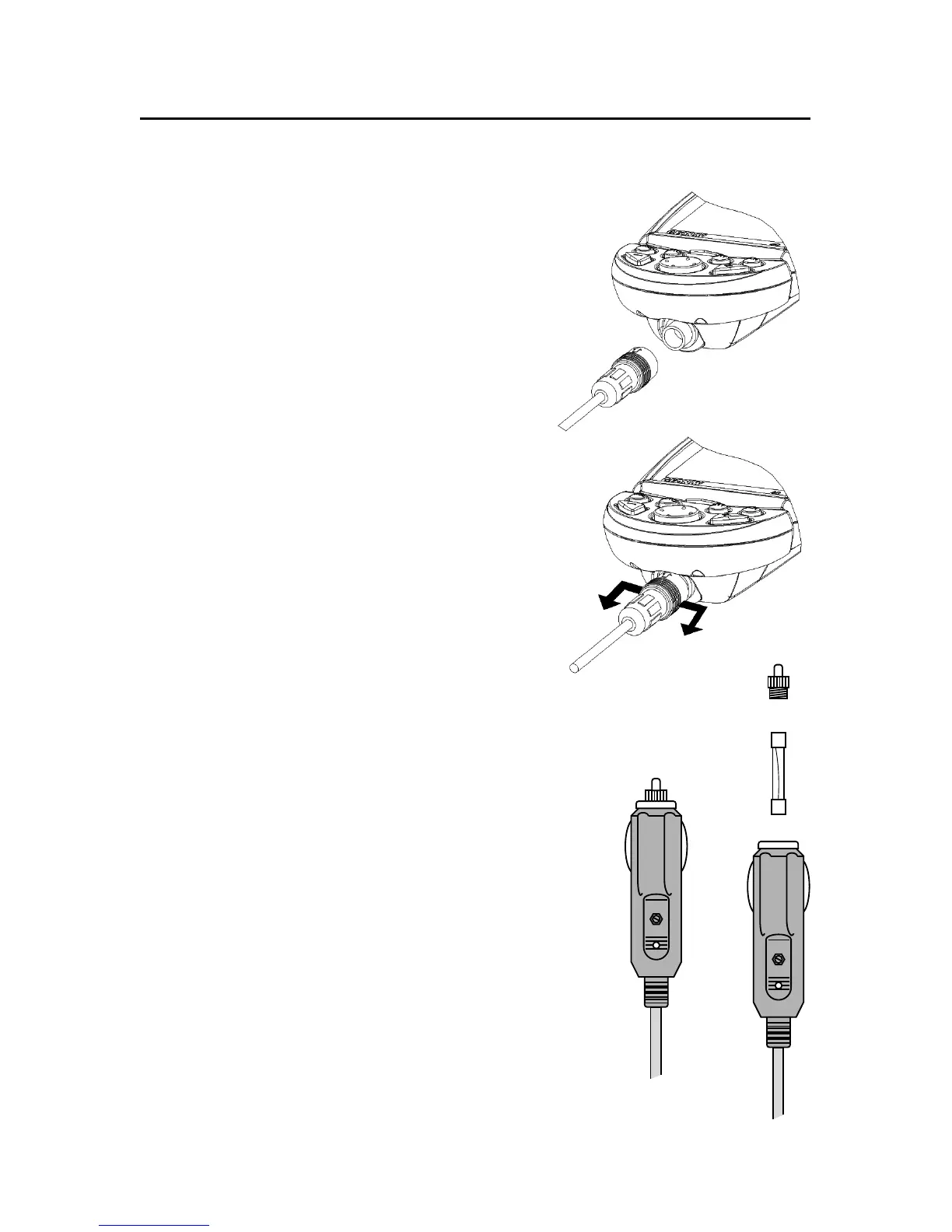
Install the power supply cable with
the connector in the position shown
in the figure, then exert a light pres-
sure until clicking.
To remove the cable, extract the ring
nut without rotating it.
When the cable is disconnected, make
sure that the connector is protected
by the appropriate rubber cap.
External power supply
The car lighter adapter has a little lamp
(LED) that goes on if the car is correctly
providing power to the bracket.
If the lamp is off:
• check that the 12V voltage is available
from the lighter plug;
• open the adapter and check the fuse.
If the fuse is broken, replace it with a fuse
having the same electrical characteristics.
DO NOT USE ANY BYPASS CIRCUIT.
The fuse ensures that the special protec-
tion circuit inside the plotter works prop-
erly in case of accidental short-circuit, po-
larity inversion and overvoltage.
Connections
fuse
LED



 To Next Page