Maintenance procedures
Periodic maintenance
4
Maquet Volista
NM 01780 EN 03
23 / 56
4.2.2.1 On the VPS power supply
WARNING!
Risk of electric shock
The product on which the technician is to work may still be connected to a
power source.
Before performing any maintenance, turn off the device and lock out the elec-
trical supply.
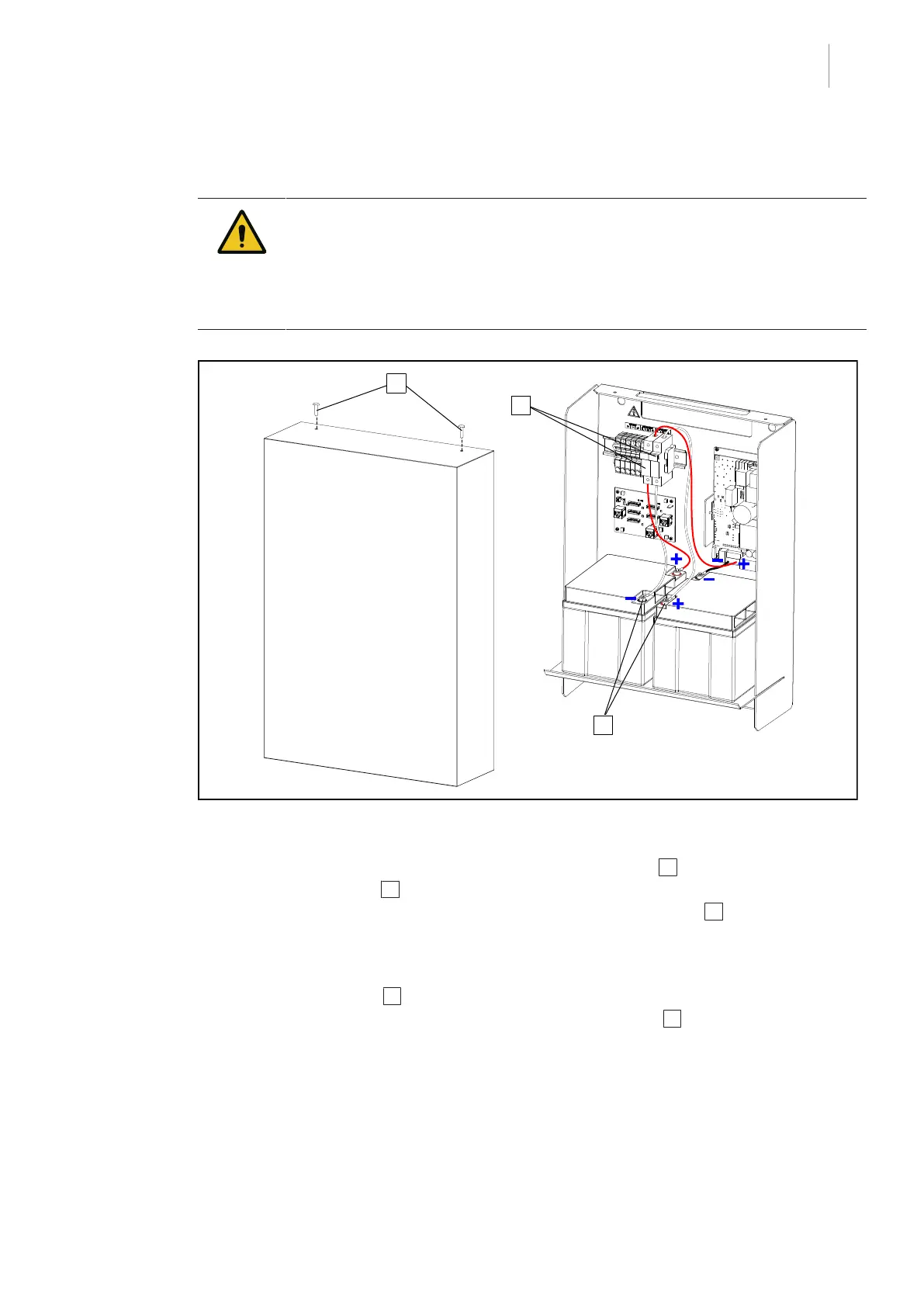
Fig.11: Replacement of VPS power supply batteries
• Switch off the power supply.
• Open the battery pack cover by removing the mounting screws 1 .
• Open the fuse holders 2 .
• Unscrew the nuts and remove the lugs from the four battery terminals 3 .
• Replace the two batteries.
• Reconnect the cables to the terminals in compliance with the position shown in the illustra-
tion.
• Close the fuse holders 2 .
• Close the battery pack cover and screw in the mounting screws 1 .



 To Next Page