EasyManua.ls Logo

Gewa G9 - Page 110

Gewa G9
180 pages
Print Icon
To Next Page IconTo Next Page
To Previous Page IconTo Previous Page
Loading...
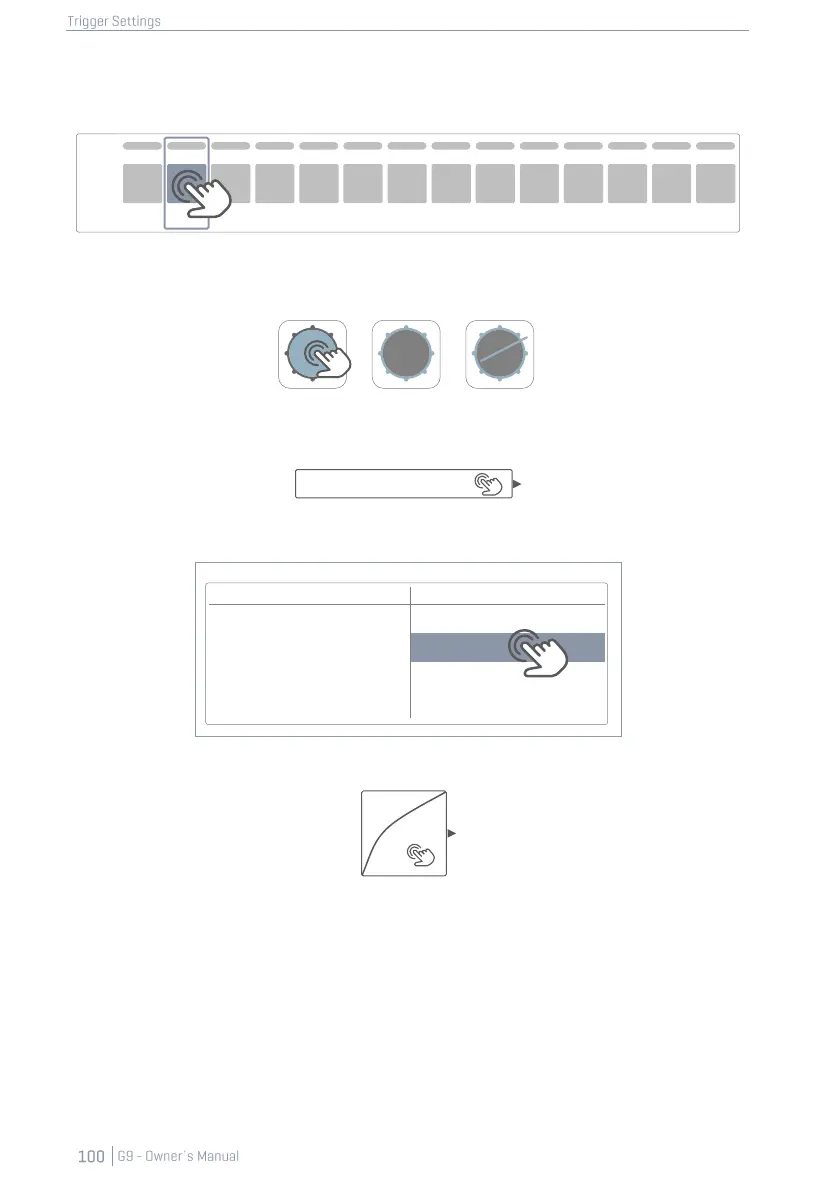
11.3.2.5.1 CREATING CUSTOM CURVES
1. Select an Input Channel in Module 1(Pad).
2. Select a component to edit by tapping the corresponding icon in module 2 (Trigger Selec-
tion).
3. In the the function set Advanced Settings (Module 3) tap once the [Curve Settings] field.
4. Select one of the curves in the User Presets column by double tapping.
Curve Settings
5. Tap the field [Curve Editor] once in the function set Advanced Settings.
6. Edit the curve by dragging the dots and check effects by playing on the pad component.
Presets
User
Linear
Custom 1
Concex 1
Custom 2
Convex 6
Custom 7
Kick
Peak
Input
Snare
Tom 1
Tom 2
Tom 3
Tom 4
Ride
Hi-Hat
Crash1
Crash2
Aux 1
Aux 2
Aux 3
Aux 4
Curve Settings
Linear
Curve Editor

Other manuals for Gewa G9

Related product manuals