that the referenced sound samples are installed, whether they are factory sounds or sounds down-
loaded from the Sound Store. Missing sounds in the importing device will result in empty Sound Select
fields in Kit Editor ➔ Module 2 ➔ Instrument Select.
Drum Kit Parameters -Performance
Snare Style – all related parameters
Any change in value of one or more of the parameters shown above will cause
the drum kit name to update. A preceding asterisk (*) will be added to the
drum kit name in all Drum Kit fields in the user interface. The asterisk is a remind-
er to save the drum kit before changing it, so that altered kit parameters are
retained.
Instances of the Drum Kit field are in:
Performance ➔ Module 1 ➔ Drum Kit
Kit Editor ➔ Module 2 ➔ Drum Kit
For details on drum kit parameters, please refer to the Kit Editor section on page 37. The most rele-
vant task in Performance mode is being able to select a drum kit.
8.2 MODULE 2
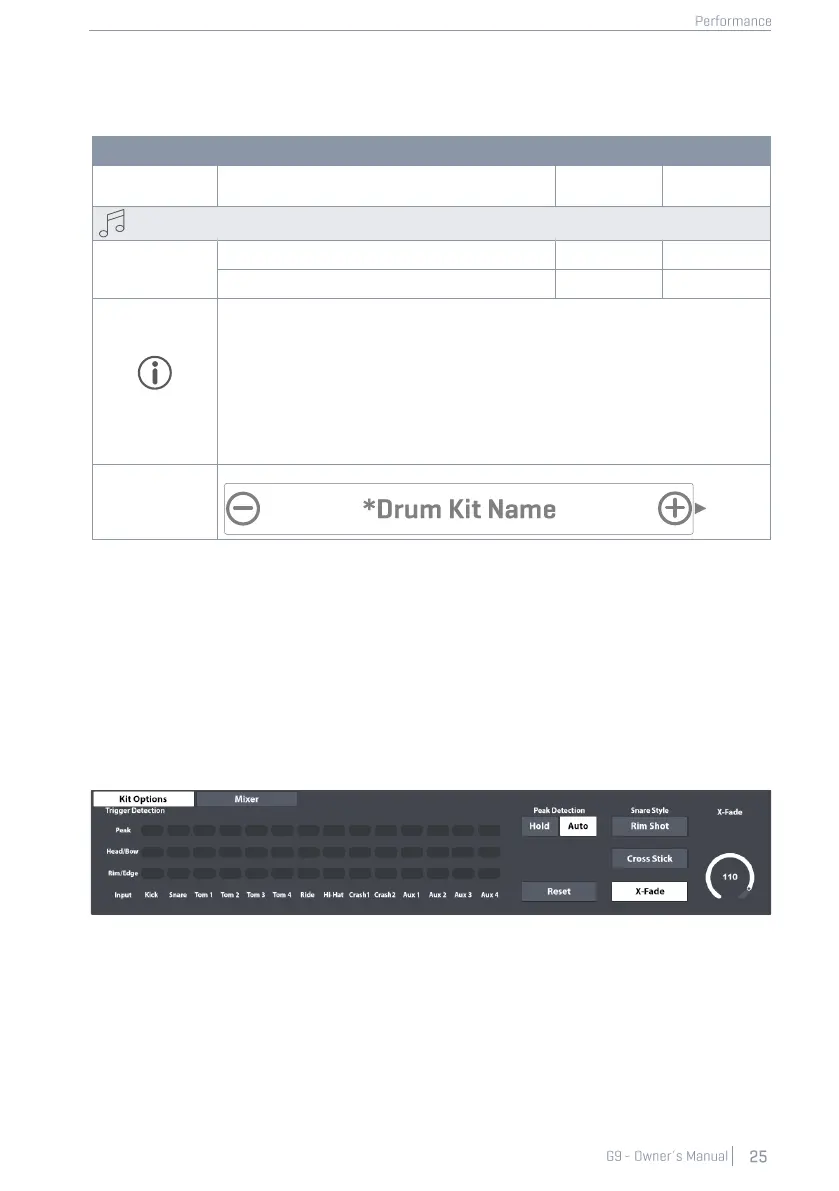
In this module you can monitor your trigger detection, customize the behavior of the snare rim and
mix all pad volumes in relation to each other.
8.2.1 KIT OPTIONS
8.2.1.1 TRIGGER DETECTION
The Trigger Detection panel allows for monitoring general trigger settings for each individual Pad
(Input Channel) inside the Performance mode. You can´t change trigger settings in this view, but
you will be provided with visual feedback about the trigger performance. Red color lighting up
while playing moderately or softly is an indicator that a pad is maxing out too quickly and trigger
settings should be reviewed. (For more information see section 11 Trigger Settings on page 77)



 To Next Page