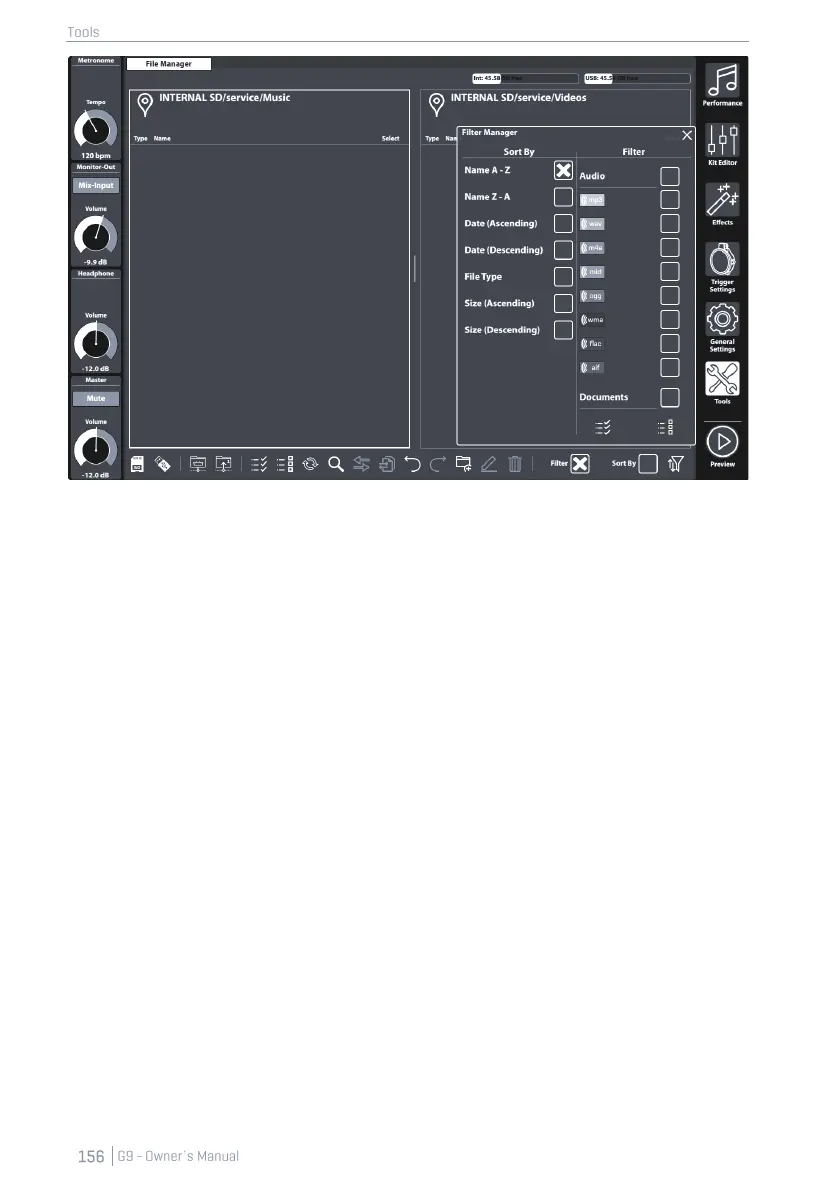
13.4.2.1 PROPERTIES
Each file browser of the G9 provides filtering and ordering options which operate independently
from each other. Consequently, the Filter Manager only affects browsers, where it is available.
• Opens by tapping the Filter Manager button
• Filters and ordering rules can be globally activated or deactivated in the task bar (Check
Boxes)
• Columns with scroll bars
• Filter section categorized by file types
o Multiple selections possible
o Checking a category will select all file types of that category at the same time
(parenting).
o Uncheck individually if needed (category check box becomes unchecked,
other children remain checked).
o Check All/ Uncheck All buttons available (affect all categories and their file
types at the same time)
• Sorting Function
o No multiple selections allowed
o Choose one of the options provided.
• Close
o Close the dialogue by tapping the filter manager icon.
o Change the mode (e.g. to Performance).
o Tap a cross in the upper right corner of the manager.
o Tap in any other area of the File Manager interface.
• Closing rules
o Stores the last state of the Filter Manager (Selections) automatically.



 To Next Page