Page 6
Gateway
2.1. Serial Interface Connections
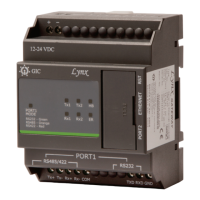
There are two serial ports provided on the device for communication:
Port 1 & Port 2.
Port 1 (RS232/RS422/RS485):
Port1 is used to connect Master/ Slave devices at serial side. The serial device interface can
be RS-232, RS-485 & RS-422 and the connections are screw terminals. This following
section along with the diagrams describes in detail the practical methods for connecting
devices at the serial end for the RS-232 & RS 422/485 Serial interface.
Serial Interface Signals for Port 1:
Signal Direction Primary Function
TXD Out Transmit Data for RS232
RXD In Receive Data for RS232
GND NA Ground for RS232
TX+/D+ Out Differential Transmit Data(+) for RS422/RS485
TX-/D- Out Differential Transmit Data(-) for RS422/RS485
RX+ In Differential Receive Data(+) for RS422
RX- In Differential Receive Data(-) for RS422
COM NA Ground for RS422/RS485
Port 2 (RJ11):
This is an optional port for debugging. RJ11 port is provided for the RS232 connections.
Serial Interface Signals for Port 2:
Pin No Signal Name DIR Primary Function
1 NC - -
2 TXD Out Transmit Data for RS232
3 RXD In Receive Data for RS232
4 NC - -
5 GND GND Ground for RS232
6 NC - -
Tx+ Tx- Rx+ Rx- COM
TXD RXD GND


 To Next Page