Gigaset A690-A690A/AS690-AS690A / LUG-Kombi UK-IE/IM-Ost/GR en / A31008-M2816-L101-1-7619 / telephony.fm / 2/26/
Template Module, Version 1.2, 11.09.2018
Making calls
15
Making calls
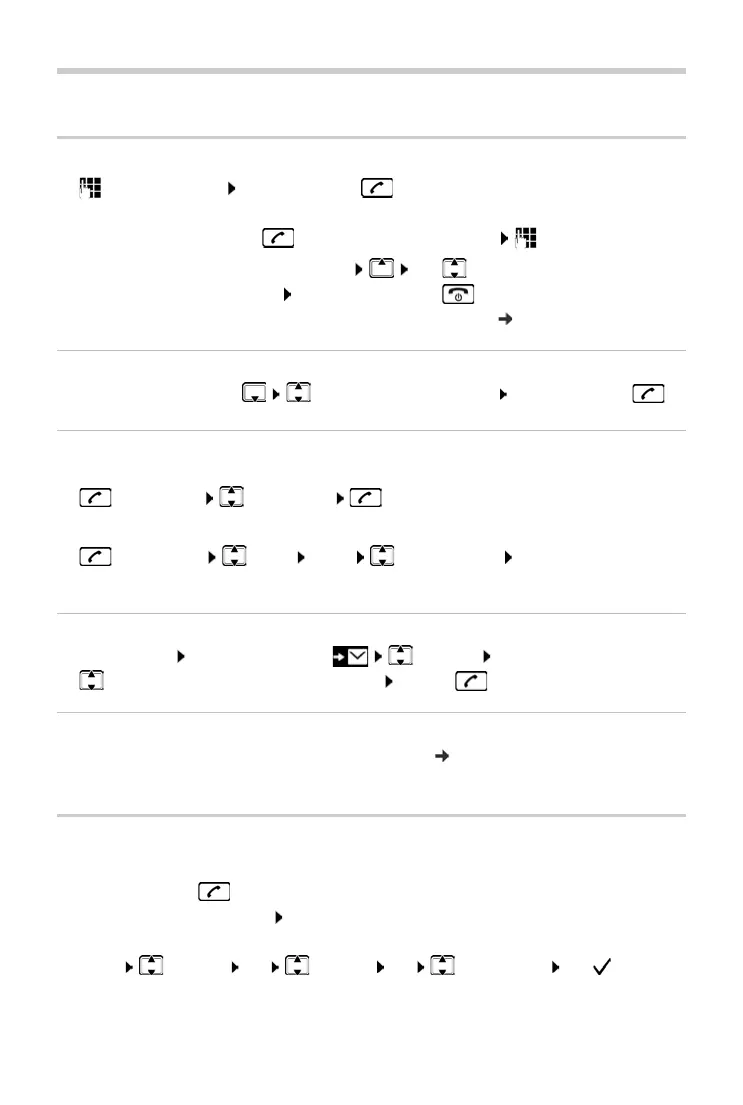
Making a call
¤ Enter the number Press the Talk key . . . The number is dialled
or
¤ Press and hold the Talk key . . . The dial tone can be heard Enter the number
To change the receiver volume during a call: Use
to set the volume
Ending a call / cancelling dialling: Press the End call key
Automatically prefix every number with a network provider prefix: page 18
Dialling from the directory
¤ Open the directory with Scroll to the required entry Press the Talk key
Dialling from the redial list
The list contains the 10 numbers last dialled with the handset.
¤ Press briefly Select entry
Managing entries in the redial list
¤ Press briefly Select Menu Select function OK
Possible functions: Use Nu
mber / Copy to Dir. / Delete Entry / Delete List
Dialling from the call list
Open the call list: Press the Display key CallsList OK
¤ Scroll to the required entry and press the Talk key
Dialling with speed dial key
Entries from the directory can be assigned to keys 2 to 9 ( page 22).
¤ Press and hold the quick dial key to which the required number is assigned
Accepting a call
The handset indicates an incoming call by ringing and by a display on the screen.
¤ Press the Talk key
Function Auto
Answer enabled: Simply take the handset out of the base / charging cradle
Enabling function Auto
Answer:
¤ Menu Settings OK Handset OK Auto Answer OK ( = enabled)



 To Next Page