Template Module, Version 1.2, 11.09.2018,
Call/message lists
Gigaset A690-A690A/AS690-AS690A / LUG-Kombi UK-IE/IM-Ost/GR en / A31008-M2816-L101-1-7619 / telephony.fm / 2/26/
20
Call/message lists
The phone saves information about various events in lists:
• Call list: Numbers of all incoming and missed calls
• Answer machine list: Messages on the local answer machine (if available)
• Network mailbox list: Messages on the network mailbox
An advisory tone sounds as soon as a new entry ap
pears on one of the lists.The default is the
message key (on the left Display key) flashing and New messages being shown on the display.
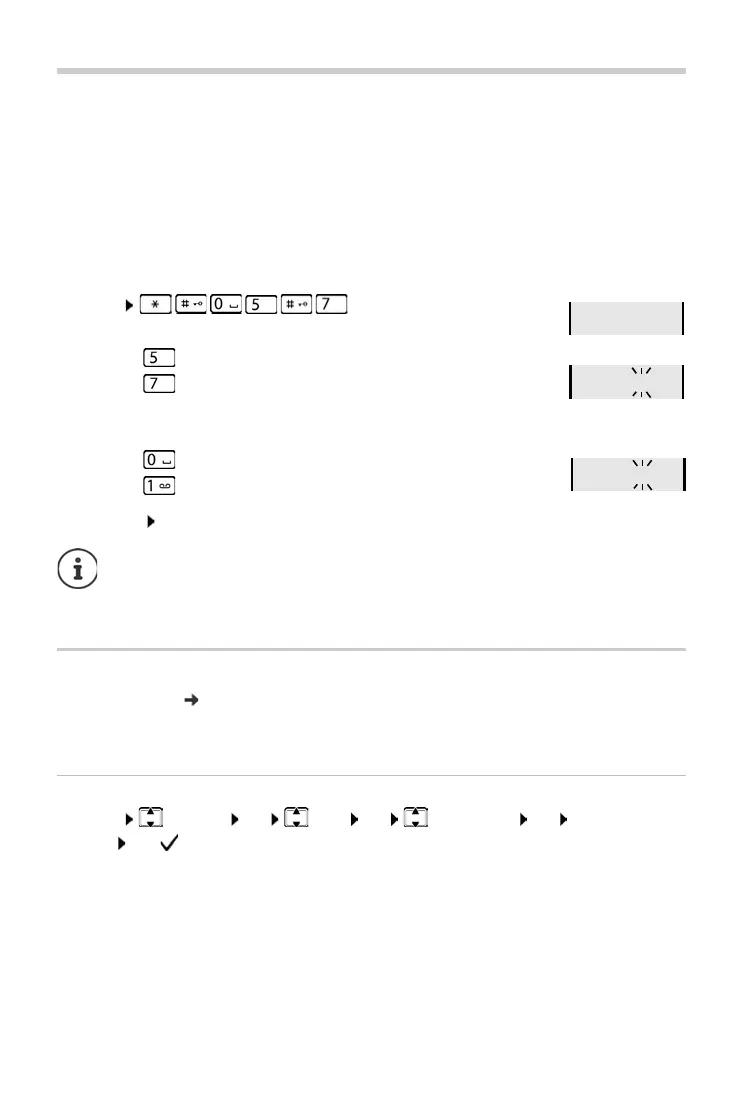
Disabling the display of new messages
¤ Menu
Select the type of message:
Setting the actions for new messages:
Save setting: OK
Call list
Prerequisite: CLIP ( page 18)
Depending on the type of list set, all numbers for the last 25 inco
ming calls are saved, or only the
missed calls are saved.
Setting the list type
¤ Menu Settings OK Base OK Call list type OK Missed Calls / All
Calls OK ( = selected)
¤ Press key for missed calls
¤ Press key for messages on the local answer machine (if avail-
able)/network mailbox
¤ Press key The presence of new messages is displayed (default)
¤ Press key The presence of new messages is not displayed.
A change to the setting only becomes effective once the next new message is
received.
If calls are stored in the network mailbox, you receive a message when the setting is
configured (dependent on the network provider).



 To Next Page