Template Module, Version 1.2, 11.09.2018,
Operating the handset
Gigaset A690-A690A/AS690-AS690A / LUG-Kombi UK-IE/IM-Ost/GR en / A31008-M2816-L101-1-7619 / operating.fm / 2/26/
12
Operating the handset
Switch the handset on and off
When you place a switched-off handset into the base or the charging cradle, it switches on auto-
matically after about 30 seconds.
Lock/unlock the keypad
The keypad lock prevents any accidental use of the phone.
Lock/unlock the keypad: Press and hold
Keypad lock
enabled: The symbol is shown on the display
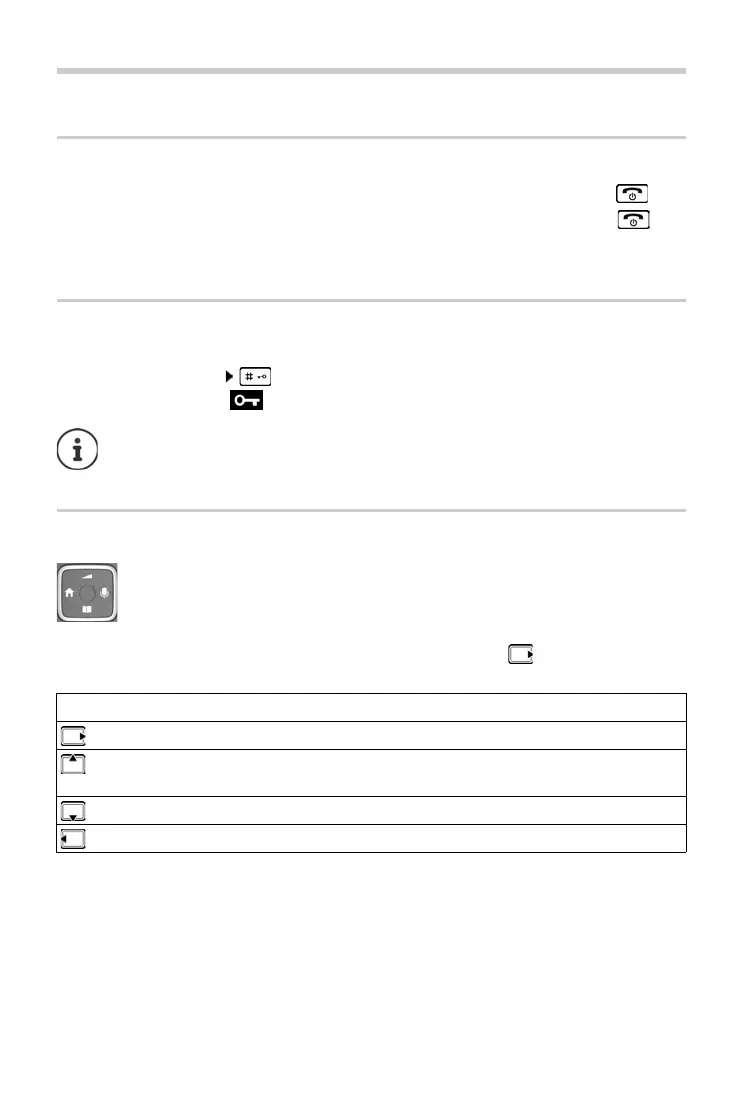
Control key
In the description below, the side of the control key is marked with an arrow (up, down, left,
right) that must be pressed in the different operating situations, e.g. for “press right on the
control key”.
Switching on:
¤ When the handset is switched off, press and hold the End call key
Switching off:
¤ When the handset is in idle mode, press and hold the End call key
If a call is indicated on the handset, the keypad automatically unlocks and you can
accept the call. It then locks again when the call is finished.
It is also not possible to call emergency numbers when keypad lock is enabled.
The control key enables you to navigate the menus and input fields, and also to call
up certain functions depending on the situation.
In idle mode During a conversation
Open the main menu Mute the microphone
Select audio settings Adjust the loudspeaker volume for receiver
and handsfree mode
Open the directory Open the directory
Make internal call / open list of handsets Initiate an internal consultation call



 To Next Page