Template Module, Elderly, Version 1.1, 01.04.2019,
Getting started
Gigaset E290-E290A / LUG-Kombi CH en / A31008-M2901-F101-1-2X19 / starting.fm / 5/5/20
16
Setting up the handset for use
The display is protected by a plastic film. Please remove the protective film.
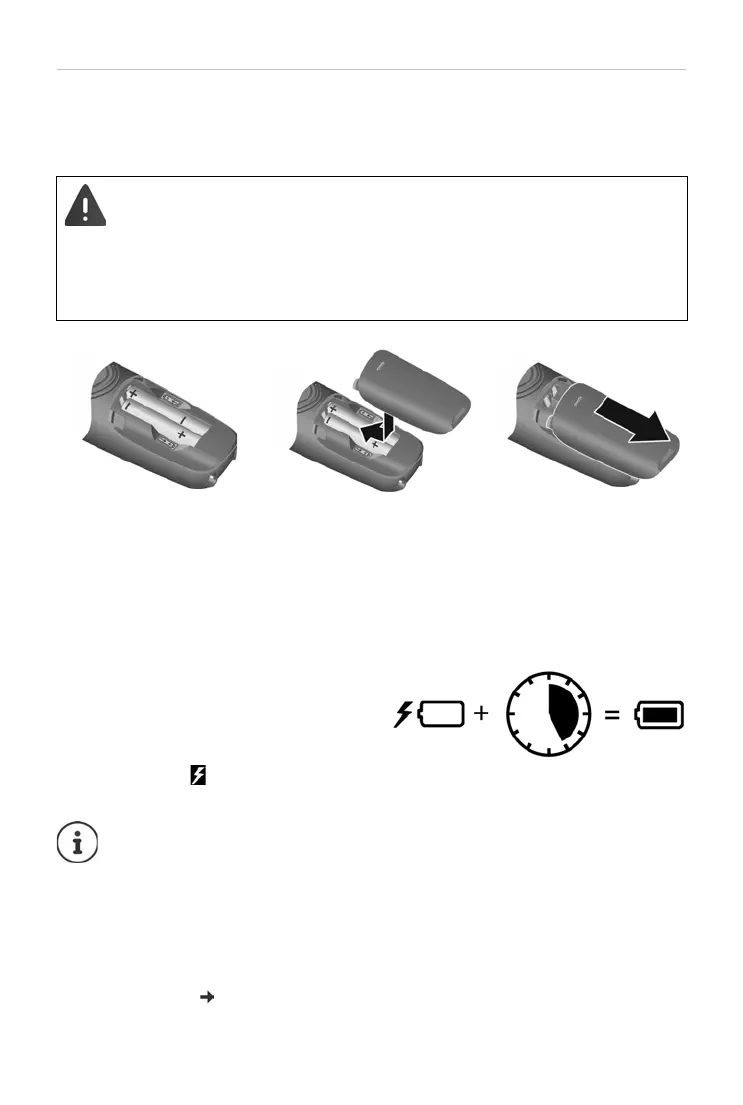
Inserting the batteries
Charging the batteries
¤ Before using batteries the first time,
fully charge them in the base or
charging cradle.
The batteries are fully charged when
the ba
ttery icon disappears from the
display.
Only use rechargeable batteries, as t
his could otherwise result in
significant health risks and personal injury. For example, the outer
casing of the batteries could be damaged beyond repair or the
batteries could explode. The device could also malfunction or be
damaged as a result of using batteries that are not of the recom-
mended type.
¤ Insert the batteries
with the polarity in
the right direction
(refer to the picture
for +/- positions).
¤ Fit the battery cover
from the top.
¤ Push the cover
closed until it clicks
into place.
To re-open the battery
cov
er:
¤ Grip the notch on the
cover and slide it
downwards.
Batteries can heat up during the charge process. This is not
da
ngerous.
Over time, the charging capacity of the batteries will decrease for
te
chnical reasons.
Handsets contained in the package have already been registered to
th
e base. If a handset has not been registered however (Please
register handset or Put into base is displayed), please register it
manually ( p. 46).



 To Next Page