Template Module, Version 2, 20.02.2020,
Getting to know your telephone
Gigaset E720-E720A / LUG_Kombi CH en / A31008-M2903-F101-1-2X19 / operating.fm / 4/21/20
18
Menu guidance
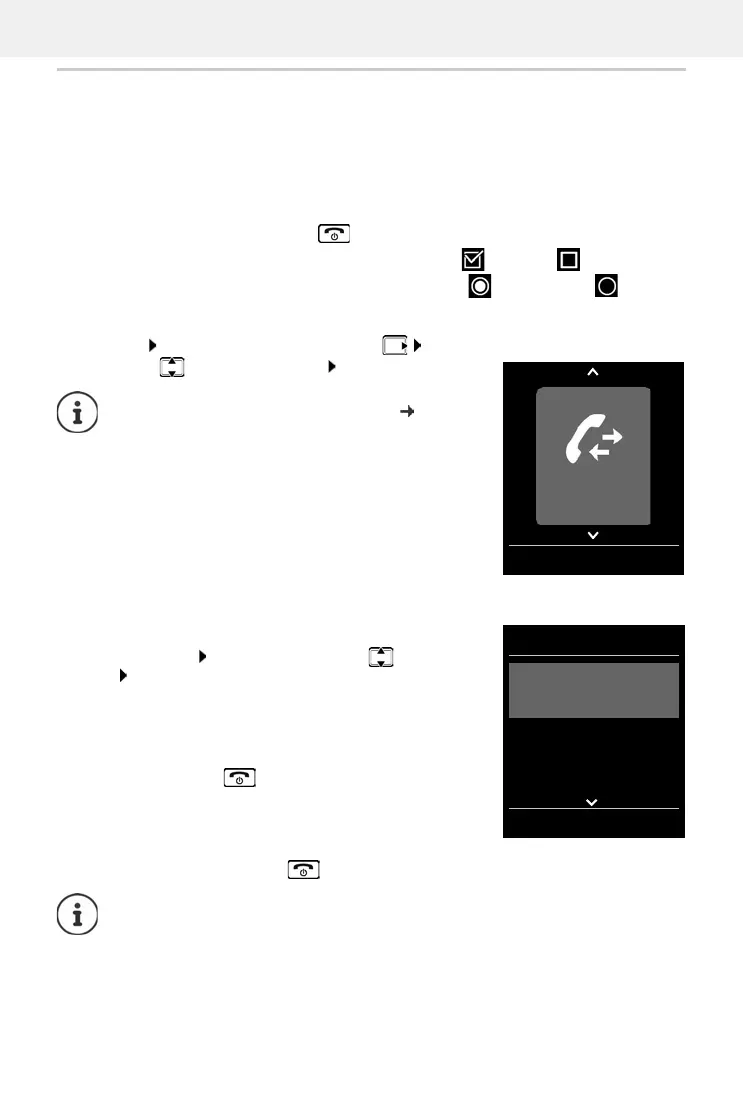
The functions of your telephone are displayed in a menu that consists of several levels.
Selecting/confirming functions
Main menu
In idle status: Press the control key on the right . . . use
the control key to select a submenu OK
Submenus
The functions in the submenus are displayed as lists. The current
selection is shown in large font and highlighted in orange.
To access a function: . . .
use the control key to select a
function OK
Return to the previous menu level:
¤ Press the display key Back
or
¤ Press the End call key briefly
Returning to idle status
¤ Press and hold the End call key
Confirm selection using OK
One menu level back using Back
Change to idle status lang Press and hold
Switch function on/off using Change enabled / disabled
Activate/deactivate option using Select activated / not activated
You can set which submenus are displayed
( p. 50).
If a key is not pressed, after 2 minutes the display will automatically change to idle
status.
Settings
Date/Time
Display
Language
Registration
Back OK
Example


 To Next Page