Rev.: 4, Print date: 2021-05-05
18
NL95
4. Configuration
4.1 Configuration
After installation, it is necessary to configure main unit according to ship’s specific arrangement. Each main
unit is delivered with empty configuration. Configuration section includes setting up lights and their properties,
Input modules used with their addresses, linking lights with terminals on modules and setting light
presentation on screen.
4.2 Enter / Exit configuration mode
In order to enter configuration mode follow instructions bellow:
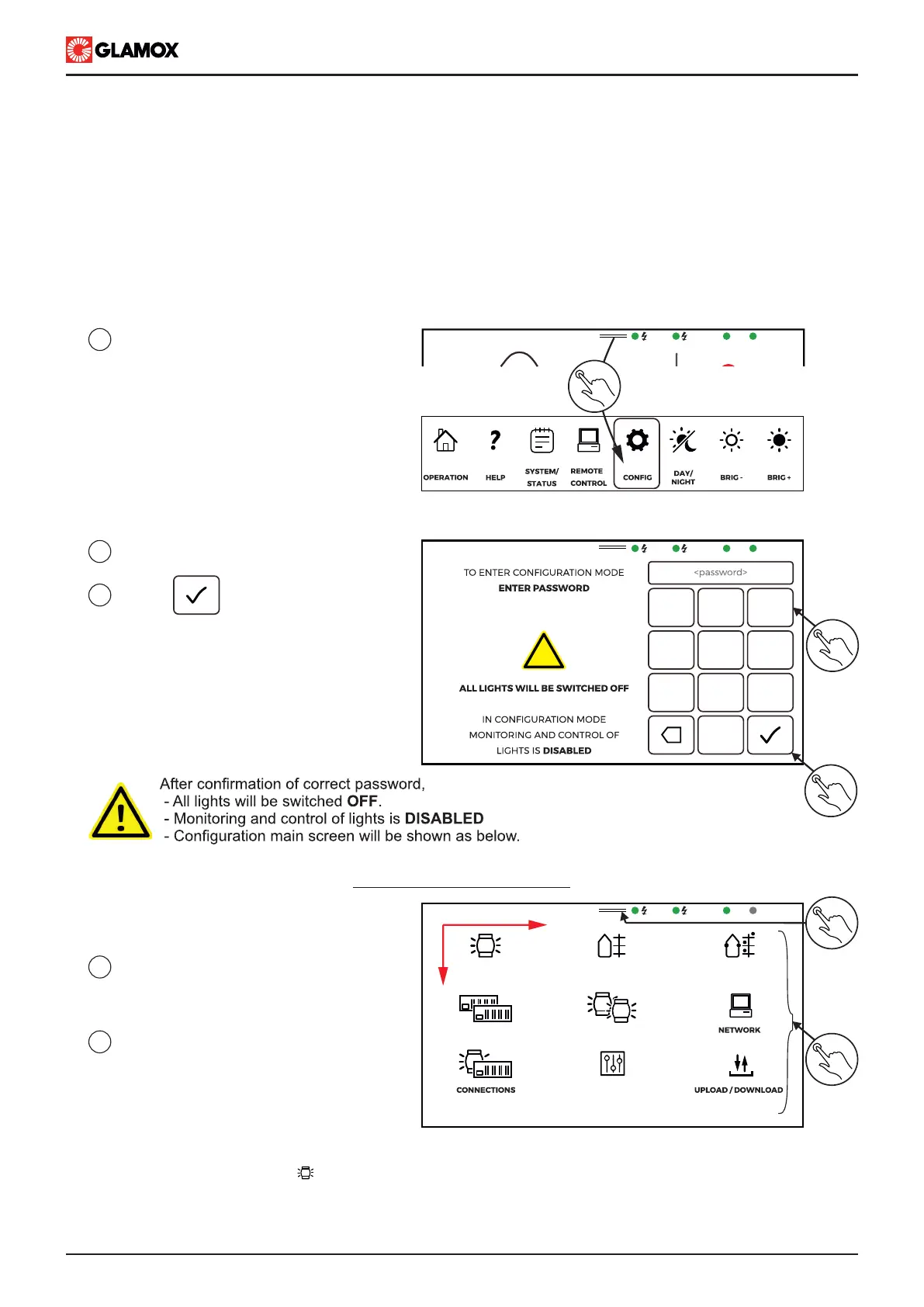
1
Swipe down to show main menu,
and tap on CONFIG.
4
5
Tap on the related section icon to
view / modify section configrations.
Check the next page for details of
each section
Swipe down to show main menu,
and tap on OPERATION to exit
configuration section
Configuration screen is arranged in way to guide. It is necessary to configure the lights with their properties
(icon located in top left corner ). After that, it is possible to configure graphic part of system (direction A) or
hardware part (direction B). Once these two parts are configured, system can be operated. In order to easy up
system operation, group configuration and preferences may be done. Once the system installation and testing is
completely done, system configuration should be uploaded to USB stick archived in a safe place
Tap on to confirm password
2
3
Enter password “1202”
Configuration main screen
x
9
6
3
0
8
5
2
7
4
1
!
2
3
MIMIC LIGHTS POSITIONLIGHTS
MODULES GROUPS
PREFERENCES
5
4
A
B
MAIN
EMERG.
SYS
MODULES
PS
SB
1
MAIN
EMERG.
SYS
MODULES
MAIN
EMERG.
SYS
MODULES


 To Next Page