Rev.: 4, Print date: 2021-05-05
27
NL95
5.1 Normal operation mode
Normal operation mode Operation screen
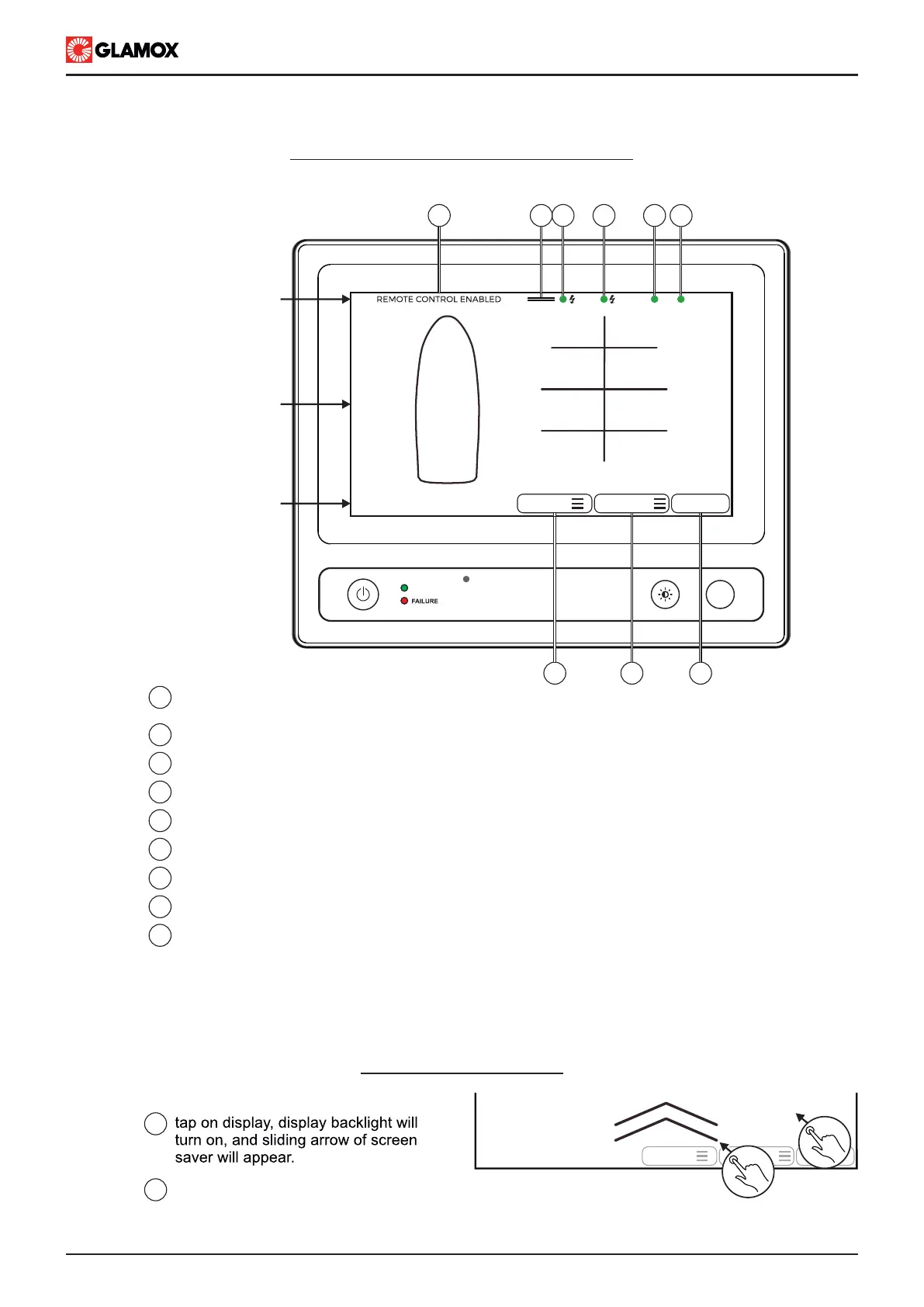
Main unit screen consists of three sections: Status bar (upper section), Lights control screen (middle section),
Operation menu (lower section) shown below :
Main power supply status
Power Supply module communication status
Emergency power supply status
Input module status (common indication)
Main menu, swipe down to open
Operate lights via individual light list
Operate lights via groups list
Operate lights through light control screen, same if lights control screen is touched
1
2
3
4
5
6
NOTE: Display enters in screen saver / backlight automatically when there is no user activity after period of 10s-
60s, according to user configuration.
REMOTE CONTROL ENABLED indication.
please check separate document for further information
7
8
9
LIGHTS
GROUPS
LIGHTS
2
Exit Screen saver mode:
Swipe up till the top of the display,
operation screen will be completely visible
1
2
1
POWER ON
F1
Lights control screen
Status bar
Operation menu
MAIN
EMERG.
SYS
MODULES
LIGHTSGROUPS
LIGHTS
1 2 3 4 5 6
789
PS
SB


 To Next Page