Rev.: 4, Print date: 2021-05-05
35
NL95
5.2 Manual operation mode
1
Slide switches for manual light
operation
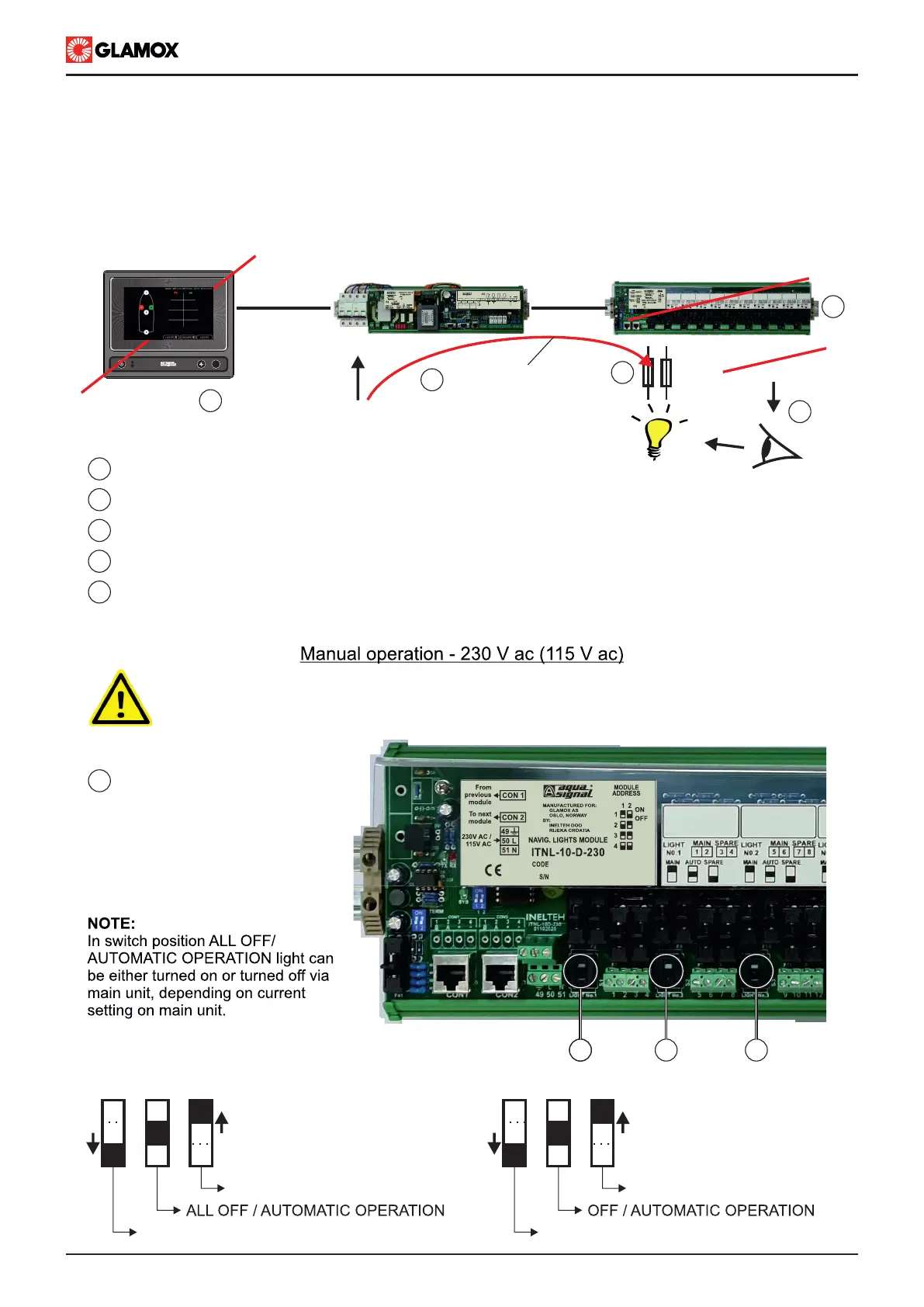
Manual operation mode enables user to manualy switch on/off lights in case of emergency. Lights can be switch
on/off by slide switches on the Input modules. In case of manual operation power supply will be directly forwarded to
lights, bypassing all electronics. Fuses will remain in circuit. In case of manual operation, it is recommend that Input
module is disconnected from communication line (RJ45 cable - connectors). Please check troubleshooting section.
1
2
3
4
5
Switches for manual operation are located on Input modules
Power supply is directly forwarded to Input modules
Fuses will remain in circuit (Lights remain individually fused)
Lights are not controlled and their operation needs to be visually checked
Navigation lights controller can not control manual operated light
IMPORTANT!!!
There is 230 V ac on PCB. For manual operation use insulated screwdriver.
Slide switches in one direction for
manual operation of light.
ITNL-10-D module
MAIN light switched ON
SPARE light switched ON
ITNL-10-S module
Light switched ON
Light switched OFF
POWER ON
FAILURE
F1
POWER SUPPLY
MANUAL
OPERATION
CONTROL
1
4
2
3
5
CON1 CON2
MAIN UNIT
ITNSL-01TP
CON1 CON2
CON3
AUDIO ALARM ACCEPT INPUT
AL2
2 3 4 5 6 7 8 9 10 12 13 14 15 161
AL1 AL3SYS
C.O. VOLTAGE-FREE OUTPUT CONTACT
18 19 2017 21
SYSTEM OPERATING
COMMON ALARM OUTPUT
B A B A
-
RX TX
NMEA 0183
RECIEVER
NMEA 0183
TRANSMITTER
CON3
INPUT
MODULES
11 1 1


 To Next Page