WRAPPING UP INSTALLATION AND COMMISSIONING
Once you have completed the installation, do not forget to carry out the following steps:
1. Connect the batteries to the Panel as described in the Installation section of this manual.
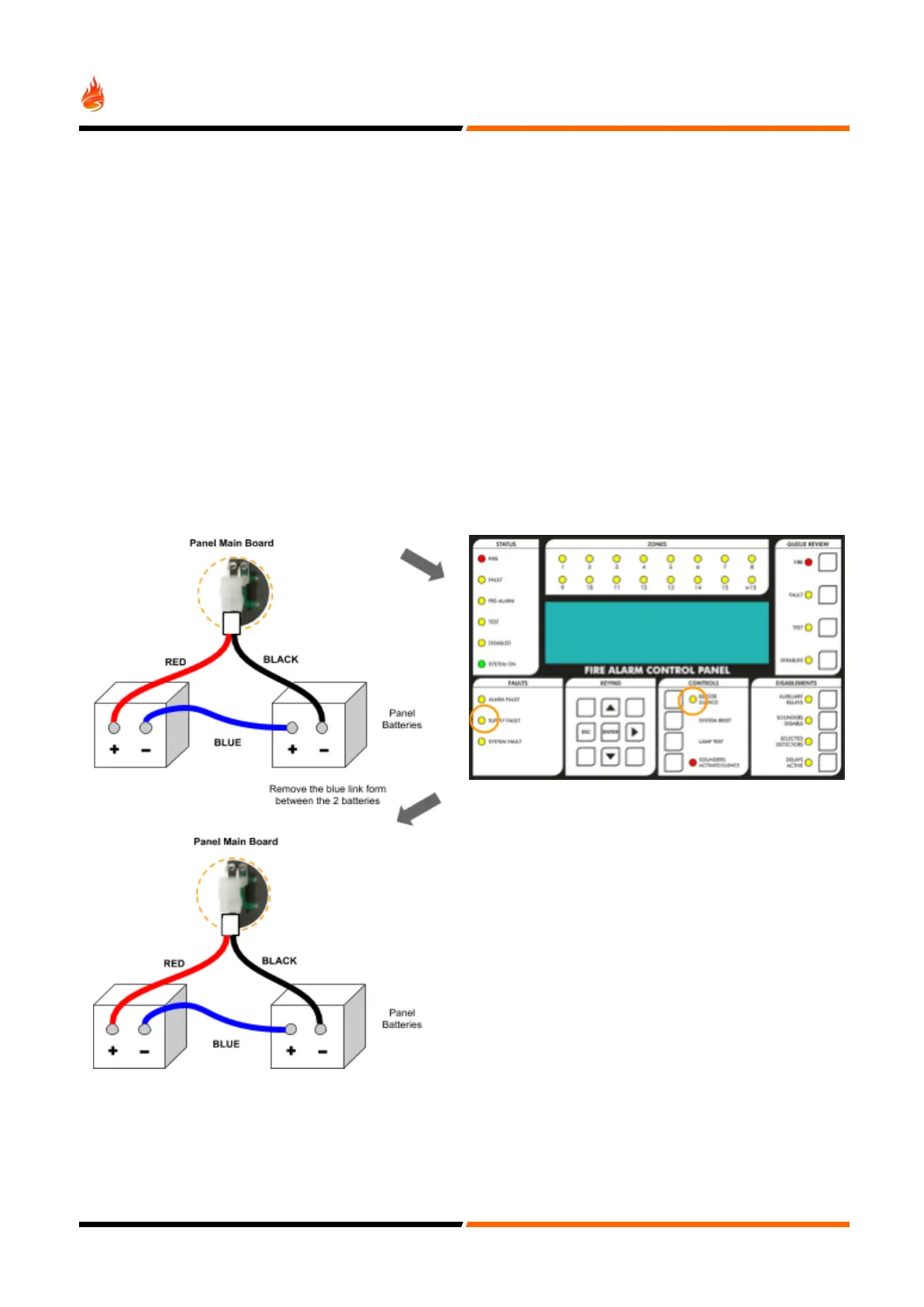
2. Test that the battery monitoring is functional by temporarily removing the blue wire between the batteries. After a
few seconds the fault should be reported on the Panel.
3. When the blue wires are reconnected pressing SYSTEM RESET should clear the fault report.
4. Test that the primary supply monitoring is functional and that the battery system works. Switch off the AC supply to
each power supply unit in the Panel. After a few seconds the fault should be reported on the Panel.
5. Reconnect the AC supplies and press SYSTEM RESET.
6. Confirm that the system is in Active Mode - the SYSTEM ON LED is permanently lit.
Battery Fault Message Test
This test should be performed for each set of batteries. Test only the actual battery connections.
After a short delay, the SUPPLY FAULT
LED will be ON, the panel buzzer
sounds and the "Battery Fault" message
appears on the LCD Display.


 To Next Page