Vehicle Equipment Installation Instructions
12
5.1 Vehicle Radio/GPS Unit Installation
WARNING
Vehicle batteries contain sulfuric acid and
may contain explosive gases. Keep sparks,
flames, and cigarettes away. Wear eye
protection. Disconnect the negative cable
first to prevent shorting the positive
terminal to the chassis when removing the
positive cable. Battery acid may cause skin
irritation and eye injury. Explosive gases
may cause severe injury or death.
This subsection describes how to install the
vehicle radio/GPS unit.
1. Disconnect the battery before beginning the
installation. Disconnect the negative battery
cable first, then the positive battery cable.
2. Remove interior panels and headliners, as
necessary, to provide access for cable routing.
3. Determine an appropriate location in a
protected area inside of the vehicle or trunk.
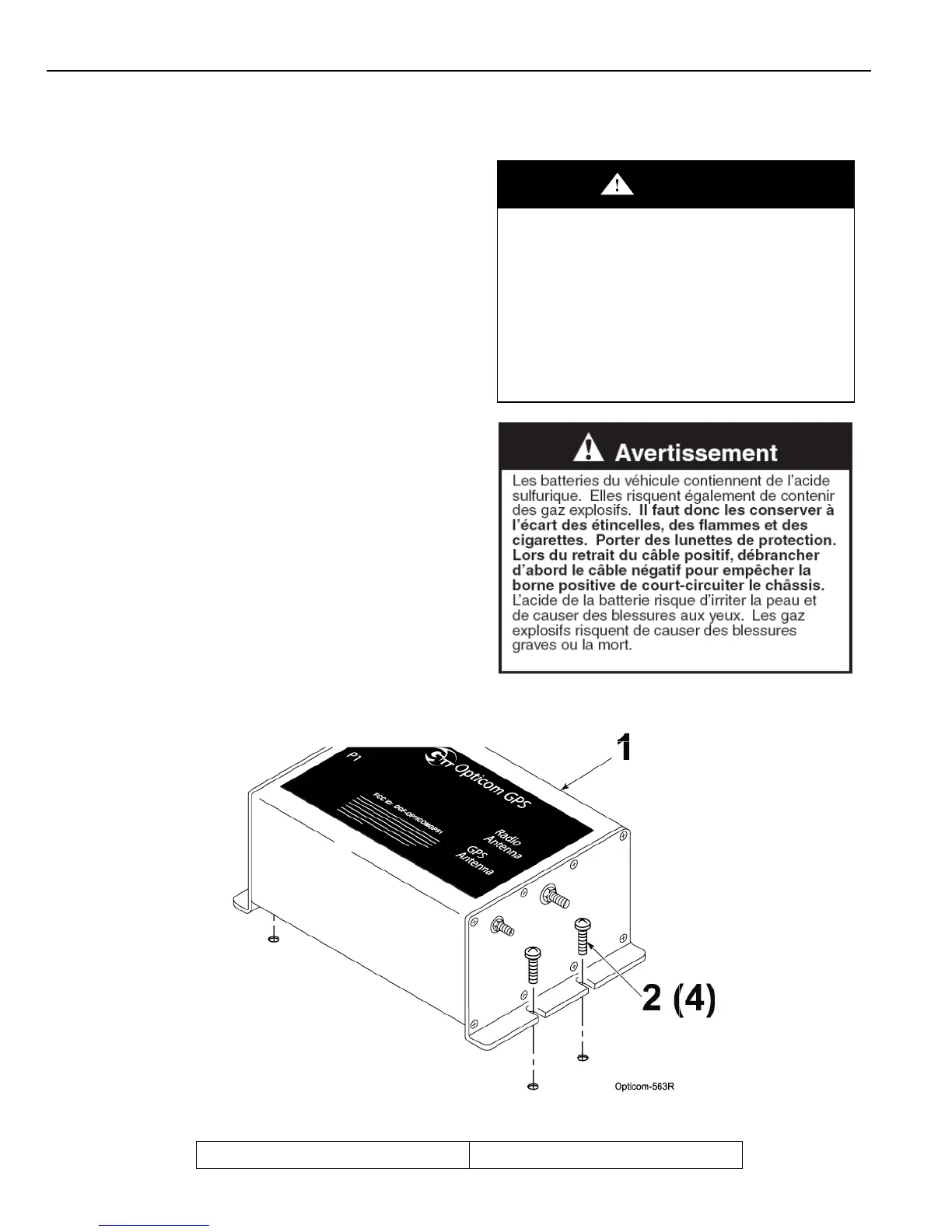
4. Using the provided screws, attach the
Radio/GPS unit to the mounting location.
5. The provided screws are self drilling/tapping
screws.
Note: The radio/GPS unit is not watertight;
therefore it should be mounted inside the
passenger compartment or some other
protected area of the vehicle.
Figure 5-1. Mounting Radio/GPS Unit on Priority Vehicle
1. Vehicle radio/GPS unit 2. Mounting screws (4)



 To Next Page