Vehicle Equipment Installation Instructions
25
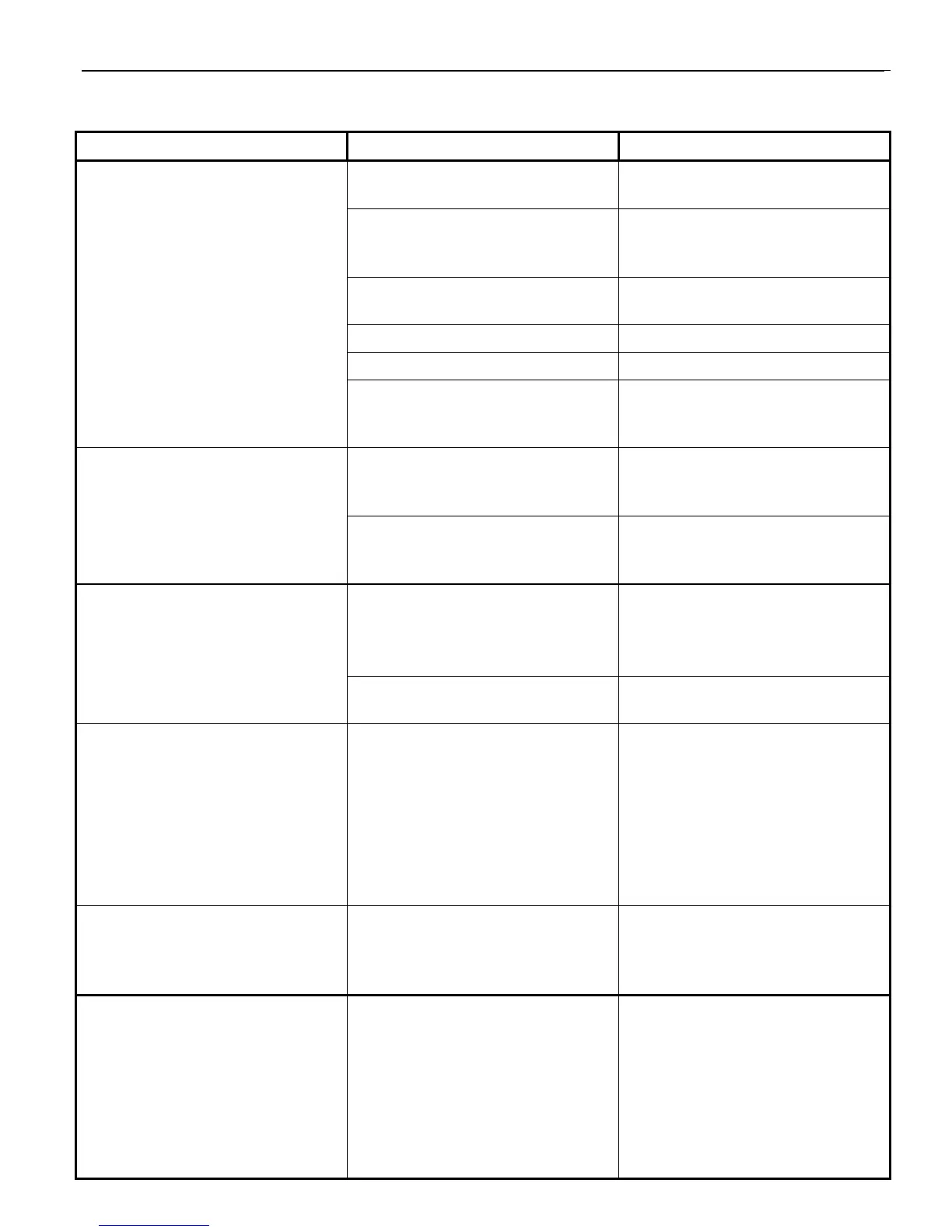
Table 7-1. Troubleshooting Symptoms, Possible Causes, and Solutions (continued)
Symptom Possible Cause Solution
RADIO LED is amber. Incorrect wiring. Check wiring at both ends of
radio/GPS cable.
Radio/GPS cable connector
(terminal block) plugged in
backwards.
Plug in terminal block correctly.
Radio/GPS cable damaged or
poor terminations.
Replace cable, redo terminations.
Radio/GPS unit failed. Return unit to GTT for service.
Vehicle control unit failed. Return unit to GTT for service.
No power to radio. Check voltage between violet (+)
and violet/white (–) wires. It
should be about 9.0 VDC.
Unable to communicate with
vehicle control unit.
Communication cable not
connected.
Check cable connection at
vehicle control unit and at
computer.
Baud rate/serial port incorrect. Using ITS Explorer, change baud
rate/serial port under Environment
options.
Intersection Name not Heard
listed instead of intersection
name.
Name not heard yet. Press Get Intersections Heard
button again.
Cycle power on vehicle control
unit.
Name not assigned in
intersection.
Assign an intersection name.
Intersection alternates displaying
and dropping the left turn arrow
when approaching vehicle has left
turn signal activated.
Vehicle brake light bulb shared
with turn signal indication.
Emergency flashers are active.
Controller or phase selector not
programmed correctly.
Reconnect vehicle turn signal
sense lines to front turn signal
wires.
Turn of emergency flashers
Reprogram controller or phase
selector.
Vehicle does not enter disable
mode when activated
Incorrect disable trigger mode has
been set
Verify that you have set the unit to
reflect how the disable line is
wired 12 VDC to Ground or
Ground to 12 VDC
Intersection does not display left
turn arrow when approaching
vehicle has the left turn signal
activated.
Vehicle brake light bulb shared
with turn signal indication.
Emergency flashers are active.
Controller or phase selector not
programmed correctly.
Reconnect vehicle turn signal
sense lines to front turn signal
wires.
Turn off emergency flashers
Reprogram controller or phase
selector.



 To Next Page