GMG 1930ED - 4646ED
Operator’s manual
Operator’s Manual - 1930----4646ED
March 2019 #940400-3-EN
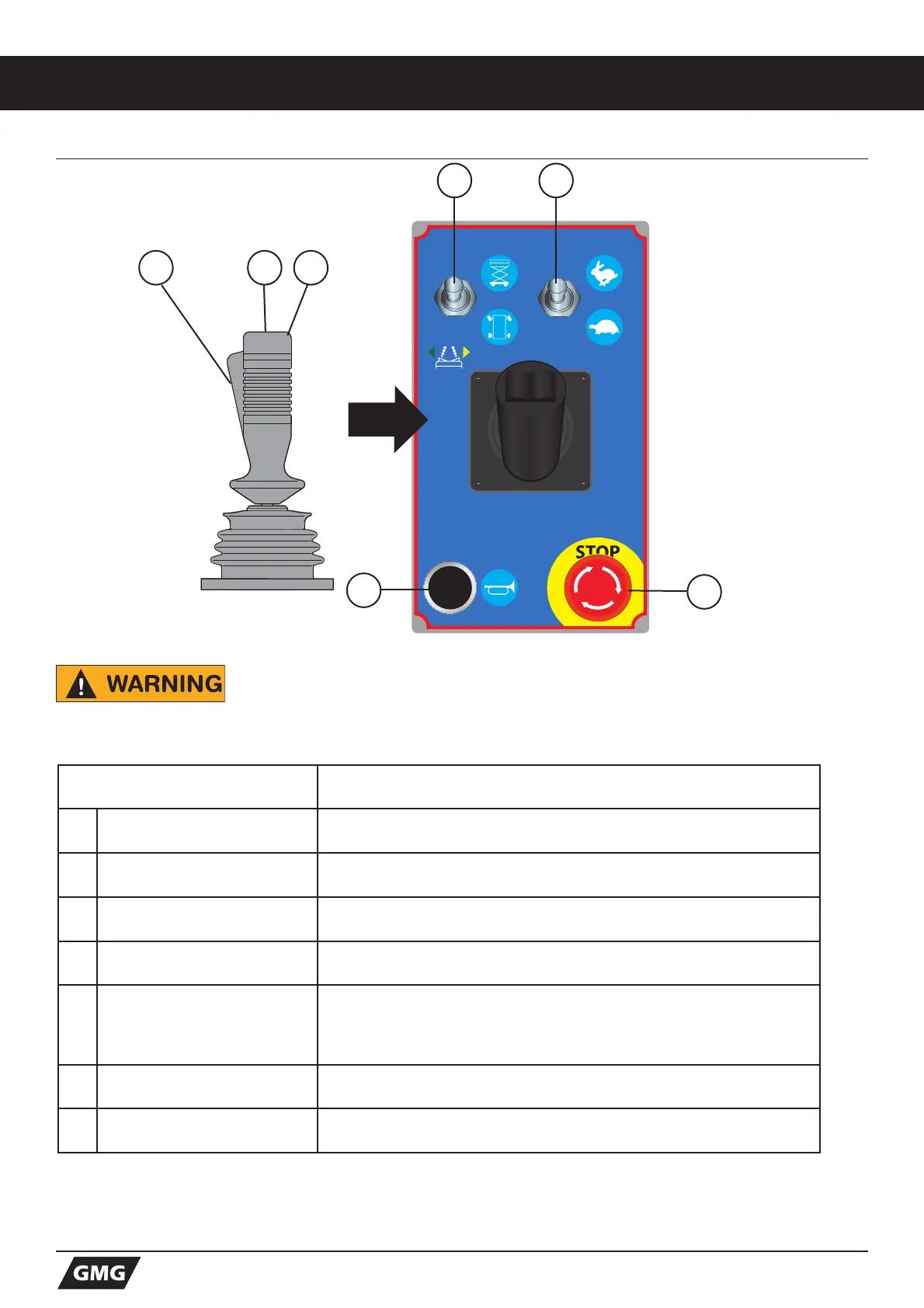
3.2.A PLATFORM CONTROLS (TYPE A)
Be aware of the machine’s position and of your surroundings before
activating any control function.
Control Description
1 Function Enable Switch Squeeze to enable DRIVE, STEER and LIFT functions from the Control
Handle.
2 Steer Switch Using your thumb, press and hold the rocker switch to steer Left or
Right.
3 Control Handle DRIVE - Proportionally controls Forward and Reverse Travel.
LIFT - Proportionally controls Lift and Lower functions.
4 Lift/Drive Select Toggle this switch to the UP position for Lift function.
Toggle this switch to the DOWN position for Drive function.
5 Drive Speed Select Switch in UP position (Rabbit symbol) indicates High Speed Drive is
selected.
Switch in DOWN position (Turtle symbol) indicates Low Speed Drive is
selected.
6 Horn Button Press to sound warning horn.
7 Emergency Stop Press the EMERGENCY STOP at any time to stop all machine
functions. Turn the switch clockwise to reset.
21 3
7
4 5
6


 To Next Page