EasyManua.ls Logo

Go Partner 1680X - CORRECTING ACCIDENTAL WRONG MOVES; ILLEGAL MOVES

Default Icon
20 pages
Print Icon
To Next Page IconTo Next Page
To Previous Page IconTo Previous Page
Loading...
Occasionally
the
computer
will
make
a
move
even
though
the
number
does
not
count
down
to
0.
If
you
do
not
wish
to
wait
for
the
computer
to
calculate
its
move,
press
PLAY
once
to
force
the
com¬
puter
to
make
a
move.
3.
W
hen
the
computer
is
ready
to
move,
the
display
shows
the
piece
the
com¬
puter
wants
to
move
and
the
TO
square.
The
rank/file
board
lights
show
the
FROM
square.
Note:
If
the
computer’s
move
cap¬
tures
any
of
your
pieces,
the
black
piece’s
symbol
and
X
appear
on
the
display.
4.
Press
the
computer’s
piece
down
on
the
FROM
square.
The
display
again
shows
the
piece
the
computer
wants
to
move
and
the
TO
square,
and
the
rank/file
board
lights
show
the
TO
square.
5.
Press
the
computer’s
piece
gently
down
on
the
TO
square.
The
display
shows
to
indicate
it
is
your
turn
to
move.
Here’s
an
example
of
howto
move
pieces
and
communicate
with
the
computer.
Try
it
now!
1.
P
ress
the
white
pawn
on
square
E2.
The
display
shows
A
E2
and
the
rank/
file
board
lights
flash
at
square
E2.
2.
M
ove
the
pawn
to
square
E4
and
press
it
on
the
square.
The
display
might
show
and
a
number.
The
computer
records
your
move
and
be¬
gins
to
think
about
its
move.
3.
T
he
computer
might
display
and
E5
for
its
TO
square
(you
might
get
a
different
response),
and
the
rank/file
board
lights
show
the
current
location
of
the
piece
the
computer
wants
to
move.
4.
P
r
ess
the
black
pawn
on
its
current
location.
The
computer
displays
A
and
E5
for
its
TO
square
(you
might
get
a
different
response),
and
the
rank/
file
board
lights
show
the
location
where
the
computer
wants
you
to
move
the
piece.
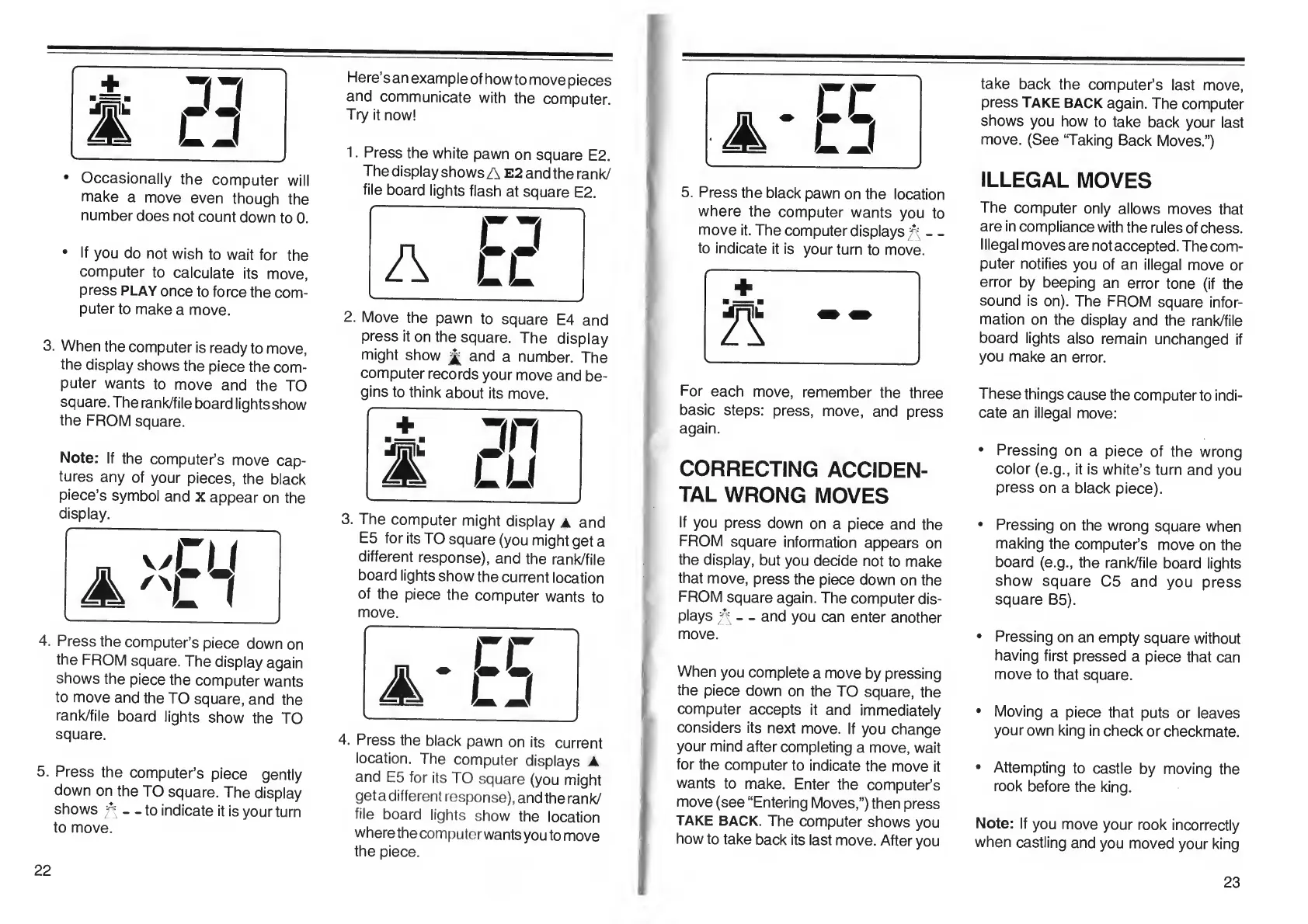
5.
P
r
ess
the
black
pawn
on
the
location
where
the
computer
wants
you
to
move
it.
The
computer
displays
.
.
to
indicate
it
is
your
turn
to
move.
+
For
each
move,
remember
the
three
basic
steps:
press,
move,
and
press
again.
CORRECTING
ACCIDEN¬
TAL
WRONG
MOVES
If
you
press
down
on
a
piece
and
the
FROM
square
information
appears
on
the
display,
but
you
decide
not
to
make
that
move,
press
the
piece
down
on
the
FROM
square
again.
The
computer
dis¬
plays
^
-
-
and
you
can
enter
another
move.
When
you
complete
a
move
by
pressing
the
piece
down
on
the
TO
square,
the
computer
accepts
it
and
immediately
considers
its
next
move.
If
you
change
your
mind
after
completing
a
move,
wait
for
the
computer
to
indicate
the
move
it
wants
to
make.
Enter
the
computer’s
move
(see
“Entering
Moves,”)
then
press
TAKE
BACK.
The
computer
shows
you
how
to
take
back
its
last
move.
After
you
take
back
the
computer’s
last
move,
press
TAKE
BACK
again.
The
computer
shows
you
how
to
take
back
your
last
move.
(See
‘Taking
Back
Moves.”)
ILLEGAL
MOVES
The
computer
only
allows
moves
that
are
in
compliance
with
the
rules
of
chess.
Illegal
moves
are
not
accepted.
The
com¬
puter
notifies
you
of
an
illegal
move
or
error
by
beeping
an
error
tone
(if
the
sound
is
on).
The
FROM
square
infor¬
mation
on
the
display
and
the
rank/file
board
lights
also
remain
unchanged
if
you
make
an
error.
These
things
cause
the
computer
to
indi¬
cate
an
illegal
move:
Pressing
on
a
piece
of
the
wrong
color
(e.g.,
it
is
white’s
turn
and
you
press
on
a
black
piece).
Pressing
on
the
wrong
square
when
making
the
computer’s
move
on
the
board
(e.g.,
the
rank/file
board
lights
show
square
C5
and
you
press
square
B5).
Pressing
on
an
empty
square
without
having
first
pressed
a
piece
that
can
move
to
that
square.
Moving
a
piece
that
puts
or
leaves
your
own
king
in
check
or
checkmate.
Attempting
to
castle
by
moving
the
rook
before
the
king.
Note:
If
you
move
your
rook
incorrectly
when
castling
and
you
moved
your
king
22
23

Table of Contents